
Fileset Tools
Fileset Tools are quick actions for common Fileset management tasks: duplicate a Fileset, show or create associations, rename it, add a comment, delete it, or set administrator permissions. Select the Tools icon in the main toolbar or right-click a Fileset to open the menu.

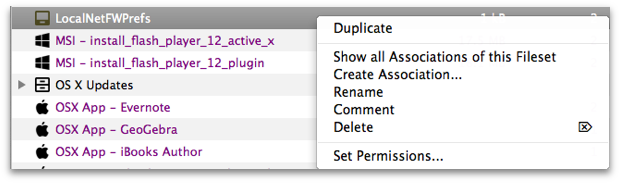
- Duplicate – Create a copy of a fully configured Fileset. FileWave adds the suffix "copy." Use this when different administrators need separate deployment options, or when VPP tokens require separate licenses for the same content.
- Show all Associations of this Fileset – Open the Associations pane so you can view the Fileset and its assigned clients.
- Create Association – Open a searchable list of clients that you can associate with the Fileset.
- Rename – Change the Fileset name after creation.
- Comment – Add a comment that appears in the Fileset view to help track purpose, ownership, or rollout notes.
- Delete – Delete the selected Fileset from the database.
- Set Permissions – Set administrator access for a specific Fileset or Fileset Group.