
Fileset Tools
AlongFileset withTools allare ofquick theactions editingfor andcommon modificationFileset capabilitiesmanagement youtasks: have with Filesets, there is alsoduplicate a basicFileset, show or create associations, rename it, add a comment, delete it, or set ofadministrator toolspermissions. that you can use to make simple changes. These tools support some ofSelect the most common tasks you will need to perform as you manage large collections of Clients and Filesets. The Tools are found by selecting the icon in the main toolbar,toolbar or right-clickingclick ona anyFileset Fileset.
to open the menu.



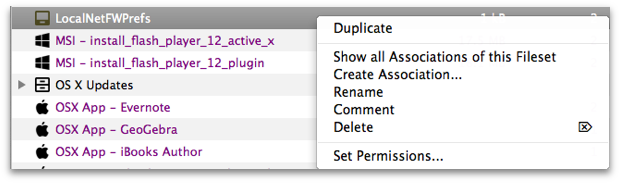
- Duplicate –
You can takeCreate afully-copy of a fully configuredFilesetFileset.andFileWavecreate an exact Clone withadds the suffix "copy."ThisUseshouldthisbe done whenever you want to assign a Fileset to more than one administrator forwhen different administrators need separate deployment options, or whenusingVPP tokensthatrequiredifferentseparate licensesassigned tofor the same content. - Show all Associations of this Fileset –
This will take you toOpen the Associations panewhereso you can view the Fileset and its assignedClients.clients. - Create Association –
This brings upOpen a searchable list ofClientsclientstothat you can associate with the Fileset. - Rename –
This allows you to change the name ofChange the Fileset name afterit has been created.creation. - Comment –
This allows you to addAdd a comment thatwill showappears in the Fileset view toassist you in managing and keepinghelp trackofpurpose,yourownership,Filesets.or rollout notes. - Delete –
This deletesDelete the selected Fileset from the database. - Set Permissions –
ThisSetallows you to specify theadministrator accesslevel of your administrators tofor agivenspecific Fileset or Fileset Group.