Fileset Tools

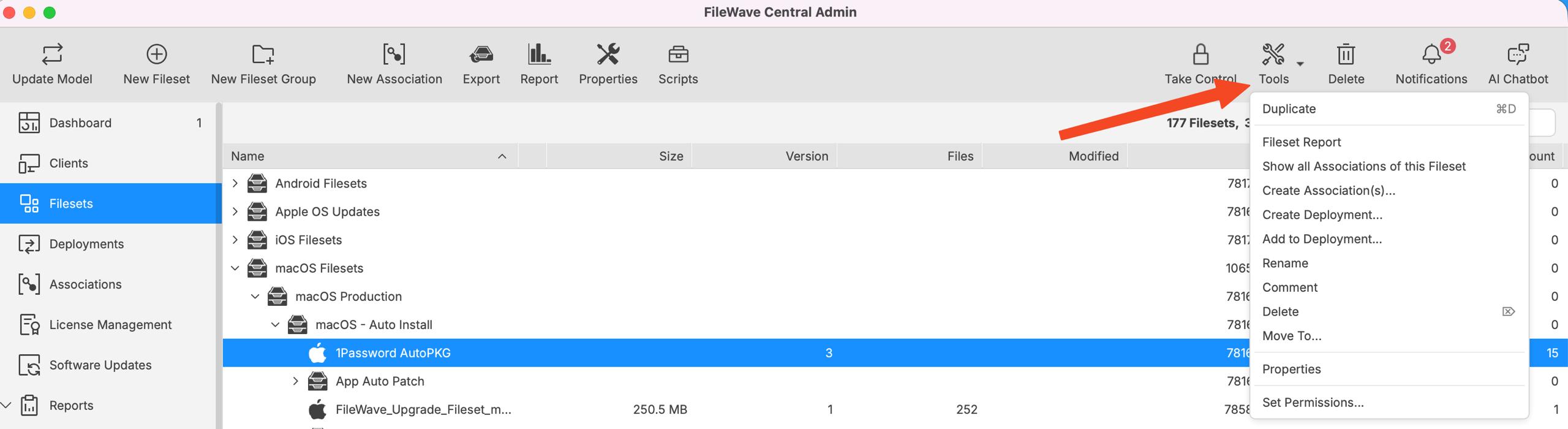
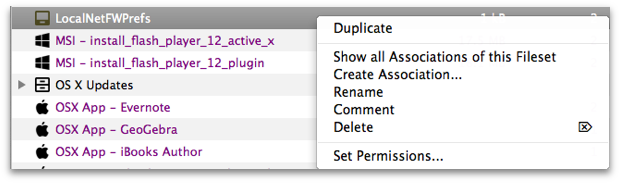
Fileset Tools are quick actions for common Fileset management tasks: duplicate a Fileset, showgenerate a Fileset report, review or create associations,associations renamewhen it,Associations are visible, create or add ato Deployments, rename, comment, deletedelete, it,move, open properties, or set administrator permissions. Select the Tools icon in the main toolbar or right-click a Fileset to open the menu.

kdUDA7Pw32p5OPQx-embedded-image-ncb9nngo.pngThe Tools menu is context-sensitive. Options can vary by the selected item, administrator permissions, and FileWave Central feature visibility. If Associations are hidden in Central, Create Association(s)... may not appear; use Create Deployment... or Add to Deployment... for the deployment-centered workflow.

VBkpckdgUPskWGGS-embedded-image-fm1x4tku.pngFileWave Central Fileset Tools menu showing duplicate, report, association, deployment, rename, comment, delete, move, properties, and permissions options

  • Duplicate – Create a copy of a fully configured Fileset. FileWave adds the suffix "copy." Use this when different administrators need separate deployment options, or when VPP tokens require separate licenses for the same content.
  • Fileset Report – Open a report for the selected Fileset.
Show all Associations of this Fileset – Open the Associations pane so you can view the Fileset and its assigned clients. Create AssociationAssociation(s)... – Open a searchable list of clients that you can associate with the Fileset. This option may be hidden when FileWave Central is configured to hide Associations; new FileWave instances commonly hide Associations by default as deployments become the preferred workflow. Create Deployment... – Start a new Deployment using the selected Fileset. Add to Deployment... – Add the selected Fileset to an existing Deployment. Rename – Change the Fileset name after creation. Comment – Add a comment that appears in the Fileset view to help track purpose, ownership, or rollout notes. Delete – Delete the selected Fileset from the database. Move To... – Move the selected Fileset to another Fileset Group. Properties – Open the selected Fileset's properties. Set PermissionsPermissions... – Set administrator access for a specific Fileset or Fileset Group.