Add Profile
What
ProfilesApple allowprofiles let you to control settings, features, and capabilitiesrestrictions for AppleiOS, devices; iOS,iPadOS, macOS, iPadOS,and TvOStvOS devices.
When/Why
Devices may needUse profiles for initial setup, requested restrictions, and ongoing configuration (likechanges. toCommon allowexamples theminclude toWi-Fi join a network), in reaction to a request (like please disable thesettings, camera onrestrictions, thewallpaper devices),settings, orcertificates, toprivacy configurecontrols, settingsand atother anytime.managed-device behavior.
How
SelectingSelect the plus (
 ) in the top right
 willto open a the profile editor for a new profile.
Basic Profile Properties
Every configuration profile hasneeds a few required properties, regardless of the profile type. Every time we create a profile we must specify these basic properties before weit can savebe the profile. saved. At minimum, we must set a profile name and add at least one payload (configuration) to the profile.category.
How
The three most common elements to setset, (or change from the default value)value, are highlighted below:

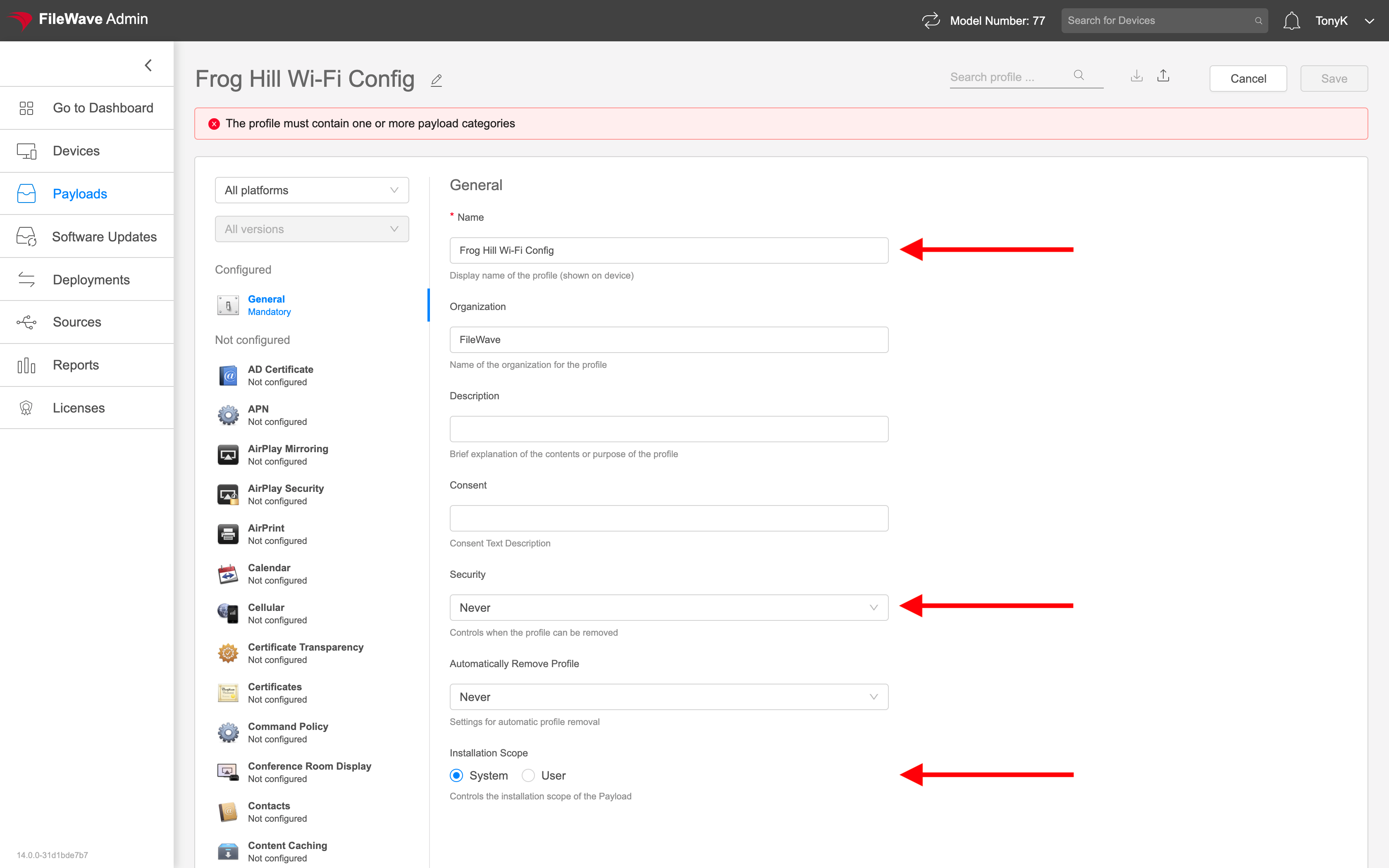
In order, those elements are:
- Name: Must be unique, should be descriptive, and
can notcannot be leftblankblank. - Security: Specifies when this profile can be removed by the
useruser. - Installation scope: Defines whether the profile installs for the
system,system or for the user of thedevicedevice.
The highlighted warning abovein the screenshot is remindinga usreminder that wethe haveprofile tomust addcontain at least one payload to the profilecategory before weit can savebe it.saved.
Navigating an Apple Profile
Configuration profiles aren't hard. In fact they are quitestraightforward, simplebut generally. Findingfinding the right setting can betake bothersomea though,minute. soUse FileWavethe providesplatform, someOS user interface options to make this easier. We'll use filteringversion, and search optionsfilters in the profile editor to help us narrow downthe ourlist searchof foravailable payload items.
How
Let'sFor example, assume that weyou want to set the wallpaper for an iOS device. We can narrow down the options firstStart by specifyingchoosing the platform for our setting in the upper left (iOS in this case):left:

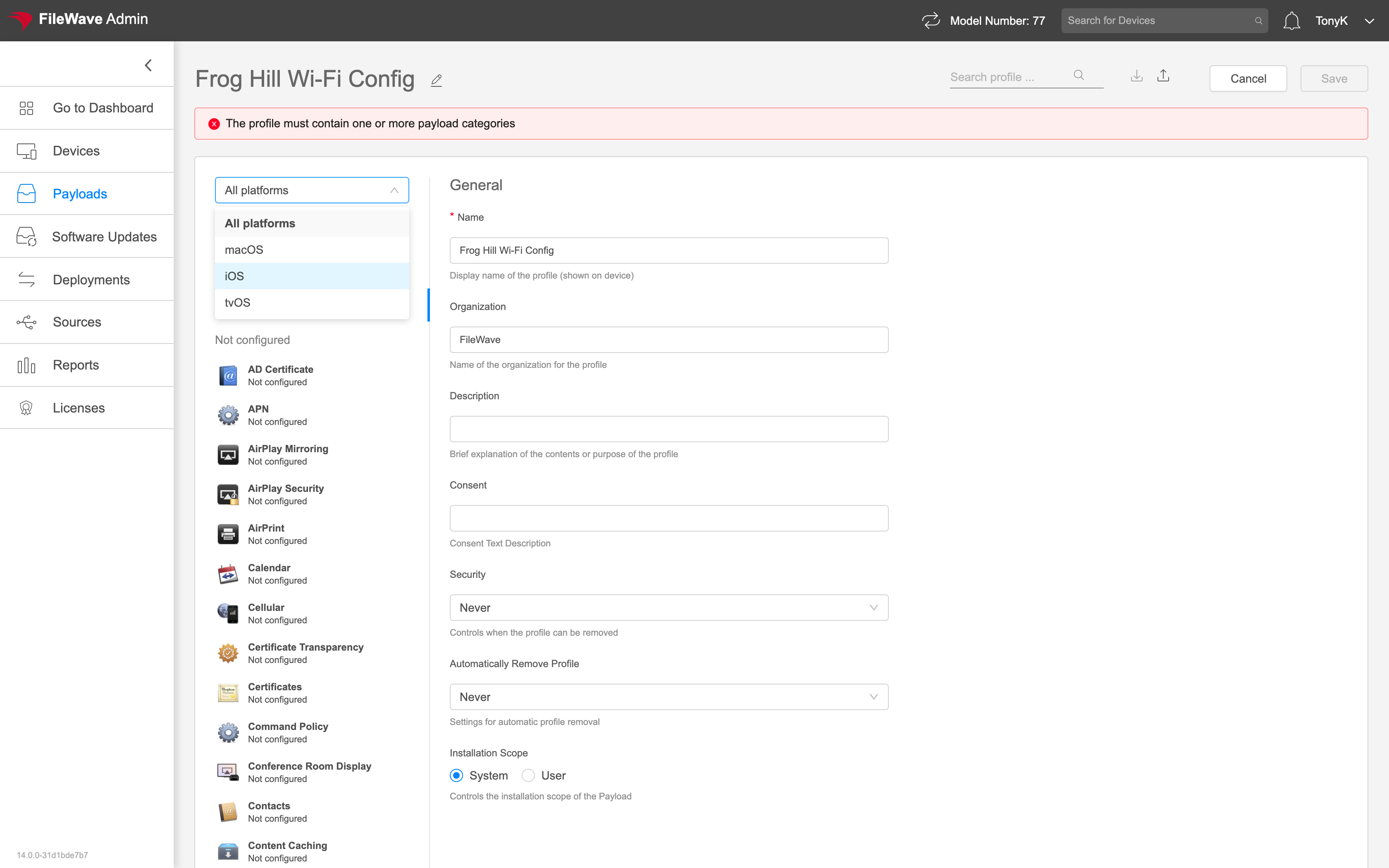
Once the platform is set, the list of profile categories becomes smaller (but still long). smaller. If weyou know specifically what version of iOS a setting is for,tied thento wea specific OS version, you can specifyalso that to further refineuse the list.version (Notfilter, usedthough frequently)most profile builds do not need it.
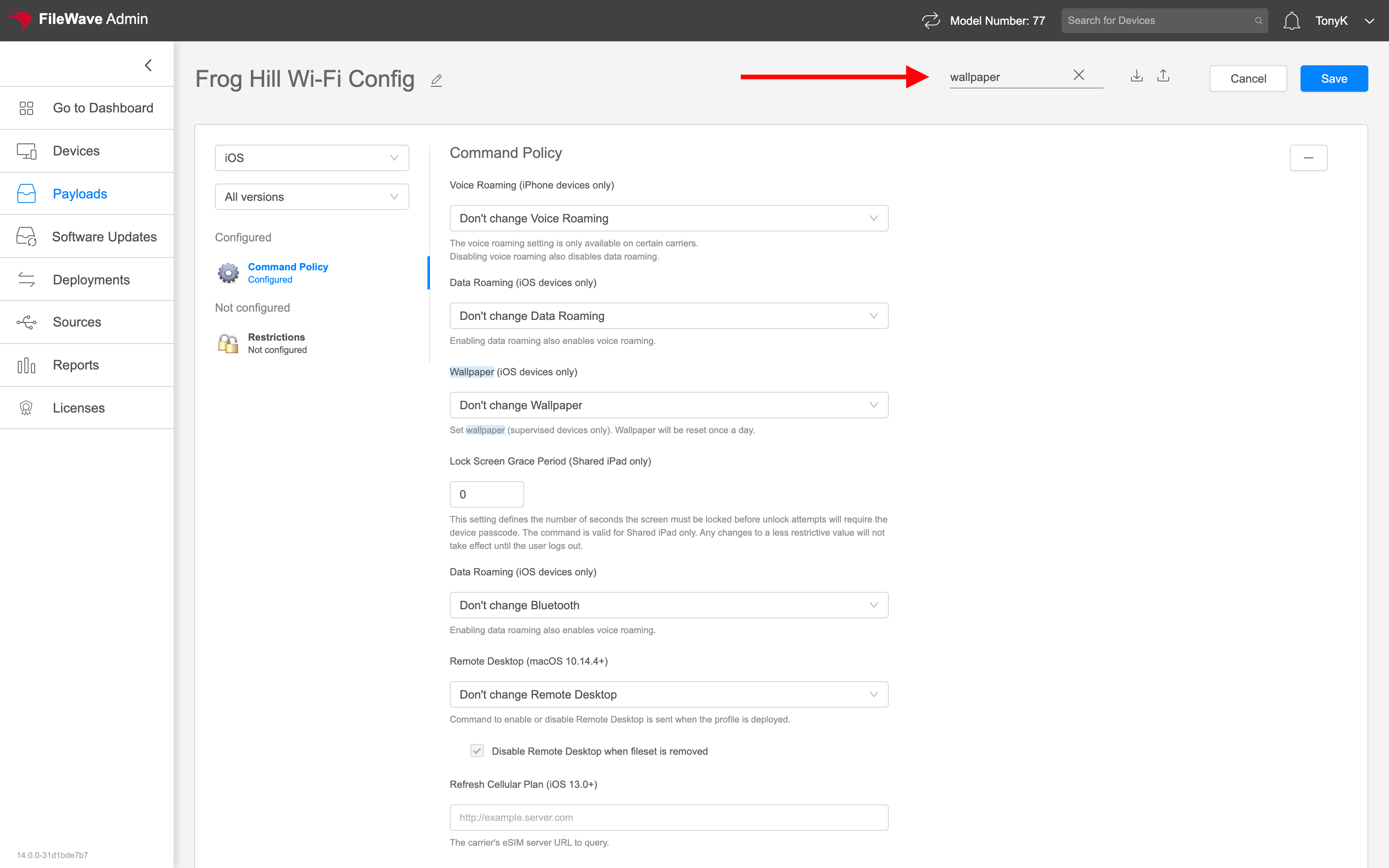
But,With withthe ourplatform filter in place above, we can alsoplace, search for "wallpaper"wallpaper to further refinenarrow the payloads.payload list Noticefurther. thatThe whenmatching wepayload enternames are highlighted in the search term below, the payloads refine to just two sections, and in that section "wallpaper" is highlighted as well:editor:

Setting Profile Payloads
The intended result of the creationpurpose of a configuration profile is always to make some change toendpoint configurationconfiguration. ofThe endpoints.exact What those changes are,settings, and how they arebehave, madedepend differson profilethe bypayload profile.you choose.
ProfilesProfile tendwork tousually fallfalls into two categories:
StuffSettingswe'veyoudonehavebeforealready built and tested before.- New
stuffsettingsweyouhaven'thavetouchednotbeforeworked with yet.
The first category is nousually trouble, because we know what we are doing. routine. For instance,example, afterif weyou have already created aWi-Fi wi-fi config profileprofiles for 41 oflocations, our 42 locations,building the 42nd oneprofile isn't going toshould be too much trouble.familiar.
But, what if we have somethingFor new tosettings, douse thatboth wetesting haven'tand done before? There are two answers to this:documentation:
(no better teacher than experience withon a deviceinyouhand)can inspect directly.- Use
ReadApple'sthecurrentdocumentationdevice-management(yes,documentation:seriously):https://support.apple.com/guide/mdm/welcome/web#/mdmf0ec4d860Intro to device management profilesFileWaveIntro(nortoanydeviceothermanagementMDMpayloads
provider)defines what the elements in profiles are or what they mean. The above reference explains them all - For third-party payloads or settings,
referenceuse theVendor'vendor'sdocumentationdocumentation.
FileWave, like other MDM providers, exposes settings defined by Apple or the relevant vendor. Those references are the authoritative source for what a payload key means and which OS versions support it.
How
Defining every MDM elementspayload is outoutside the scope of scope for ourthis Knowledge Base, but wethese canpractices givewill best-practicekeep guidanceprofile onwork building and testing profiles:safer:
- Build
profilesprofiles,(especiallyrestrictions)restrictions, as small and focused as possible...donotAvoidintermixmixing unrelated settingsifinatoneallprofilepossiblewhen you can.- This
preventsmakeshavingexceptions easier later because you do not have to splitprofilesalaterlargewhenmixedyouprofilehave the inevitable exceptions to deal withapart.
- This
- Test, test, and then test again against a device
inyouyour handscontrol. - Never create and deploy a profile directly to production without
testingtesting. - Be especially careful
withwheneditseditingtoprofiles that are alreadyassignedassigned, particularly Wi-Fi profiles(especially wi-fior anything else where a mistake couldcausedisconnectcatastrophicdevicesconsequences)or break management.
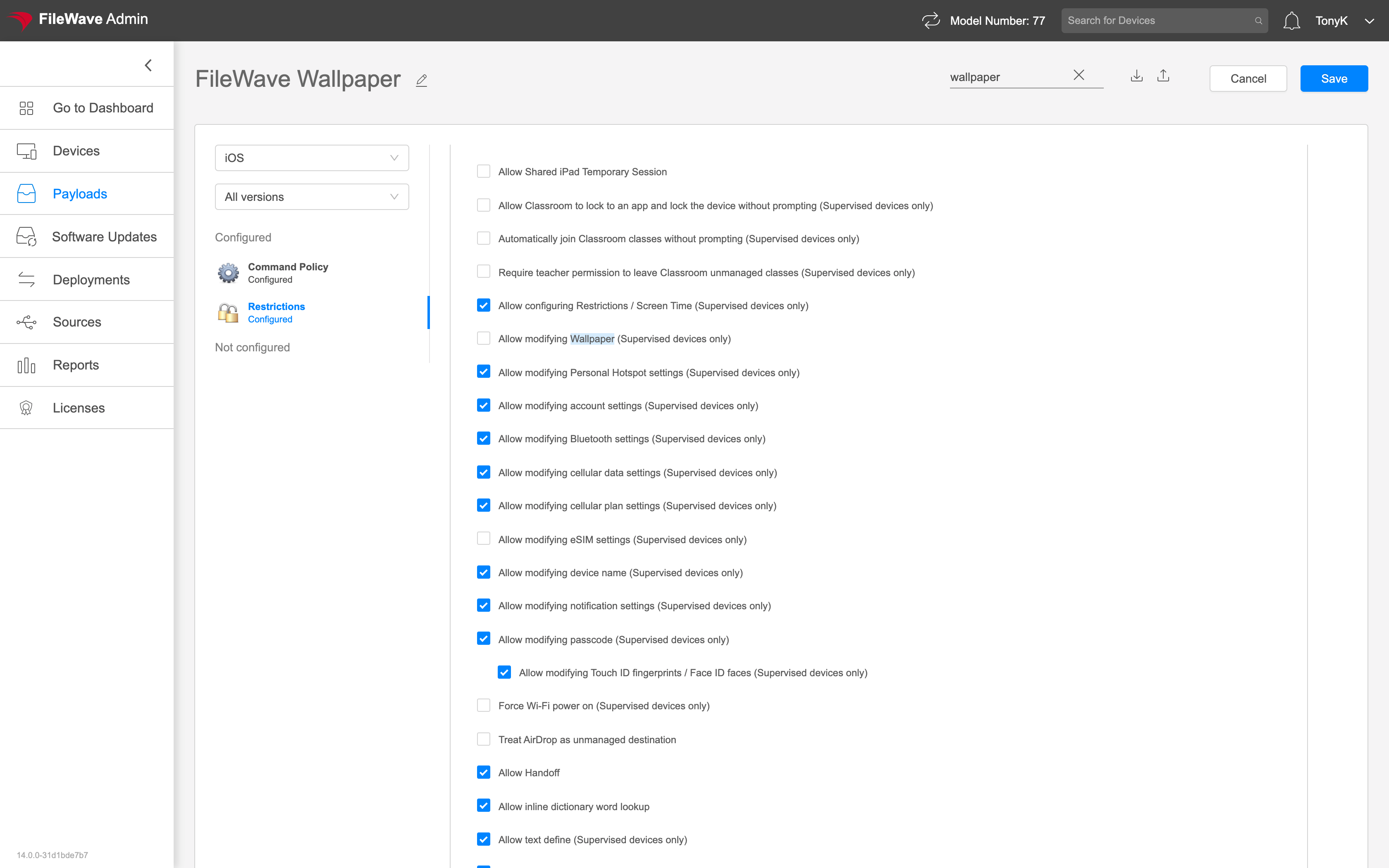
Here is a simple example ofthat settingsets a Wallpaperwallpaper and preventingprevents it from being changedchanged. (noticeNotice that it uses two payloads,related but related):payloads: