Device Actions Overview
What
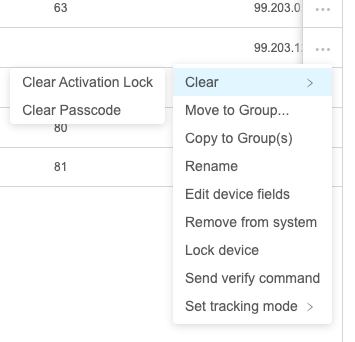
Device Actions are all of the "actions" or "commands" thatcommands you can executesend againstto ana endpointdevice from the FileWave WebAdmin. Actions are taken fromOpen the (...) button in the Devices view, or from the detail view of any particular device.
When/Why
Having inventory devices is never quite enough. We will frequently want to do something to the devices in the field immediately, and the Actions list is a way to do that. Note that all actions have some degree of pre-requisite...i.e the device might need to be supervised, or a certain command can't work if the device is BYOD user enrolled for instance. Some pre-requisites are accounted for in the UI and those commands won't show if not applicable. For instance, Wipe Device won't show if the device happens to be user enrolled.
How
As mentioned above, actions are taken from the (...)three-dot menu in the Devices view, or inopen the device details page, to see the actions available for that device.
When/Why
Use Device DetailActions view:when you need to do something on a managed device right away, such as locking it, sending Verify, or clearing supported settings. The available actions depend on the device and its management state. For example, some actions require supervision, and others are hidden when they do not apply. A user-enrolled device, for example, will not show Wipe Device.
How
In Devices, click the three-dot menu next to the device, or open the device details page and use the same menu.