
Device Actions Overview
What
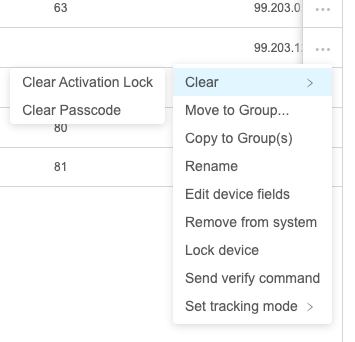
Device Actions in FileWave Anywhere let you manage a selected device record or send commands to the device. Open the three-dot menu in the Devices view, or open the device details page, to see the actions available for that device.
When/Why
Use Device Actions for tasks such as locking a managed device, sending Verify, or clearing supported settings. Sending a command is not proof that the device has received or completed it. The available actions depend on the device and its management state. For example, some actions require supervision, and others are hidden when they do not apply. A user-enrolled device, for example, will not show Wipe Device.
How
In Devices, click the three-dot menu next to the device, or open the device details page and use the same menu.
Confirm the device identity and the effect of the selected action before continuing. For a routine check-in or inventory refresh, use Send Verify Command; it is different from a screen lock or a change to the device record.
Verify the result
For an Apple MDM command, open the device name in Devices, then select Command History in the Device Detail View. This tab appears only for Apple MDM-enrolled devices; it is not a history of every device-record action or every platform's commands.
In Apple MDM Command History, not sent means the request is queued while FileWave waits for the device to check in. acknowledged means the device processed the request. Review not now and error responses before repeating an action. For a record change such as group membership, check the updated record instead; for other platforms, use the verification steps in the specific action's instructions.
No comments to display
No comments to display