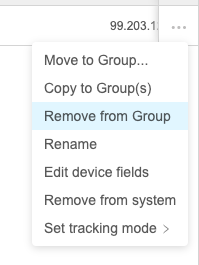
Remove from Group
What
TheUse "Remove from Group" command is whatwhen you might remember from the native FileWave admin as "Delete", and it has the same consequences. But, in the native admin Delete was the same for the original object and the copies, even though the result was different. The WebAdmin has split this into two commands to help clarify.
When/Why
We'll use this command whenever we want to remove aone copy of a device from a manual group.group without Theredeleting arethe device from FileWave.
When/Why
This is useful when a device no consequenceslonger belongs in a specific manual group, or when that group should stop applying deployments to datathat copy. The device record remains in FileWave, and any other copies willof bethe unchanged.same device Noteremain unchanged, and inventory data is preserved.
If the group copy was receiving content through a deployment, removing the copy from the group also removes that if this copy had payload content assigned it via agroup-based deployment thatpath itfor wouldthe losedevice. thatUse payload."Remove from system" only when you intend to delete the device record from FileWave.
How
HighlightSelect anya device copy (in a manual group),group, fromopen the (...) button,action menu, and choose "Remove from Group":