
Could not create the /Volumes/XYZ directory error when opening client info
Problem
ErrorClient whenInfo openingmay client info forshow a client machine that it "Could not create the directory". The error is caused when youits selectlast "Export Current Tab"Tab in Client info and save the file to a directory that is nowlocation no longer on the machine.exists. This iscommonly mosthappens commonafter when you save the fileexporting to aan external hard drive and then disconnectdisconnecting thethat drive. Since the directory path no longer exists it gives the error like the one shown below. The path in the message will mostusually likelybe differ.different from the example below.


Solution
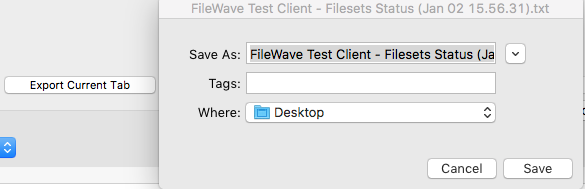
The error is resolved when you selectSelect a new export location forto Export current view. To do this followclear the below steps. error:
DoubleOpenclickClientonInfo for a macOS or Windowsclientclient.- Select "Export Current Tab" on the left side of the
clientClientinfoInfowindowwindow. SelectChoose adirectory that islocaltofolder on themachine.computer,Isuchsuggest selectingas yourUsers desktopdesktop.- Select "Save"

NowClosewhenClientyou close client infoInfo andre-opentheitwindowagain.youThewill not see thedirectory error should no longer appear.