
Prevent Duplicates During Enrollment
A Desktopdesktop device (FileWave Client) is identified in FileWave by its Client Name and Device Fingerprint. HaveIf a device is duplicated in FileWaveFileWave, couldenrollment causecan issues in communication, incorrectstop, inventory informationcan asbe wellwrong, asand re-enrollmentdeployments issues.may target the wrong record.
- Client Name - The name
as displayedshown in FileWaveadminCentral.consoleThis(notistoseparatebe confused withfrom the operating system devicename)name.- Mainly used for Fileset deployment and group or association placement.
- Device Fingerprint -
WhichAnisidentifier based on the serial number(macOS)on macOS or MAC addresses(Windows)on Windows.identifieridentifier.
ItQuick won'tanswer: beIf possibleenrollment tois blocked by a duplicate client name, duplicate device fingerprint, or client conflict message, resolve the record in the New Client dialog before updating the model.
FileWave will not enroll multiple devices with the same client name or fingerprint. When FileWave willdetects detecta conflict, an administrator needs to choose how to handle the conflictnew and notexisting allow enrollment until it's resolved. A FileWave Admin will have to decide what to do to resolve the conflict. records.
There are three options:
-
Remove the new client
Select this option if you want to refuse the client for now. You can fix the device identifier and re-enroll itlaterlater. -
Remove the old client and enroll the new client
Select this option if the old entry is obsolete and can be safelyremoved;removed.allAll clones associated with the old client record will beremovedremoved. -
Replace the old client with the new client
Select this option ifyou wantthe new clientto replace the existing entry (This willshould take over theoldexistingrecordrecord,withincludingallits clones, associations,etc)and group placement.
HowResolve you resolve thesea duplicate conflicts:enrollment conflict
Devices in conflict will appear asin such inthe New Client dialog. To resolve,resolve the conflict, select the device and click Solve Conflict onin the bottombottom-left left.corner.




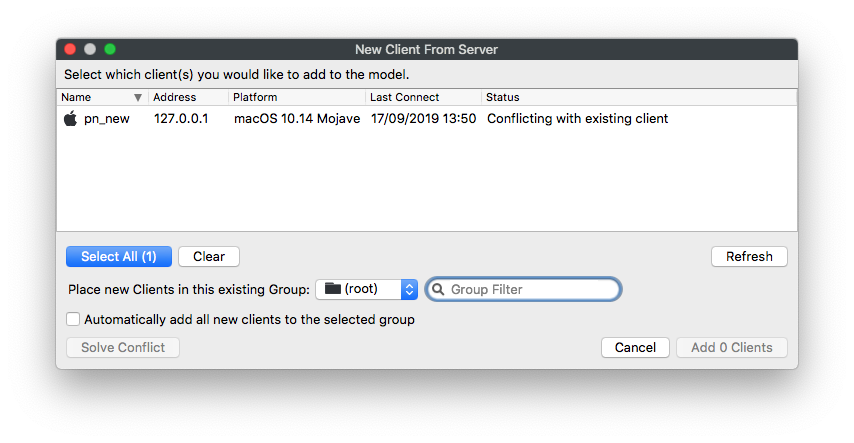
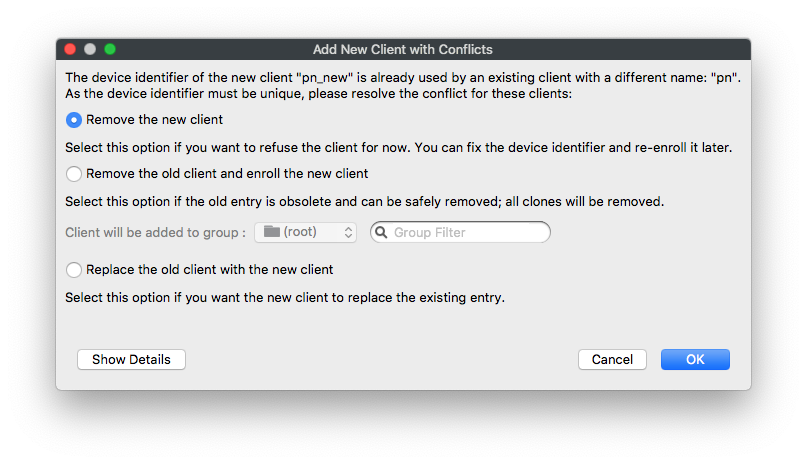
Then,Choose simply choose whichthe option bestthat suitsmatches yourthe situationsituation, andthen run Update Model.Model.
Use "Replace the old client with the new client" is the only option that will allowwhen the device toshould take overkeep the sameold record's associations and placementgroup inplacement. Use one of the FileWaveremove structure.options only when the old record is obsolete or the new enrollment should be refused.