
Archiving Clients
OneArchive ofa client when you want to stop active management while keeping the Statedevice optionsrecord ofand FileWavehistorical isinventory archivingin clients.FileWave. Archived clients do not consume a FileWave licence. Device records will continue to exist from the point of archive, but the device will no longer receive any communication with the FileWave Server.
Archived devices are known to be 'removed from the FileWave Model'. Model Update changes will not apply.
Archived Clientslicense, are hidden from viewnormal client views by default, butand thereare is the option to 'Show' them if desired:
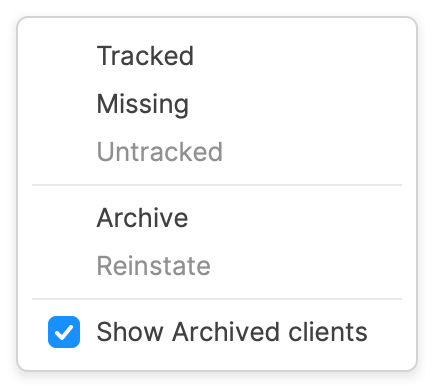
Archiving, removes devicesremoved from the active FileWave ModelModel.
Archive is different from Delete. Delete removes the record from FileWave. Archive keeps the record as an inactive object that can be shown again or reinstated later.
What Archive does
A Model Update is required after makingchanging anyclient state change.state.
Before you
Computer Clients
archive
Once archived, computer clients will not be included in any model updates, nor will their inventory update with the server.
At any point, the device may be removed back from archived using the Reinstate option.
Since the FileWave Client is not removed on archive,If the device should continuestop tocommunicating check back in as before, updating to the latest model.
Apple MDM enrolment is of concern when re-instating, as highlighted in the below section.
The following KB articles describe removing thewith FileWave Client. If attempting topermanently, remove the clientactive throughmanagement FileWave,path thesebefore Filesetsor shouldduring bethe pushedarchive to devices prior to archiving:workflow.
Reinstating an archived client
Clearly,Use Reinstate when a previously archived computer should return to active management. Reinstating only works if the device still has a working FileWave Client or enrollment path. If the FileWave Client iswas removedremoved, fromreinstall the device,client abefore Reinstate will not causeexpecting the device to check back in. The FileWave Client will requiring reinstalling.
Apple MDM
enrollmentWhen archivingan devicesMDM-enrolled whichApple aredevice is archived, FileWave may attempt to remove the MDM enrolled,enrollment itprofile. isWhether possibleFileWave forattempts that removal depends on the enrolmentenrollment profiletype to be removed duringand the state change to archived. Whether the enrolment profile removal is attempted is based upon either the type of enrolment or the FileWave Central Admin setting foundin in:

DevicesAfter willan notMDM beenrollment ableprofile is removed, the device may no longer have a management channel to report success ofback to FileWave. Treat the profilecommand removal,as sincea oncebest-effort offboarding action and verify the profiledevice isstate removed, there is no longer a mechanism to report back success.separately.
Archiving a device enrolled usingFor Automated Device EnrolmentEnrollment (also know as DEP) will even attempt to remove enrolment profiles which are configured to be non-removable. Indeed,devices, Apple onlygenerally supplyprovides two officialsupported options for removing an enrolment profile configured as non-removable: MDM command to remove (as triggered by archiving) and wiping the device.
See the troubleshooting section below for further information on removing a non-removable profile.
Troubleshooting
Since MDM enrolment profiles may be configured to be non-removable, how can this be addressed if for some reason the command to remove the profile is not received, since it is not possible to re-instate and try another archive.
If the reason the below is being attempted is due to a device no longer appearing to be MDM enrolled despite it originally being otherwise, recommendation would be to try the below option for re-enrolment, before using the extreme method of disabling SIP and editing the OS.
Apple's SIP (System Integrity Protection) prevents certain folders and files being altered, enrolment profile and related files included. Therefore,ways to remove a non-removable enrollment profile: send the MDM command that removes the profile, or wipe the device. FileWave can trigger the MDM removal command through the archive workflow when the applicable setting and enrollment state allow it.
If MDM removal does not complete
If an Apple MDM profile withoutis wipingnon-removable and the archive command did not reach the device, involves disabling SIP, removing the related files and then reinstating SIP for security.
The below methods aredo not supportedtreat bymanual Appleprofile-file orremoval FileWaveas anda anynormal unexpectedoffboarding behaviourprocedure. from attempting any of the following is the sole responsibility of those actioning the commands.
Disabling SIP
# csrutil disable && rebootThis should both disable SIP and cause the computer to reboot to finalise the process.device.
Removing Enrolment
Enrolment profile and matching files are found in the following directory:
# /var/db/ConfigurationProfiles/Use the following commands to remove profiles and reinstate SIP:
# rm -rf /var/db/ConfigurationProfiles/Store/*
# csrutil clear
# reboot
Re-Enrolment
If itthe goal is deemedto necessaryrepair a Mac that should still be managed but appears to re-enrolhave thelost device,its followMDM theseenrollment finalstate, steps:see Apple MDM Missing Enrolment Profile before using destructive recovery steps.
Related Content
ReinstateRetiring a device from FileWave
# sudo profiles renew -type enrollmentOn completion the device should have re-enrolled. Confirmation may be observed with the following command and similar output.
Output may vary depending upon macOS version. Server name will be the name of the server the device enrolled with.
# sudo profiles status -type enrollment
Enrolled via DEP: Yes
MDM enrollment: Yes (User Approved)
MDM server: https://demoserver.filewave.net:20443/ios/mdm