
How does FileWave work?
FileWave iscombines a combination ofthe tools and services integratedyou throughuse to manage devices from a commonshared administrative application front end. Since theinterface. FileWave AdminCentral applicationruns is multi-platform, using Apple'son macOS and Microsoft Windows, aso systemsadministrators administrator isare not limitedtied to a singleone platform for day-to-day lifecycle management. The FileWave basic workflow involvesis thea 'push-pull'pull interactionexchange between FileWave Central, the FileWave Admin, FileWave server,Server, and FileWave clients.Clients.

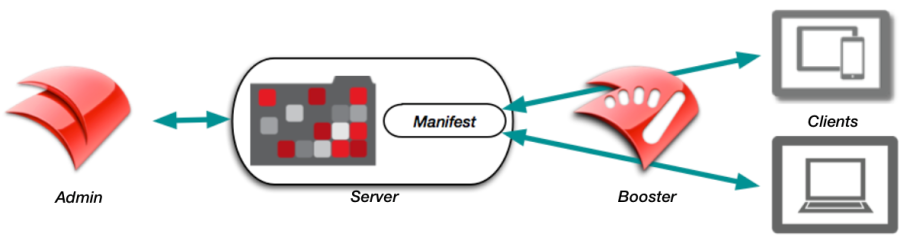
A FileWave administrator creates a Fileset which resides on the FileWave Server. Filesets can contain applications, images, profiles, books, settings, or other content arethat associatedis withassigned to client devices. The FileWave Client is sentreceives a Manifest that identifies athe newassigned Fileset. The ClientFileset, then requests that Fileset from the Fileset,server. that may be cached at aA FileWave Booster incan ordercache Filesets closer to provideclients betterso scalability.large deployments put less load on the server and network.
A basic FileWave configurationenvironment consistsmay ofhave a singleone administrator connecting to aone FileWave Server to manage and maintain a set of clients. MultipleLarger environments often have multiple administrators mayand beone inor use, as well asmore Boosters. toFileWave decrease network load by distributing Filesets closer tohandles the clientnormal systemsclient-server ascommunication wellfor as,management withand FileWavecontent handlingdelivery; allinventory Client-Serverdata communications,follows withits theown exception of inventory. Each of the major components is described in the following section.flow.
To learn more you canmore, review the Evaluation Guide or videothe our video video-based intro course FileWave Foundry: Onboarding Videos.