
Run PowerShell Commands as a Specified Windows User
Description
By default, theThe FileWave Client executesnormally runs Windows scripts andas tasksSystem. This example uses PowerShell remoting to run a specific command block with elevatedcredentials permissionsfor (Systemanother onWindows Windows). The below shows a method to launch a command as an alternate user.account.
Ingredients
- Text editor
- FileWave Central
Directions
ThisCredentials methodare requiresrequired. Never hard-code a username or password in the usernamePowerShell body. Use a dedicated account with only the permissions required by the task, and rotate its password ofaccording to your organization's credential policy.
PowerShell Invoke-Command accepts a PSCredential for the userspecified toaccount.
In the command.Fileset Doscript notproperties, add usernames and passwords directly in scripts.
Credentials of a user may be passed to Invoke-Command.
Due to the above warning, addconfigure the username and password as Environmentenvironment Variablesvariables torather than placing the Scriptvalues in the Fileset.script body.
For example, with a device named DESKTOP-N05SO1D:
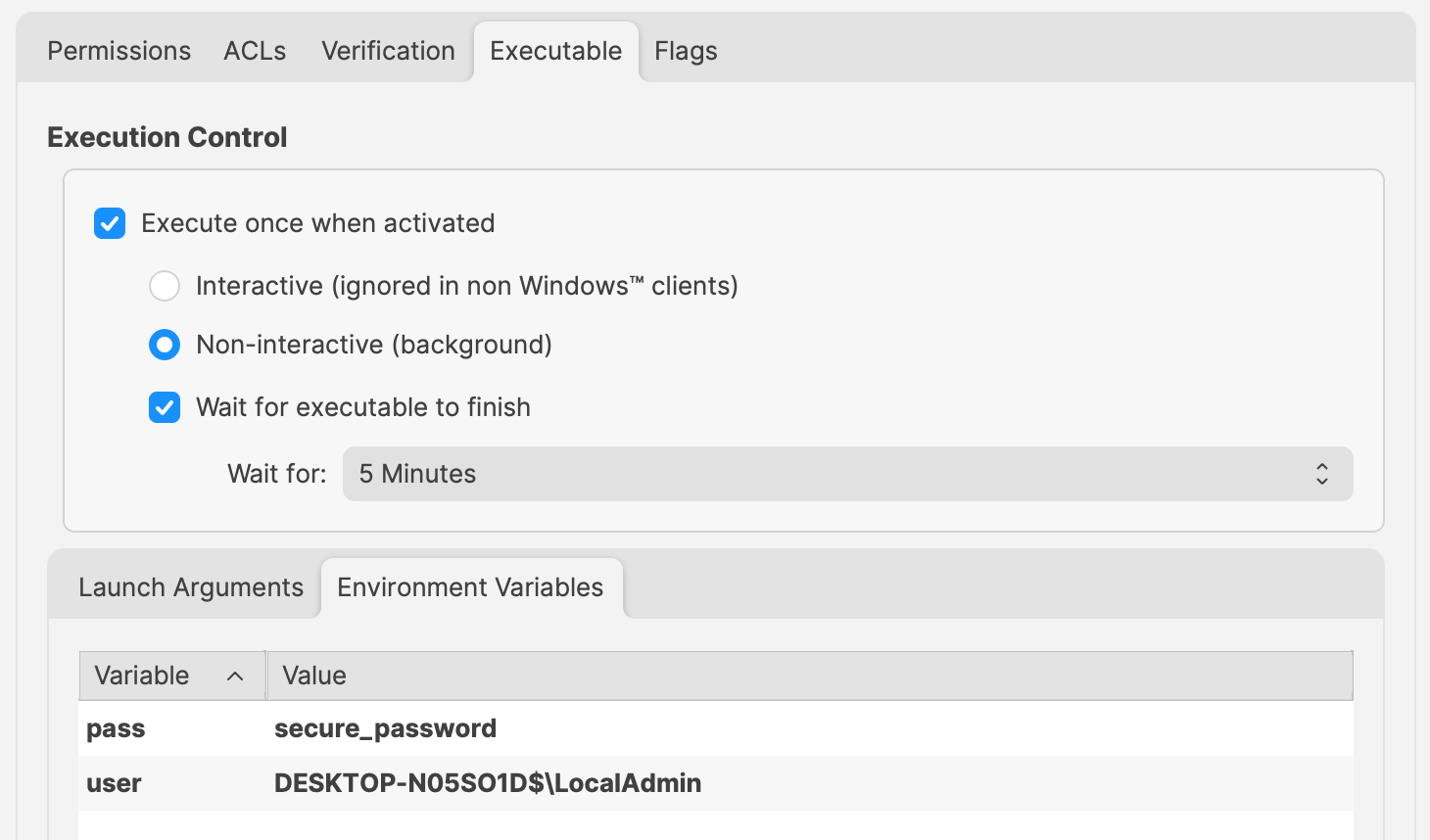
Change 'secure_password' and 'user' values to required entries.
TheseReference willthose be referencedvalues in the PowershellPowerShell Scriptscript as:
- $Env:pass
- $Env:user
For example:
$securePassword = ConvertTo-SecureString $Env:pass -AsPlainText -Force
$credential = New-Object System.Management.Automation.PSCredential ($Env:user, $securePassword)

echo "$Env:UserName"

Invoke-Command -ComputerName localhost -Credential $credential -ScriptBlock {
  # Code to action by the defined user should be added here
  echo "$Env:UserName"
}
The output of the above will show that the username has altered, byexample first echoingprints the System nameaccount andname, then prints the specified account name offrom inside the user within the scriptcommand block:
DESKTOP-N05SO1D$
LocalAdminTheWinRM abovedependency. reliesThis uponexample 'winrm'.uses Windows Remote Management. If therethe arecommand anyfails, issuescheck the WinRM configuration from an elevated prompt:winrm quickconfig
WinRM blocks this workflow when runningthe active Windows network profile is Public. Verify the command, winrm can be checked with the following command: winrm quickconfig
This method will not work if the definedintended network isprofile 'Public',and asorganizational winrmremoting willpolicy notbefore allowchanging this.WinRM settings.