
Deploy Cloudflare WARP with FileWave (macOS, iOS, Windows, and Android)
DescriptionWhat this recipe deploys
FileWave can deploy Cloudflare WARP isapplications aand populartheir choicevendor-supplied ofmanaged softwareconfiguration toacross deploymacOS, toWindows, devices.iOS, Thisand process can be simplified with FileWave.Android.
ThirdThird-party Party Softwaresoftware
Cloudflare WARP is not a thirdFileWave partyproduct. application.Use Thethe detailscurrent providedCloudflare aremanaged-deployment documentation as the authority for exampleinstallers, onlyconfiguration keys, and aresupported unsupported by FileWave.values.
IngredientsRequirements
SoftwareCloudflare PKG and/or MSI installer formacOSmanagedand/or Windows, PKG/MSIcomputersVPPApple Apps and Books (VPP) access for iOSEMMManaged Google Play access for Android EMM- Configuration
filesvalues for your Cloudflare Zero Trust organization
InformationDownload andcurrent resourcesdesktop areinstallers provided via the Cloudflare Managed Deployment documentation andfrom the Cloudflare WARP Downloaddownload page. page.The examples below show how those vendor artifacts map into FileWave.
DirectionsPlatform workflows
CloudflarePilot WARPeach hasplatform optionsseparately forbecause macOS,its Windows,installer, iOSmanaged-configuration format, and Android.app-store path differ.
macOS
Cloudflare WARP for macOS requires the PKG installer, plus a configuration profile.
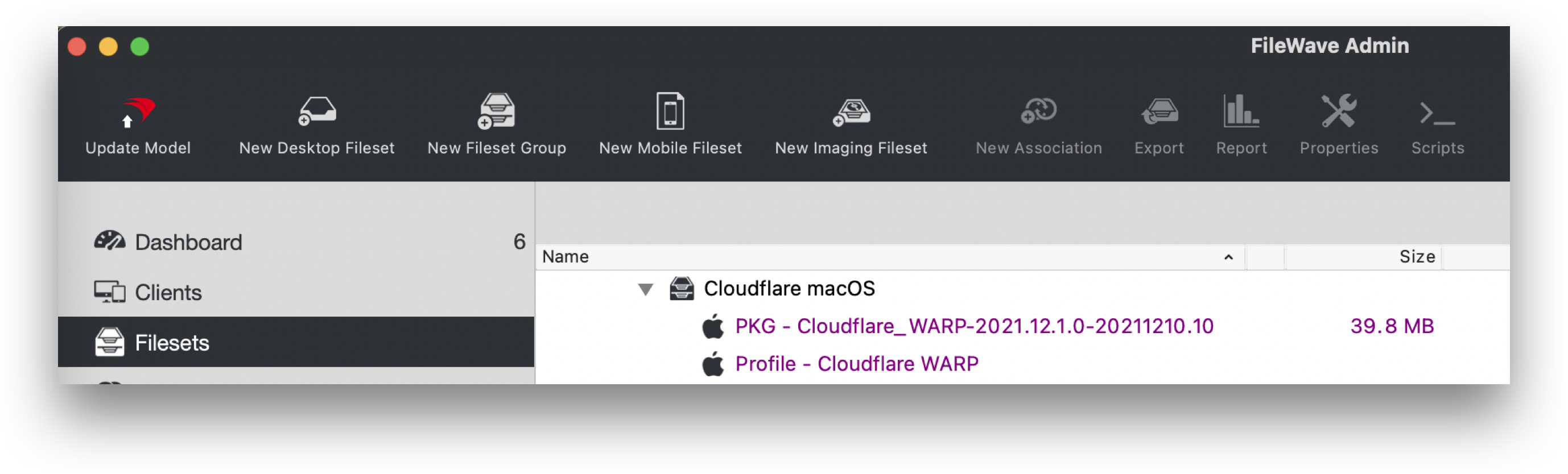
- Create a Fileset Group and
namegive it a clear name, such asdesired, e.gCloudflare macOS - Download the Cloudflare PKG
- Drag the PKG into the
FileWave AdminFileset GroupcreatedinaboveFileWave Central HighlightSelect the Fileset Group andchoose tocreate a New Desktop Fileset- Select Profile
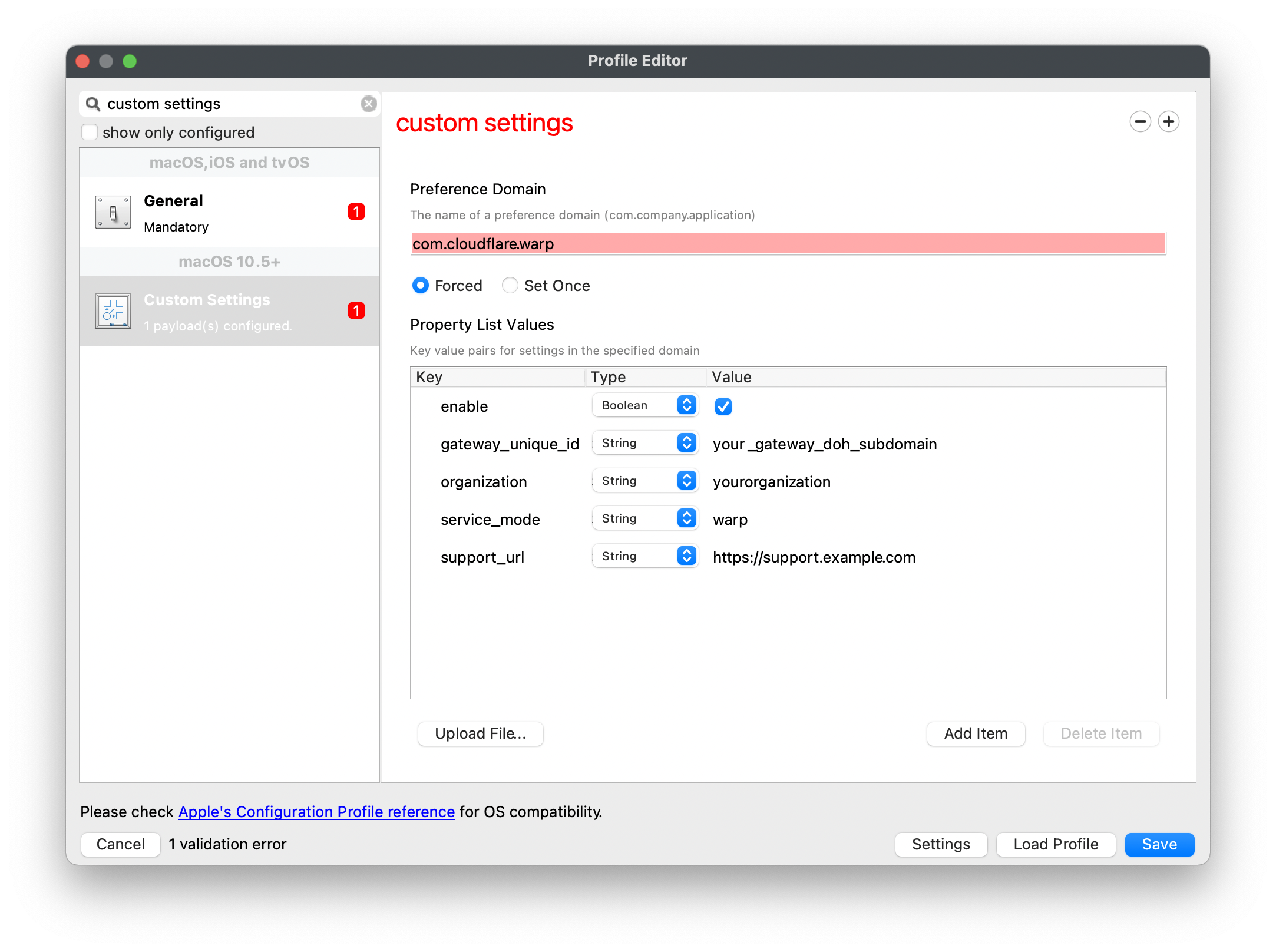
- In the Profile Editor window choose the Custom Settings Payload and Configure
TheBuild the profilemay be builtfromscratchscratch,oforthedownloadCloudflareCloudflare's example templatecouldandbeusedownloaded, benefitting from the 'Uploadfile'fileoption withinin the Profile Editor- If building manually, the preference domain should be: com.cloudflare.warp
- Edit or add/remove keys and values as required. Details of Cloudflare Parameters below
AssociateCreate a test Deployment for the Cloudflare FilesetGroupGroup,tovalidateonetheor more test devicesresult, anddeploythenonceexpandsatisfiedthealltargetis wellscope
Example Fileset Group
Example Custom Settings Payload, edit details as required
Windows
Cloudflare WARP for Windows requires the MSI installer,installer plusand an XMLmdm.xml configuration filefile.
- Download the Cloudflare MSI
- Drag the MSI into the FileWave
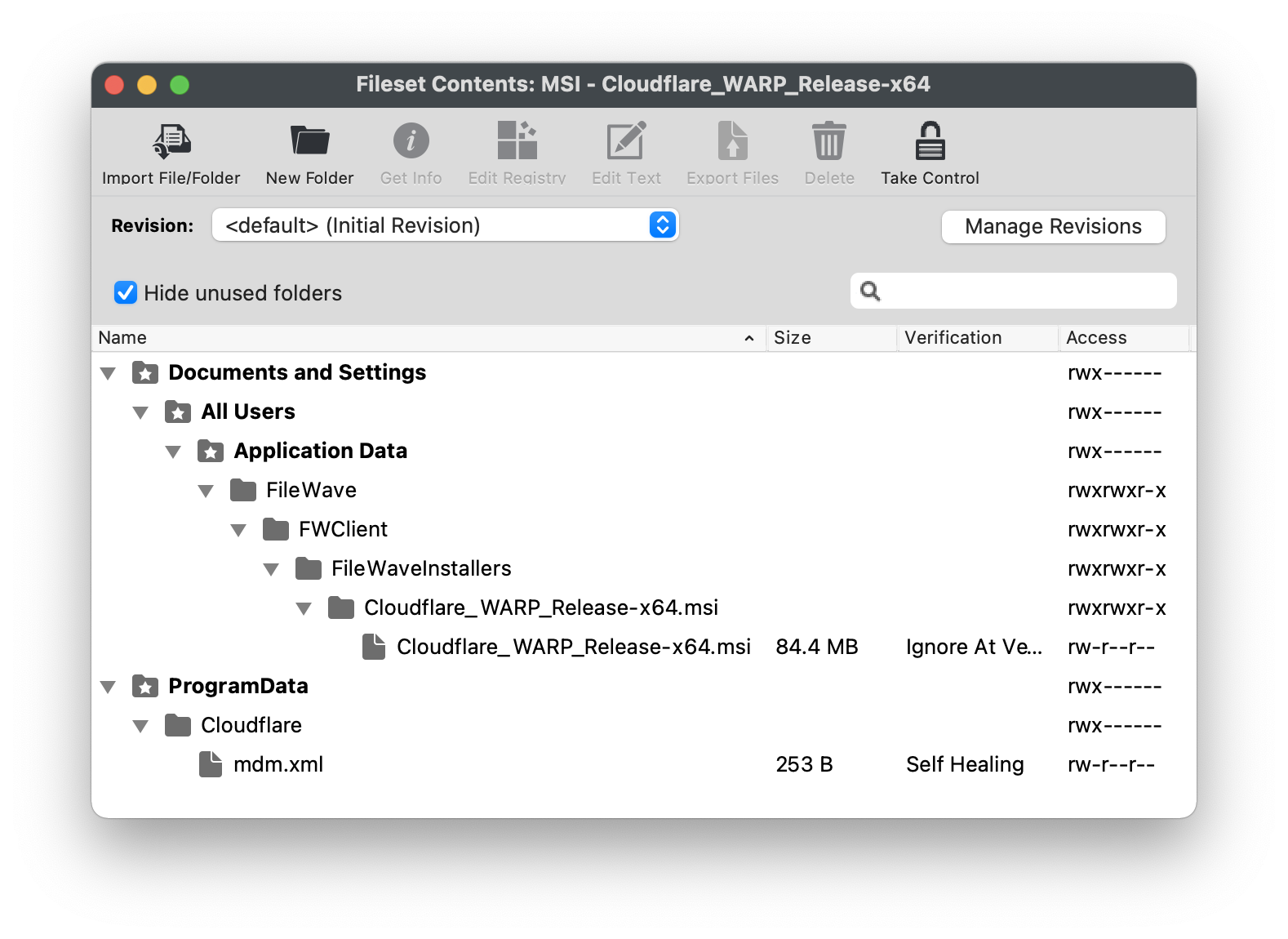
AdminCentralFilesetFilesetsview,viewcreatingto create a new Fileset - Download the mdm.xml template provided by Cloudflare or create one
- Create a folder called Cloudflare within the ProgramData folder of the Fileset
- Upload the XML file into this Cloudflare directory
- Edit or add/remove keys and values within the XML as required. Details of Cloudflare Parameters below
AssociateCreate a test Deployment for the CloudflareFilesetFileset,tovalidateonetheor more test devicesresult, anddeploythenonceexpandsatisfiedthealltargetis wellscope
Example Cloudflare Fileset
Example mdm.xml file, edit details as required
<dict>
  <key>organization</key>
  <string>exampleorg</string>
  <key>service_mode</key>
  <string>warp</string>
  <key>gateway_unique_id</key>
  <string>fmxk762nrj</string>
  <key>support_url</key>
  <string>http://support.example.com</string>
</dict>
iOS
Cloudflare WARP for iOS requiresuses the 1.1.1.1: Faster Internet App,App Store app with additionalmanaged configurationapp configuration.
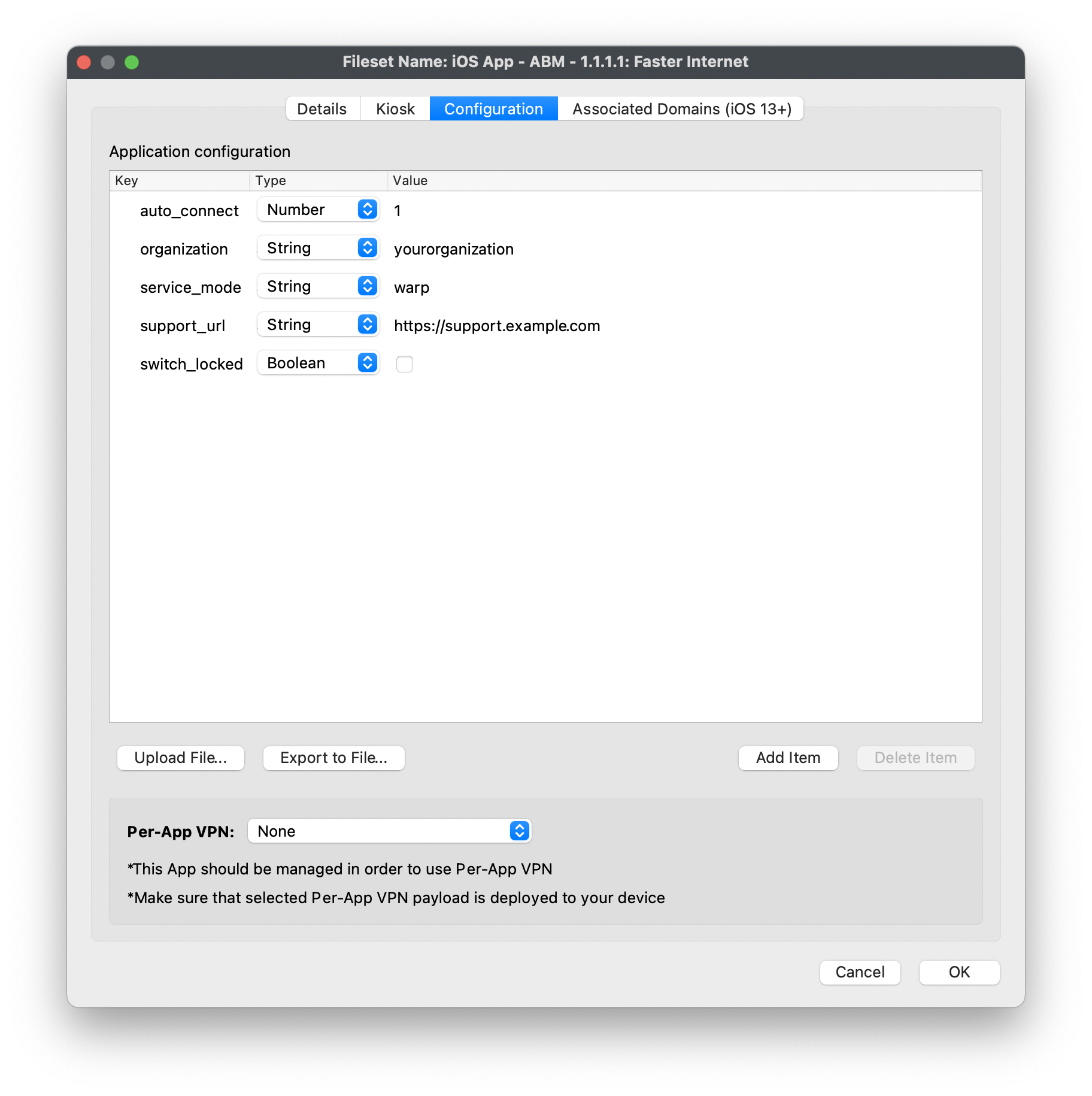
PurchaseAcquire the freeApp Store App:1.1.1.1: Faster Internetthroughappeitherin Apple Business Manager or Apple School ManagerAssociateAssign theAppapp to the relevantVPP licenceApps and Books location, sync VPP in FileWavePreferences;preferences,acceptingandtheaccept creation of thenew Fileset.Fileset- Double click the newly created Fileset and choose the Configuration tab
- Manually create keys and values or upload the Cloudflare example template file
- Edit or add/remove keys and values within the xml as required. Details of Cloudflare Parameters below
AssociateCreate a test Deployment for the1.1.1.1:appFasterFileset,InternetvalidateFilesetitsto one or more test devicesconfiguration, anddeploythenonceexpandsatisfiedthealltargetis wellscope
Example Custom Settings Payload, edit details as required
Android
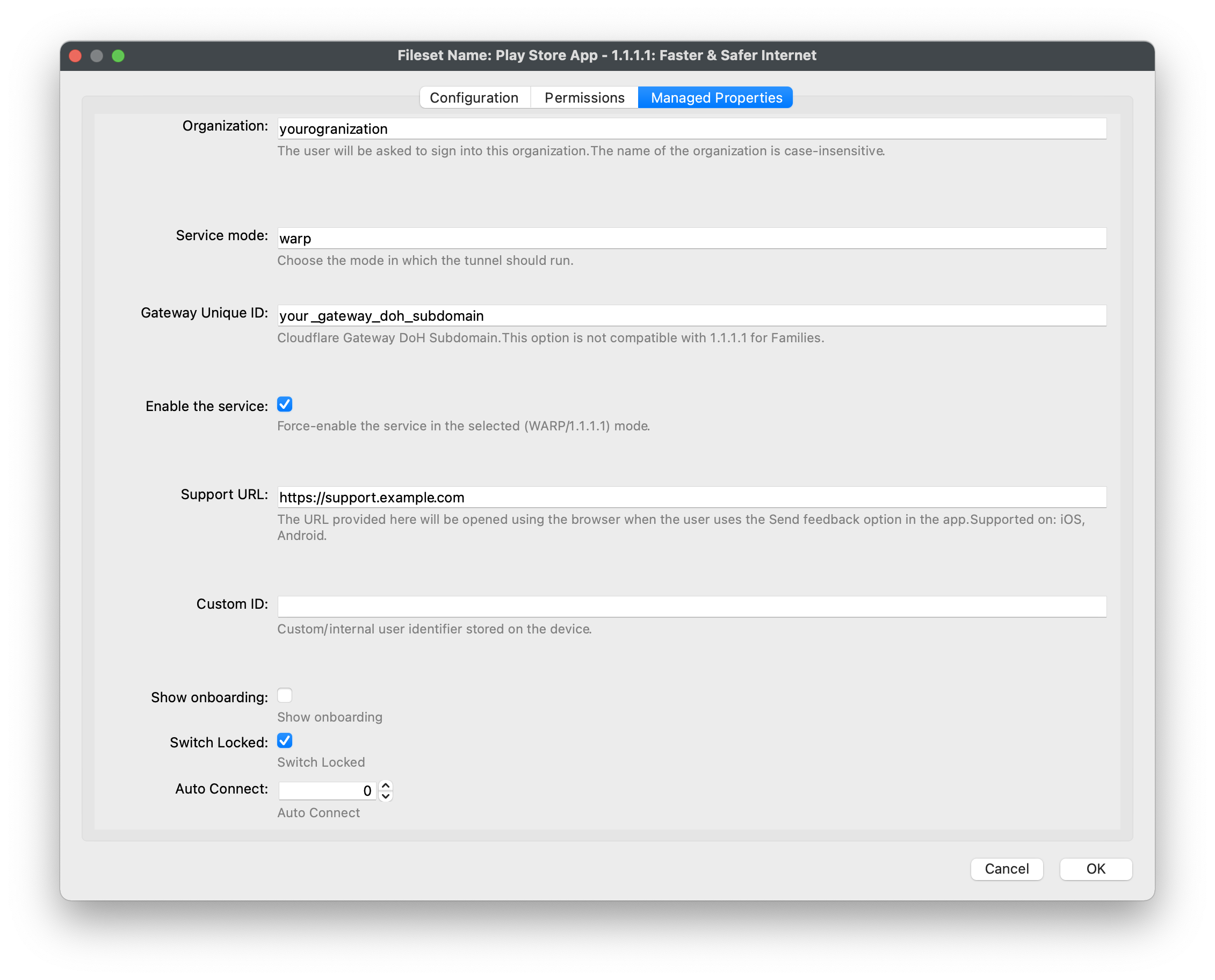
Cloudflare WARP for Android requiresuses the 1.1.1.1: Faster & Safer Internet App,Managed Google Play app with additionalmanaged configurationproperties.
- Choose New Mobile Fileset
- Select Play Store
PurchaseApprove the freePlay Store App:1.1.1.1: Faster & Safer Internet app in Managed Google Play- Double click the newly created Fileset and choose the Managed Properties tab
- Edit or add/remove values as required. Details of Cloudflare Parameters below
AssociateCreate a test Deployment for the1.1.1.1:appFasterFileset,&validateSaferitsInternetmanagedFileset to one or more test devicesproperties, anddeploythenonceexpandsatisfiedthealltargetis wellscope
Example Managed Properties, edit values as required
Cloudflare Parameters
All the above example configurations will require adapting to include appropriate keys and values for each environment. Explanations of each key and its possible requirements and values can be found in the Cloudflare Parameters list.