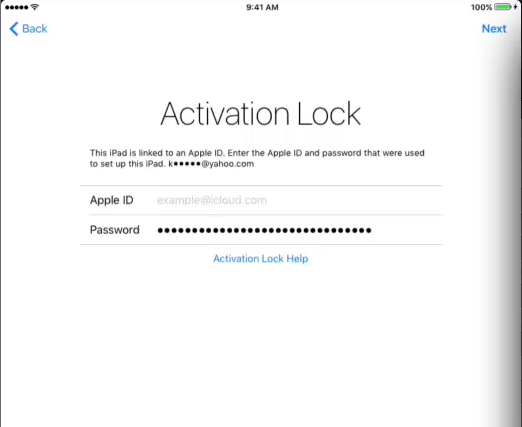
Apple ID prompt still appears even when Activation Lock Bypass Code is used during Remote Wipe
PROBLEMProblem
When executing a Remotesupervised WipeiPhone againstor aiPad Supervisedis iOSremotely 7.1+wiped devicewith and the "Remove Activation Lock"Lock optionselected, isactivation checked,should not require the expecteduser's behaviourApple isID thatpassword. onFileWave activation of the iOS device, the AppleID username and password will not be required. Instead,uses the stored Activation Lock Bypassbypass code (from FileWave AdminCentral > Assistants > Activation Lock Management...). should be used to removeIf the ActivationApple Lock.ID Inprompt somestill circumstances,appears, we have experienced thatuse the usernamebypass /code as the password dialoginstead isof still presented toentering the user.user's Apple ID credentials.
ENVIRONMENTEnvironment
iOSSupervisedDevicesiOS/iPadOS devices- FileWave MDM
RESOLUTIONResolution
Instead of enteringAt the usernameApple ID prompt after Remote Wipe, leave the Apple ID field blank and passwordenter the device's Activation Lock bypass code in the dialogpassword presentedfield. onFind the iOS device after the Remote Wipe command executes, enter the Bypass code for that device (found in FileWave AdminCentral > Assistants > Activation Lock Management...) in the password field.. Enter the codeit exactly as itshown, appearsincluding in the Activation Lock Management dialog, as the code is case sensitivecapitalization and also requires the dashes.
Keep the username (Apple ID) field empty.