
Automatic VPP License Assignment for iOS/iPadOS BYOD
What
ForDevice-based a few years, deviceVPP license assignment has beenis the preferred method for assigning licenses for managed iOS devices.and iPadOS But,devices withbecause it does not depend on a user's Apple Account. BYOD enrolledenrollment devices,cannot licensesuse can'tdevice-based beassignment, assignedhowever, and some content such as Apple Books requires user assignment. FileWave's Automatic setting handles both cases: it uses device-based assignment when the device and content support it, then falls back to theuser-based device...assignment when Sothey FileWavedo have made some changes to how we handle this which make managing BYOD enrolled devices (and as a happy accident supervised devices) easier.not.
When/Why
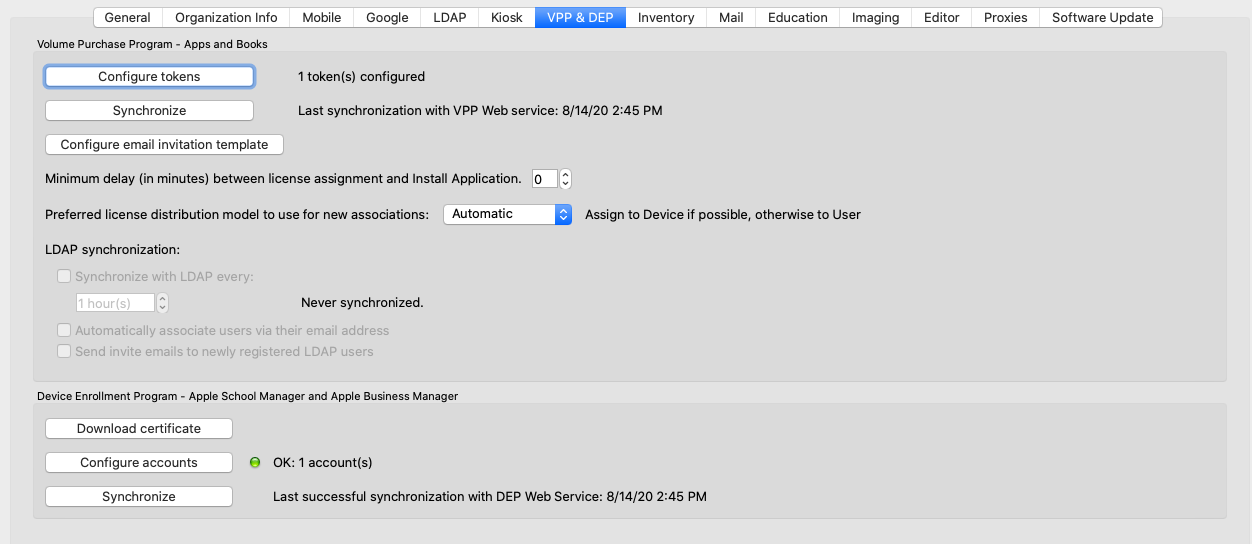
Historically,A whenVPP you created anapp association for a VPP app, you had a choice tocan assign theits license to the Device,device or tothe user. The VPP preference sets the User.default for And,new associations, while the license setting on an individual association can override that default. Select Automatic in Preferences,Preferences therewhen wasyou anwant optionnew associations to setchoose yourthe compatible assignment method. The preference (which you most likely have set to Device). There is nowshown a new option called "Automatic", which you will see below:below.

And,You thencan on each Associationoverride that default canon bean overridden:individual association:

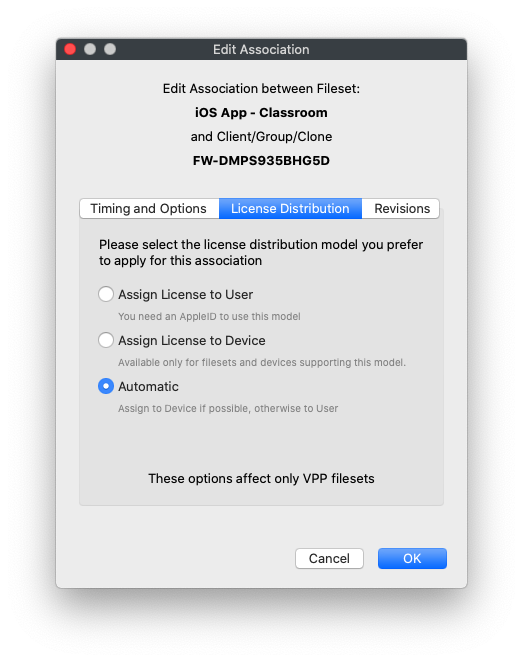
"Automatic"Automatic infirst thistries instance,device-based basicallylicensing. meansIf "Trythe todevice or content cannot use that method, FileWave uses user-based assignment instead. The fallback still needs a FileWave user and VPP user association that can receive the license; Automatic changes the assignment method, not the user identity behind it.
Automatic assignment also helps when you do a device license, but if you can't, then do a user based assignment"
Now, how does this make your life easier if you aren't going tonot manage BYOD devices?devices. Apps Thatthat issupport adevice-based greatlicensing question!continue to use it. If you setlater your default setting in preferences to "Automatic", that means that all of your apps will assign to the device if they can, but if you have something that maybe you don't do much...likeassociate an app that can'tlacks do device device-based licensing,licensing or an iTunesApple bookBook that requires a user, FileWave can use user assignment for instance, then that association willwithout still work even thoughforcing you didn't manually change it over to "User".remember a one-off setting change.
How
We showed you above changingChanging the preferencespreference so that allaffects new associations. Existing associations willkeep betheir "Automatic"current (whichlicense wesetting. think will work for almost all instances). But, what happens if you enrollIf a new BYOD device and put it inreceives a group that has a "Device" device-based association?association, In short, nothing...the app willcan be associated,associated but can nevercannot install because devicethat enrollment cannot use device-based licenselicensing. assignmentUpdate can not be used. So, for best results, you may want to consider updatingapplicable older associations to "Automatic"Automatic asso well.FileWave can fall back to user assignment.
TheIf abovemany may mean you have hundreds ofexisting associations to change...if that isneed the case,same rememberchange, that you can mass-edit associations inuse the Associations view.view to edit them in bulk.