Deploying iOS Applications to macOS Devices Using FileWave
What
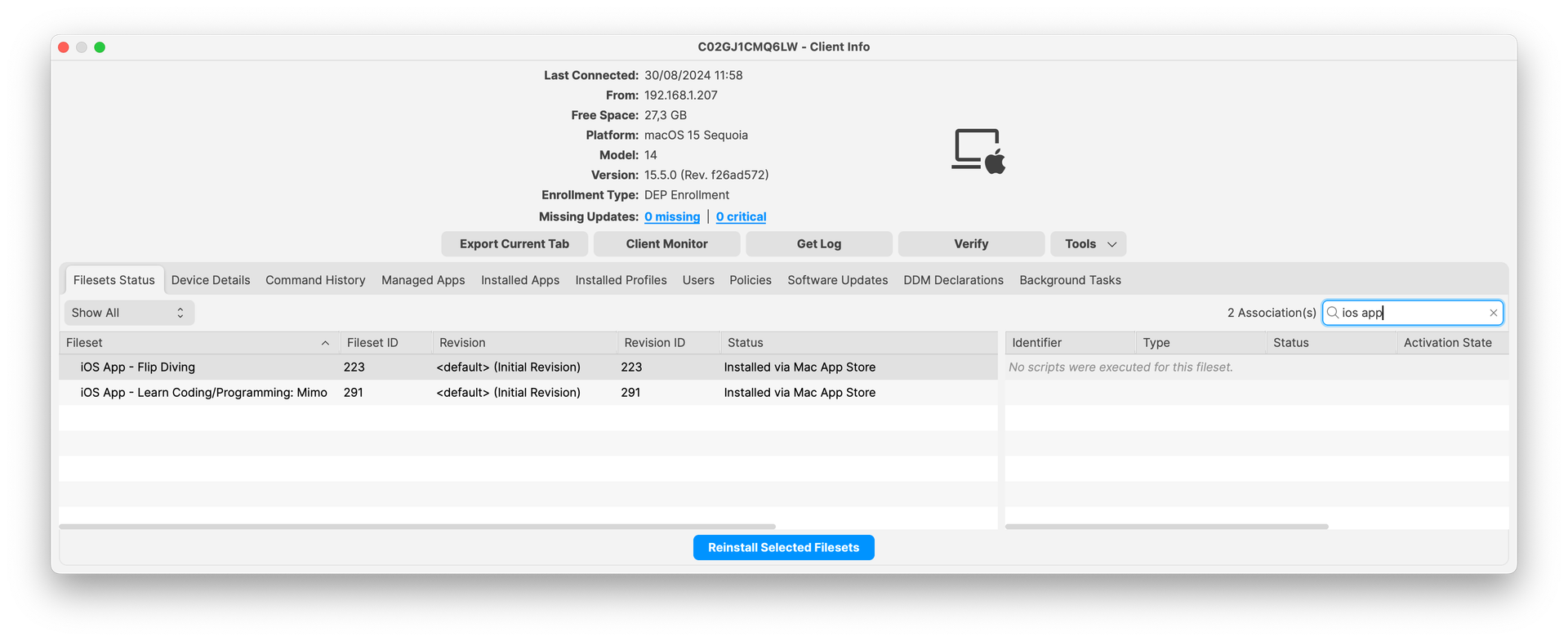
With the latest updates to FileWave 15.5.0, administrators now have the capability tocan associate iOS applicationapp filesetsFilesets with compatible macOS devices. ThisIf meansApple allows the app to run on Mac and your organization has available licenses in Apple School Manager or Apple Business Manager, FileWave can install that if an application is compatible with both iOS and macOS platforms, it can be installedapp on macOS devices directly through FileWave, provided that the necessary licenses are available. This new functionality simplifies the deployment process and expands the range of applications that can be distributed to end-users oneligible macOS devices.
When/Why
When to Use
ThisUse featurethis when an iOS/iPadOS app is particularlyalso usefulavailable whenfor youMac, haveoften applicationsbecause thatthe arevendor designedships to run on both iOS and macOS platforms—knownit as a Universal appsapp or Catalyst apps.app. TheseAssociating applications are built to operate seamlessly across Apple’s ecosystem. By associatingthe iOS applicationapp filesetsFileset with macOS devices,devices youlets can:you:
- Expand
ApplicationappAvailabilityavailability: ProvideusersawithMac-compatibleaccessiOS app toauserswideronrangesupportedof applications that were previously limited to iOS devices.Macs. StreamlineReuseDeploymentthe existing assignment workflow: Manageandthedeployappapplications to both iOS and macOS devices using a single fileset, reducing administrative overhead.
Why This Feature Matters
Apple’sApple introductionsilicon ofMacs macOS versions that support iOS applications (starting withrunning macOS 11 Big Sur onor Applelater Siliconcan devices)run hassupported blurrediPhone and iPad apps when the linesapp betweendeveloper theallows twoMac operatingavailability. systems.In LeveragingFileWave, this capability within FileWave allowsmeans organizations to:can:
MaximizeUseResourceavailableUtilizationapp licenses:UtilizeAssignexistingeligibleiOS applicationapp licensesforto compatiblemacOS devices, optimizing licensing costs.Macs.EnhanceSupportProductivitymixed Apple fleets:Equip users with essential applications regardless ofMake thedevicesametheysupportedareappusing.available across iPad and Mac where the vendor permits it.SimplifyTrackManagementdeployment from FileWave:CentralizeMonitorapplicationinstallationmanagementthroughforFileWaveiOSinsteadandofmacOStreatingdevices,themakingMacitinstalleasierastoatrackseparatedeploymentsmanualand updates.process.
How
Prerequisites
Before deploying iOS applications to macOS devices, ensure the following conditions are met:
- Compatible macOS
Devicesdevices: Devices must be running macOS 11 Big Sur or laterand be equipped withon AppleSilicon (M1 chip or newer), which supports running iOS applications.silicon. - Compatible
Applicationsapplications: TheiOSiOS/iPadOSapplicationapp must be availableonfor Mac. If the developer has disabled MacAppavailability,StoreFileWaveandcannotcompatibleforcewiththemacOSappdevices.to install on macOS. - Licenses: Sufficient licenses must be available
for the applicationthrough Apple School Manager (ASM) or Apple Business Manager (ABM).
Monitoring and Troubleshooting
- License
Availabilityavailability:EnsureMakethat there aresure enough licensesavailablearefor the deployment.available. If licenses are exhausted, theapplicationapp will not install on additional devices. - Deployment
Statusstatus: UsetheFileWaveAdmin consoleCentral to monitorthedeployment status and confirmsuccessful installations.installation. - Compatibility
Issuesissues: If theapplicationapp fails to install,verifyconfirm thatitthe app isindeedavailablecompatibleforwith macOS devicesMac and that the device meetsall systemApple's requirements. Ifitthedoesappinstall,installs butiswillunablenotto open thenopen, the appitselfvendorneedsmayanneed to updatefromthepublisher to run on macOS. In testing, the Teslaappdidn'tforwork,macOSbut the TezLab app did launch although both apps installed.compatibility.