Imaging Issue After Upgrading FileWave and Using Self-Signed SSL Certificate
What
You are experiencing difficulties imaging machines afterAfter upgrading your FileWave Server, IVS, and Clientsclients, whileimaging usingmay fail when the environment uses a Self-Signedself-signed SSL Certificatecertificate.
When/Why
ThisUse stepthis is necessaryworkaround when usingIVS imaging fails after an upgrade and the environment does not use a Self-Signedroot-trusted SSL Certificate.certificate. EnsureAdd the check to include this additional step in your IVS upgrade process iffor youself-signed arecertificate not using a Root Trusted SSL Certificate.deployments.
How
- Access the IVS via SSH or locally:
- Connect to the IVS
viaby SSH oraccesslocalit locally.console. Usesudo -sto make sure you are usingso therootfollowinguser.file edit runs as root.
- Connect to the IVS
- Edit the dnsmasq.lua file:
- Use your preferred command-line
editoreditor,(e.g.,such as vi ornano)nano, to editthe/imaging/scripts/bin/dnsmasq.lua:file. For example:vi /imaging/scripts/bin/dnsmasq.luanano /imaging/scripts/bin/dnsmasq.lua
- Use your preferred command-line
- Navigate to line 128:
Use the arrow keys or appropriate commands to navigateNavigate to line 128.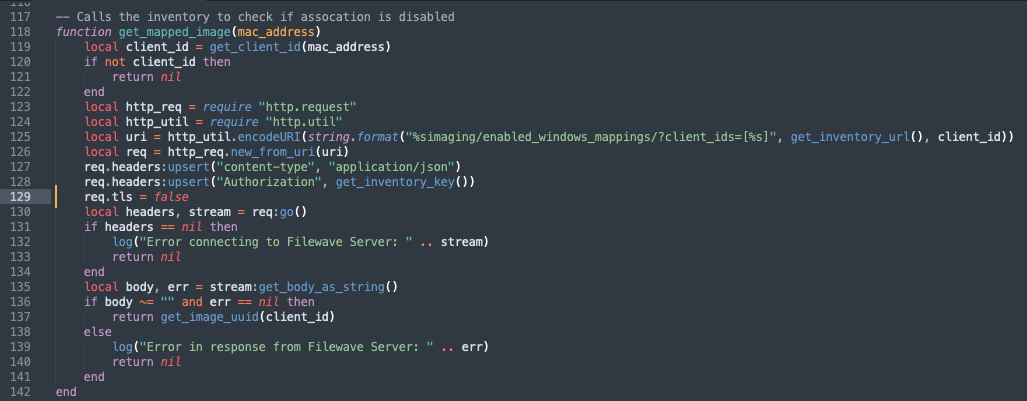
- Switch to insert mode:
PressIn'i'vi, pressito switch to insertmodemode.in vi. Or, if you're usingIn nano,you can just usemove thearrowcursorkeysto the line andedit.edit directly.
- Add the following line:
req.tls = false
- Save and exit vi or nano:
- Press the Esc key to exit insert mode.
TypeIn'vi, type:and press Enter to save andwq'wqexitexit.vi.InOr,nano,ctrl+xpress Ctrl+X and save the filewithwhennano.prompted.
- Verify functionality:
YouTestshouldimagingnowagainbeafterablesavingtotheimage machines successfully.file.