
Imaging MAC Addresses (Pass-Through MAC Addresses)
What
TheFor Windows imaging, FileWave can store a manually entered Imaging MAC addressAddress ofseparately Windows devices for imaging purposes can be specified manually byfrom the user from FileWave Admin. Unfortunately, this field will then be overwritten by the actual MAC address(es) reported byaddresses the client inreports through inventory. This is an annoying problemmatters when the MACimaging address specifiedbelongs byto handa USB Ethernet adapter, or is the one of a USB-ethernetpass-through adapterMAC thataddress, and is not always connectedactive toon the device. A more robust solution would be to store separatelyKeeping the MACimaging value separate prevents inventory updates from overwriting the address specifiedIVS byshould the admin so that it never gets overwritten by what the client reports to inventory.use.
When/Why
OnSome Windows-basedWindows systems,devices vendors have created the concept ofexpose a pass-through MAC address that is used withfor USB Ethernet donglesadapters. soInstead thatof using the adapter's own MAC address ofaddress, the dongleadapter itselfpresents isn'ta used,device-specific address. This avoids many devices sharing the same adapter MAC address, but rather the pass-through MAC address ofmay thenot device is used with the dongle. This overcomes the issue of the same MAC address showing up for many devices as the dongle is used on different devices, but creates a new challenge because that address isn't storedappear in FileWave inventory becauseunless it'sit notis normallyactive active.during inventory reporting.
How
WithUse FileWave 14.6.x a newthe editable column "Imaging MAC Address" iscolumn availablein onviews Clientsthat Viewshow clients, such as Clients, Imaging, and otherAssociations. views,When whereyou clientsenter arean visible (Imaging View, Associations View, etc.). This column shows a manually specified MAC addressAddress that is not changed by device inventory reports. Whenever the user specifies the MAC address offor a Windows clientclient, FileWave stores it separately from "Serial/MAC". The value can be set in FileWave Admin, the value is stored in a new separate field. This can happen in the following usethese cases:
- When a placeholder is created
- When a placeholder is imported from a text file
When "Imaging MAC Address" is specifiedset for an added client, the column "Serial/MAC" column is unchanged. TheBecause newthis field cannotis be the reasonused for Windows imaging, it does not create enrollment conflict, as imaging is Windows only andconflicts; serial/macMAC enrollment conflicts areapply macOSto only.macOS.
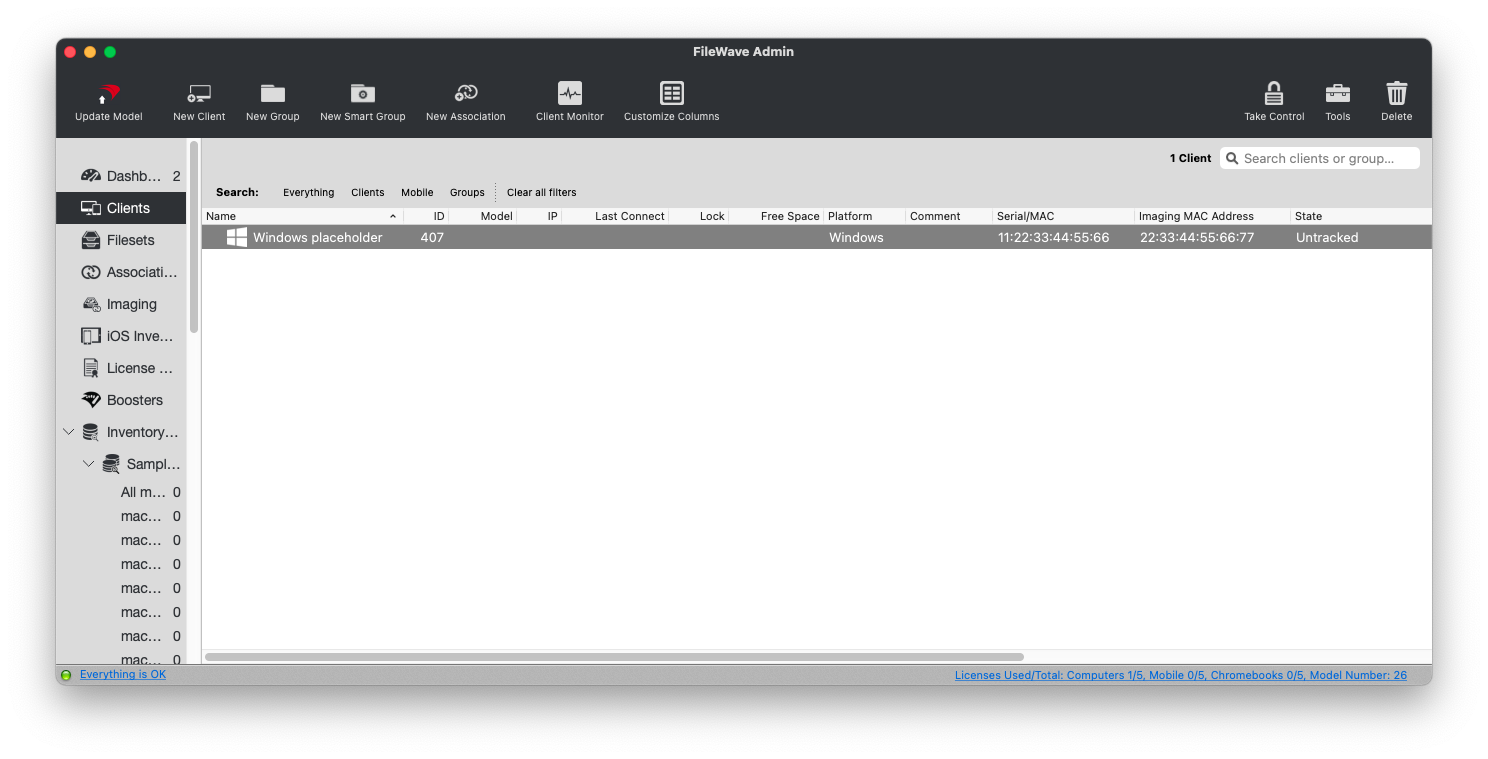
The IVS recognizes allWindows client MAC addresses from Windows clients, including the ones reported to inventory and the manually specified oneImaging MAC Address, if any.one exists.
You can also mass-import Imaging MacMAC Addresses usingwith the import tool withinin the FileWaveweb Webadmin Admin Console.console.