
Apple Profile: Apple Intelligence

What

FileWave can configure Apple hasIntelligence-related introducedrestrictions newin the Apple Restrictions payload. The first set of these controls thatarrived allow Mobile Device Management (MDM) solutions to manage and restrict the use of Apple Intelligence features on managed devices. Starting within FileWave 15.5.0, administratorsand cannewer configure these settings within the Restrictions payload in profiles. This enhancement provides organizations with the ability to enableApple or disableFileWave specificreleases AI-poweredmay featuresexpose acrossadditional theirrelated device fleets, offering greater control over how these functionalities are utilized within the enterprise.options.

When/Why

OrganizationsUse maythese haverestrictions concernswhen aboutyou thewant useto ofdelay AIor limit Apple Intelligence features on companymanaged devices, particularly regarding data privacy and the potentialdevices for confidentialprivacy, information to be inadvertently sharedcompliance, or processed.support-readiness By controlling Apple Intelligence features, IT administrators can:reasons.

  • EnsurePrivacy Data Security: Prevent sensitiveand data fromhandling: beingreduce processedexposure by AIto features thatyour mightorganization store or transmit information in ways that arehas not alignedapproved with company policies.yet.
  • MaintainCompliance: Compliance:align Adheredevice tobehavior industrywith regulationsinternal andpolicy organizationalor policiesregulated that restrict the use of certain technologies.environments.
  • ManageSupport Featurereadiness: Adoption:give Delayyour orteam controltime theto rollout oftest new AI features untilbefore theyusers havestart beenrelying thoroughlyon evaluated and approved by the organization.
Standardize User Experience: Provide a consistent set of features across all managed devices, reducing potential confusion or support issues.them.

How

To configure Apple Intelligence restrictions in FileWave 15.5.0 and above:

  1. AccessOpen the Apple Profile Editoreditor.:
    • Open FileWave Central or login to FileWave Anywhere.
    Create a new Profile Fileset.
    Fileset or edit an existing one in FileWave Central or FileWave Anywhere. Add the Restrictions payload for macOSthe ortarget iOS.platform. The screenshot below shows where the platform-specific Restrictions payloads live.
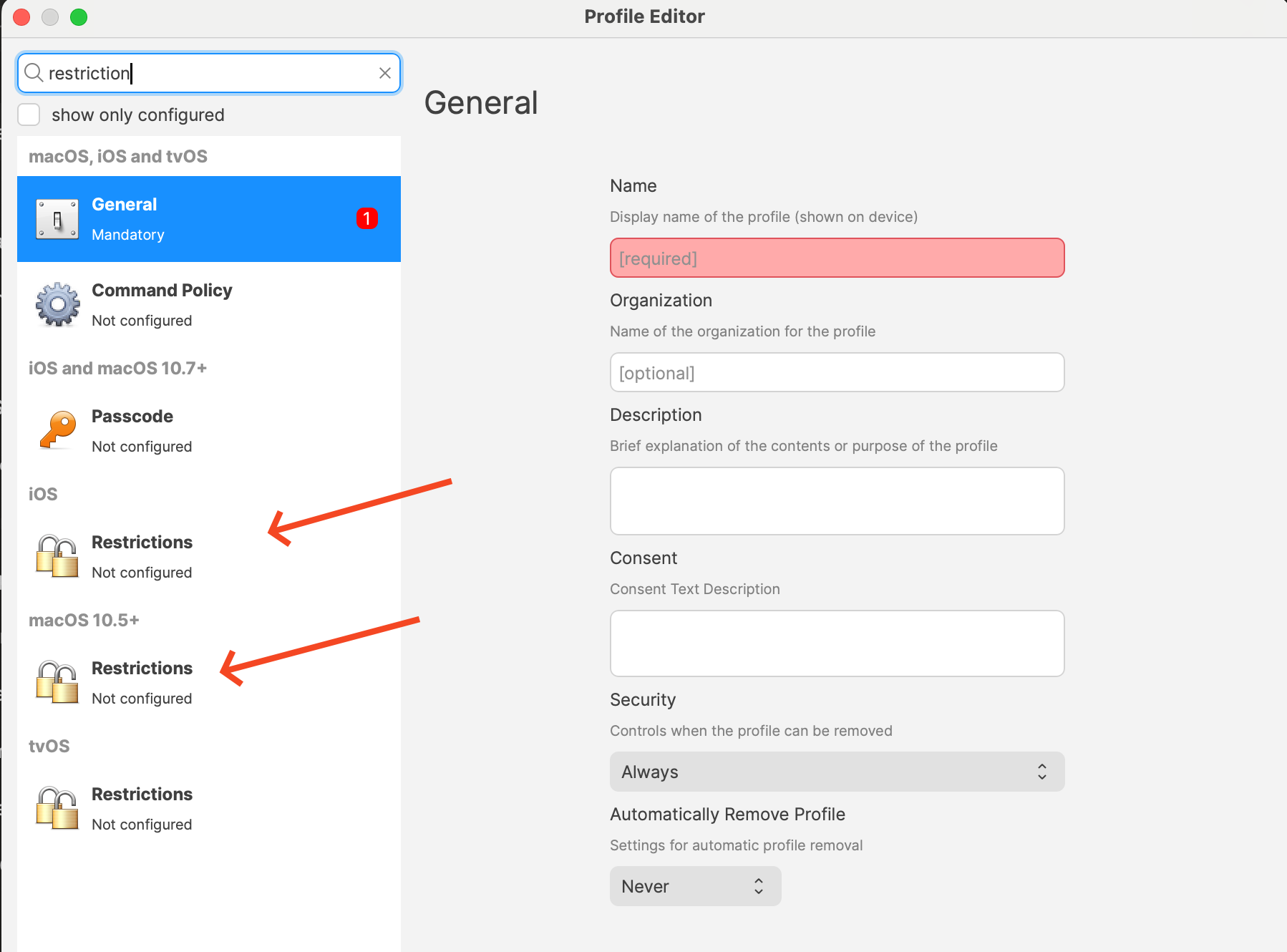
    Restrictions payload locations in the Apple Profile editor

    InConfigure the profileApple editor,Intelligence-related addsettings the Restrictionsyou want. payloadThe toexact yourlist depends on platform and FileWave version. Current Apple profile bypayloads pickingexpose onelabels ofsuch themas: Allow creating new Genmoji Allow Image Playground Allow Apple Intelligence writing tools On supported platforms, options such as Notes transcription, Mail Smart Replies, manual email summaries, Image Wand, external intelligence integrations, Safari Summary, and clicking Configure...
    Apple

    image.png

    Intelligence
    Report ConfigureReview Applethe Intelligencerest Restrictions:
      Withinof the Restrictions payload,payload locatebefore the new settings related to Apple Intelligence features. Available Restrictions:
        Allow Genmojisaving. (allowGenmoji):Every Controls the use of personalized emoji generation. Allow Image Playground (allowImagePlayground): Manages access to interactive image editing features. Allow Image Wand (allowImageWand): Enables or disables AI-powered image manipulation tools. Allow Personalized Handwriting Results (allowPersonalizedHandwritingResults): Manages personalized handwriting recognition. Allow Writing Tools (allowWritingTools): Enables or disables AI-assisted writing features. Disable Specific Features:
          For each featurerestriction you wish to restrict, uncheck the corresponding box to set the option to Disabled. Keep in mind that allpayload optionsdeploys in a Restrictions profile are appliedtogether, so review the profile to ensure everything is the way you want or consider if you already have a Profile that you simply want to edit these options on. Save and Deploy the Profile:
            Save your changes to the profile. Remember you may need one for iPads/iPhones and another for macOS.  Ensure the profileconfirm you are distributingnot targetsaccidentally thechanging appropriateunrelated devices (macOS, iOS, iPadOS).settings. Deploy the profile to the targetcorrect devices. Some options are supervised-only, and macOS, iOS, and iPadOS do not expose the exact same set of controls.

            Digging Deeper

            AsThis artificialarea intelligencekeeps continuesmoving. toApple integrateadds intonew everydayIntelligence-related devicecontrols functionalities,over organizationstime, faceand FileWave surfaces them as the challengeunderlying OS frameworks make them available.

            If your goal is a cautious rollout, check the labels shown in the Restrictions payload for each platform instead of balancingassuming innovation with security and compliance.every Apple Intelligence featuressetting offerappears powerful tools that can enhance productivity and user experience, such as AI-driven image editing, personalized handwriting recognition, and advanced writing assistance.everywhere.

            However, these features may raise concerns about data privacy, as they often process personal or sensitive information. By utilizing the new restrictions in FileWave 15.5.0, administrators can proactively manage these features, ensuring that only approved AI functionalities are accessible on company devices.

            Key Considerations:

              Data Privacy: Disabling certain AI features can prevent the potential leakage of confidential or protected information, aligning with the principle that the best way to protect data is not to collect it unnecessarily. Regulatory Compliance: Organizations subject to strict data protection regulations may need to disable specific features to remain compliant. User Training: Educate users about the AI features available on their devices and the reasons why certain features may be restricted.

              Staying Informed:

                Monitor Updates: Keep abreast of Apple’s announcements regarding new AI features and corresponding MDM controls. Participate in Beta Programs: Consider enrolling in Apple’s AppleSeed for IT program to test upcoming releases in your work environment and prepare for future changes. Regular Policy Reviews: Reassess your organization’s device management policies regularly to accommodate new technologies and evolving security landscapes.

                By effectively managing Apple Intelligence features through FileWave’s MDM solution, organizations can enjoy the benefits of Apple’s latest innovations while maintaining control over their data and compliance obligations.