
Apple Profile: System Logging
What
The System Logging Profileprofile is a new feature added toin the FileWave web Profile Editor inconfigures theApple's webcom.apple.system.logging interface,payload mirroringfor themacOS functionalitydevices. availableUse in Central Admin. This profile empowers administratorsit to configure system logging settings on macOS devices, including enablingenable private data logging andfor managingthe subsystemsystem or define logging configurations.behavior Itfor providesspecific granular control over what system events are logged, facilitating better monitoring and troubleshooting.subsystems.
When/Why
UtilizeUse thethis System Logging Profileprofile when you need detailed insights into system behaviors for diagnostics, security audits, or compliance purposes.rules It'srequire especiallymore beneficialcontrol forover troubleshootingmacOS complexlogging. issues,Enable monitoringprivate system performance, and ensuring thatdata logging practicesonly meetwhen organizationalyour policiesorganization orneeds regulatoryit, requirements.because it changes how much detail macOS records in logs.
How
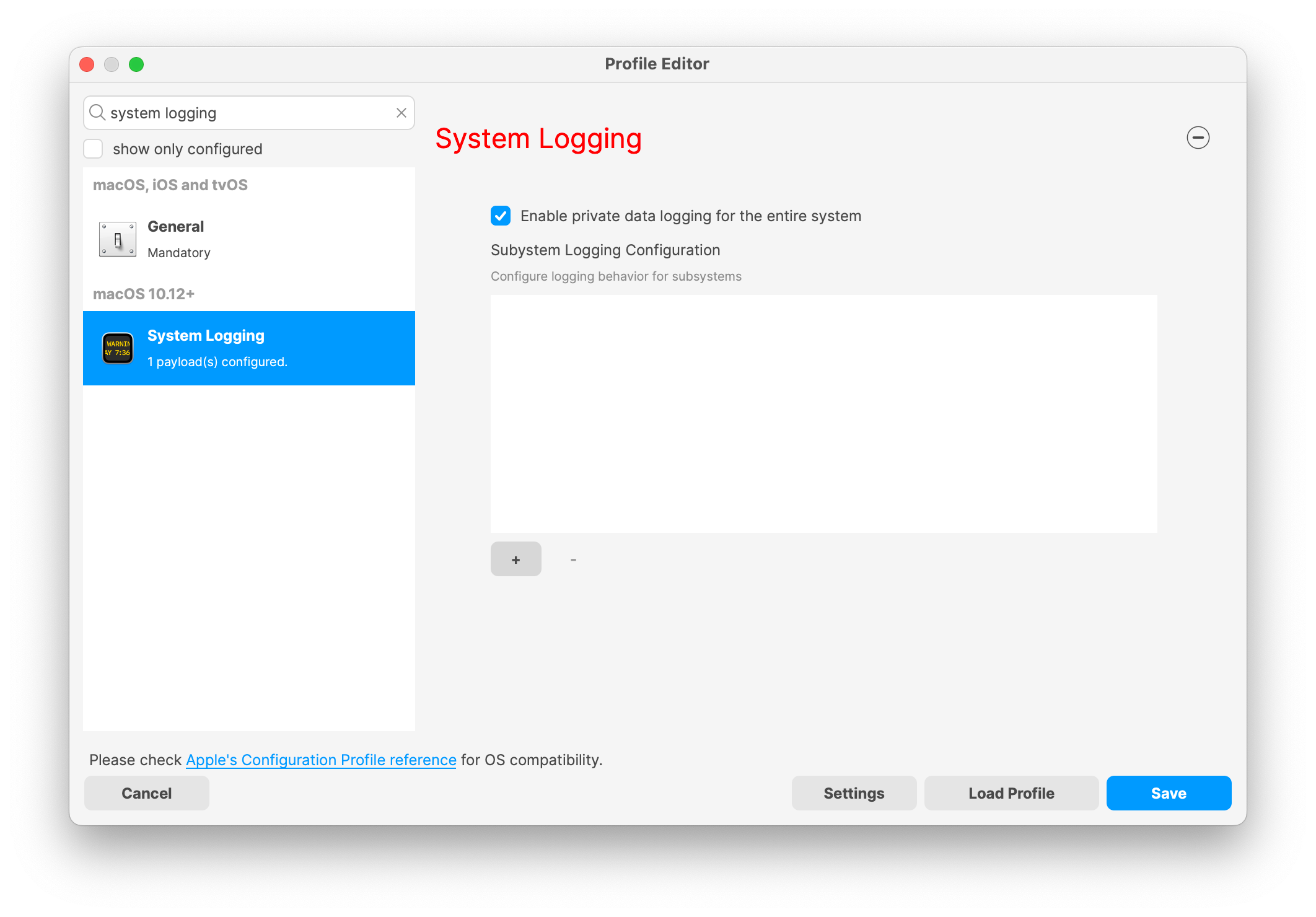
Some details about the newThe macOS Profile for System Logging;Logging profile includes these settings:
Key Features:
-
Enable Private Data Logging: A checkbox to enable or disable private data logging for the entire system. Default is unchecked.
-
Subsystem Logging Configuration: A table for configuring logging behavior for subsystems. You can add new configurations with unique identifiers and set logging categories, enabling, and persisting options.
-
Modal Configuration: When adding or editing subsystem logging configurations, you can specify:
-
Subsystem Identifier: A required, unique identifier.
-
Logging Categories: Add and configure categories with enable and persist options.
-
Additional Settings: Configure key-value pairs for each item.
-
-
Validation: The Save button is enabled only when all required fields are correctly filled. An empty profile cannot be saved.
-
Editing: Post-creation, you can edit the entire profile or individual subsystem logging configurations.
TheApple newdocuments the System Logging Profilepayload supportsas available for macOS 10.12 and later versions. All Apple profiles are signed as per the latest updates. later.
Related Content
For more details, refer to theAppledocumentation onSystem Logging payload documentation
Digging Deeper
The System Logging Profile provides a powerful tool for administrators to fine-tune logging practices on macOS devices. By customizing subsystemSubsystem identifiers and logging categories,categories let you cancollect focusthe logs you need without turning on capturingextra relevantnoise dataeverywhere. whileThat minimizingkeeps unnecessarytroubleshooting log noise. This is crucial for effective system monitoringfocused and canmakes significantlyaudit aidreview in proactive issue resolution.easier.