
Background Login Items Notification Suppression (macOS Ventura+)
What
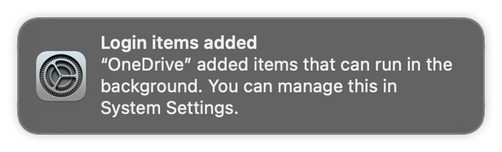
macOS 13 Ventura includesand newlater functionalitycan innotify theusers new System Settings app to controlwhen services likesuch as LaunchAgents and LaunchDaemons —are installed. Apple issurfaces (confusingly)these calling this Login Items (foundcontrols in Settings-System Settings > General > Login Items). By default, Apple has chosen to display notifications to the user when these items are installed.
When/Why
AsFor amanaged system administrator,Macs, you may notwant wantto suppress these tobackground displayitem fornotifications yourso users.users are not prompted about approved management components. The example profile fromin this article willsuppresses suppressthat notificationsnotification like this.behavior.
How
Download the attached Fileset and assign it to your MDM-enrolled macOS Ventura devices.or later devices that should receive the notification-suppression profile.


Related Content
- Managing "Login Items" for macOS Ventura - Credit to Rober Hammen for documenting this.