
Microsoft Defender Recipe (Win)
Description
Example recipe for deployingonboarding Windows devices to Microsoft Defender.Defender for Endpoint by running Microsoft's local onboarding script through a FileWave Fileset.
Scope check: Microsoft documents the local script method for testing and small deployments, currently up to 10 devices. Before using this recipe for a broader production rollout, confirm Microsoft's current recommended deployment method for your tenant.
Ingredients
On Windows devicesdevices, thisthe isrecipe relativelyneeds straighttwo forward. Just a couple of items required:pieces:
DeploymentMicrosoftScript:DefenderWindowsDefenderATPLocalOnboardingScript.batfor Endpoint onboarding package for Windows, downloaded from the Microsoft Defender portal.BelowTheprovidedexample FileWave Fileset attached below.
Downloads:
SeeImport belowthe directionsexample forFileset deploymentfirst, beforebut associatingdo not associate it with devices.production devices until you have replaced the placeholder script with the tenant-specific Microsoft script and tested the result.
Microsoft Defender deployment script is available through the M365 Defender portal; details inIn the Microsoft DeploymentDefender KBportal, go to System > Settings > Endpoints > Device management > Onboarding. Select Windows 10 and 11 and the local script deployment method, then download the onboarding package. Microsoft documents the current Windows onboarding flow here: Onboard Windows client devices to Microsoft Defender for Endpoint:. Microsoft also documents the local script method here: Onboard devices using a local script.
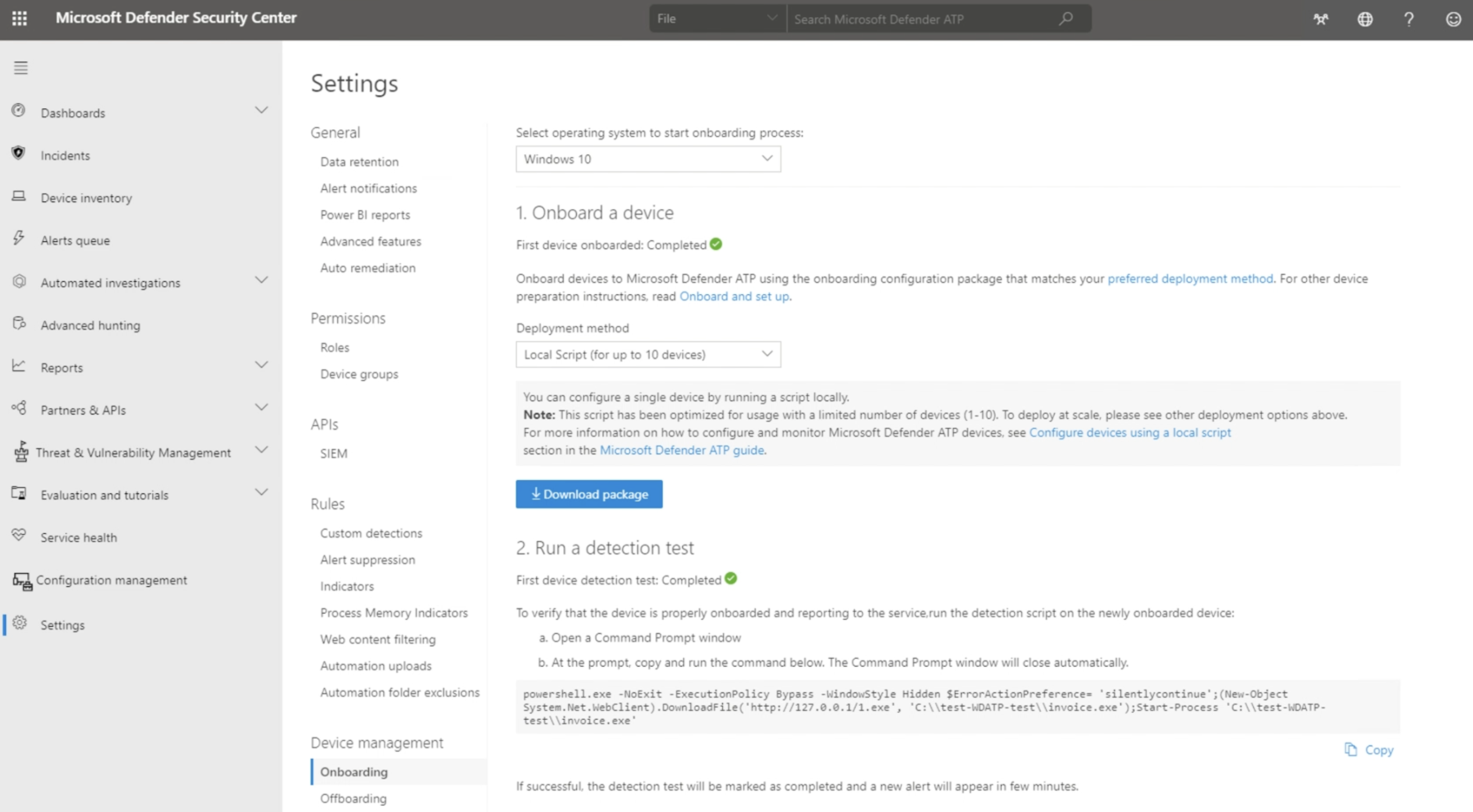
The 'WindowsDefenderATPLocalOnboardingScript.bat'Microsoft-generated isonboarding builtscript bycontains Microsofttenant-specific withonboarding thedata. appropriateTreat licenceit codeas embeddedtenant-specific intoconfiguration; thedo script,not suchreuse thatit theacross downloadtenants isor personalpaste toa thescript loggedgenerated infrom account,another whencustomer downloading.account.
ItThe tenant-specific data can be seen in the script fromnear the lineOnboardingInfo commencingregistry asvalue, below:for example:
REG add "HKLM\SOFTWARE\Policies\Microsoft\Windows Advanced Threat Protection" /v OnboardingInfo /t REG_SZ /f /d "{\"body\":\"{\\\"previousOrgIds\\\":[],\\\"orgId\\\":\\\"Directions
Script: WindowsDefenderATPLocalOnboardingScript.bat
Edit
WindowsDefenderATPLocalOnboardingScript.bat'cmd. .bat placeholder, paste the Microsoft-generated script contents into that placeholder and keep the Fileset 

Assign to Devicesdevices
By way of either a 'Deployment' or 'Association' within FileWave, assignAssign the Fileset to onea orsmall moretest group first, preferably by using a Deployment for new workflows. Associations can still be used where appropriate. Update the Model, let the test devices check in, and onceconfirm happythe expanddevices appear correctly in the Microsoft Defender portal before expanding the scope.
If you adapt this torecipe morefor devices.offboarding, download a fresh offboarding package from Microsoft when needed. Microsoft states that local offboarding packages expire seven days after download.