
SentinelOne (Windows EXE)
Description
SentinelOne is a cybersecurity company that specializes in endpoint security and threat intelligence. They provide a platform for autonomousprovides endpoint protection thatfor usesWindows AIdevices. and machine learning to prevent, detect, and respond to a wide range of security threats, including malware, ransomware, and other cyberattacks.
This recipe willshows guidehow youto onpackage configuringthe Windows EXE installer as a FileWave Fileset and deployingpass tothe yourSentinelOne Windowsregistration devices.token as launch arguments.
Ingredients
-
FWFileWaveAdminCentral -
SentinelOne registration token
- SentinelOne EXE installer
Directions
- Download the EXE installer from
SentinelOneSentinelOne. -
Upload the EXE installer into FileWave Central
toas aFileset you will use to deploy itFileset. - Highlight the Fileset and
doubledouble-clickclickit to open Fileset Contents. - Highlight the EXE
filefile. - Click
onGet Info.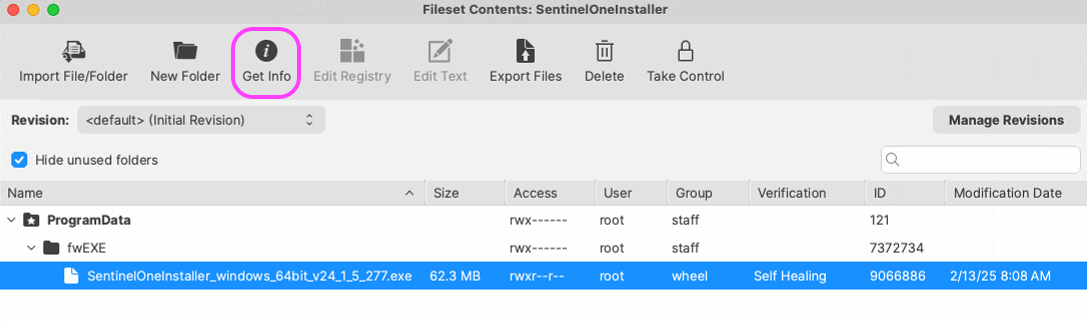
- Select the Executable
tabtab. - Check
'Execute once whenactivated'activated. - Choose
radio button 'Non-interactive (background)'. - Check
'Wait for executable tofinish'finish and select 15 Minutes. UnderOn the Launch Argumentstabtab, clickonthe +iconicon.- Enter
intheandtokenreplaceargument,"your_token_registration"replacingyour_token_registrationwith youractualSentinelOnetokenregistration token.-t your_token_registration - Click
onthe + icon to createnewanotherArgument.argument. - Enter
inthe quiet-install argument.-q - Click
'Apply'Apply to save thefilesetFileset.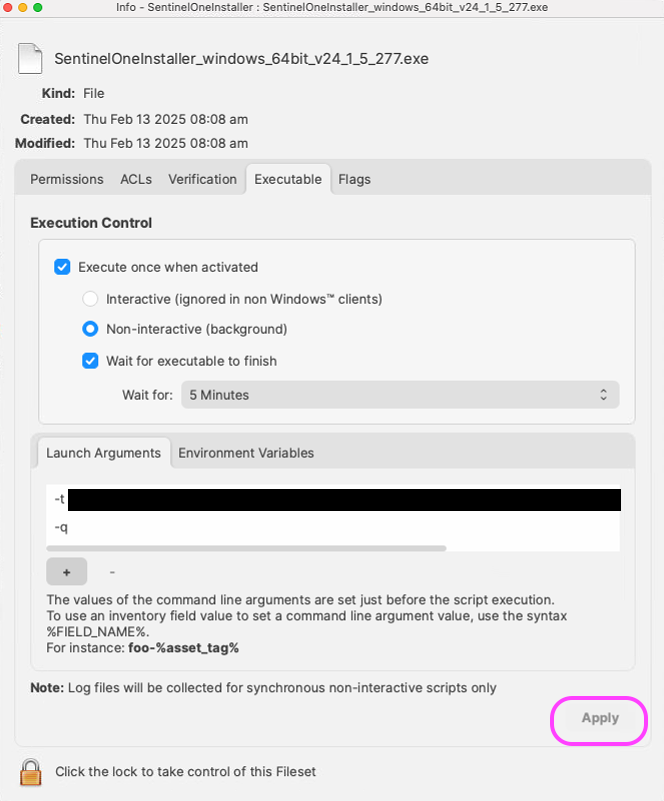
Notes
Note:Use Youboth needlaunch toarguments. useThe -q parameter makes the installer silent, and the - parameter qtso thatsupplies the installSentinelOne willregistration betoken. silent and, you must also useWithout the -t parameter and enter your token because SentinelOne needs a token and asargument, a silent installinstallation there will behas no way to enterreceive the token at install time. Keep the real token private; your_token_registration is only a placeholder.