
Classroom – Image Service
The Classroom app is able tocan display picturesstudent ofpictures. studentsIf -no bypicture default,is initialsavailable, willClassroom beuses used.the student's initials. FileWave hasneeds to bea configured regardingimage service so it knows where to getrequest images.those pictures.
Classroom uses SSL for communication and will useuses the device certificate to authenticate itself to the imagingimage service. FileWave will receivereceives the request from the devicedevice, andchecks check ifwhether the certificate is valid. If it is,valid, then FileWave will requestrequests the image from the imageconfigured (picture) picture-hosting service and servereturns back the imageit to the devicedevice.
People,People in the Classroom environment, whetherincluding teachers orand students, all have an identifier (sis_id)sis_id). and imagesImages are stored on the referenced server in two sizessizes: (large,small small).and Ourlarge. recommendation regardingRecommended image sizesizes are 675x1024 pixels for the small image and 2700x4100 pixels for the large image. Test a few images before deploying hundreds ofso imagesyou tocan ensureconfirm thatthey thesedisplay sizescorrectly work well withon your student devices.
In FileWave AdminCentral, Preferences,go to Preferences > Education Tab,> Apple Classroom pane, you canto specify where FileWave willrequests requestClassroom images from. WeFileWave supportsupports httpHTTP and httpsHTTPS protocols,image asURLs, well asplus basic and digest authentication.

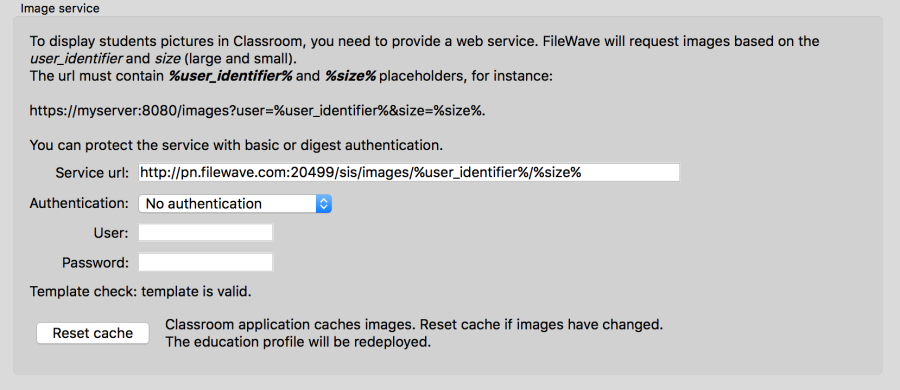
Classroom app and sharedShared iPad login screens havecache images for a long time cache based on the image URL. The cache can be "reset" by clicking the correspondingreset button above.shown Iitabove does not clear the cache (theredirectly. is no way to do so), but itIt generates a new URL for each image,image so devices download the images again.
If you are troubleshooting missing student photos, stale Classroom pictures, or Shared iPad user images that will benot forcedrefresh, check the Apple Classroom image service settings and use the reset option to re-downloadforce them.new image URLs.
For more information regardingabout setting up your Classroom Imageimage service, see this FileWave knowledgebase article: Getting student images into Classroom.