
ADE Troubleshooting
Apple Automated Device Enrollment (ADE), formallyformerly known as DEP, islets aorganizations serviceassign providediPhone, byiPad, Mac, and Apple thatTV allows organizationsdevices to easilyan deployMDM server before users start Setup Assistant. Use this page to confirm the expected ADE path and manageisolate iOS,common iPadOS,enrollment macOS, and tvOS devices. It streamlines the initial setup and configuration process for large-scale device deployments, making it easier for businesses, educational institutions, and other organizations to integrate Apple devices into their workflows.failures.
Correct ADE Workflow
|
|
|
Figure 1.1 - ADE Workflow |
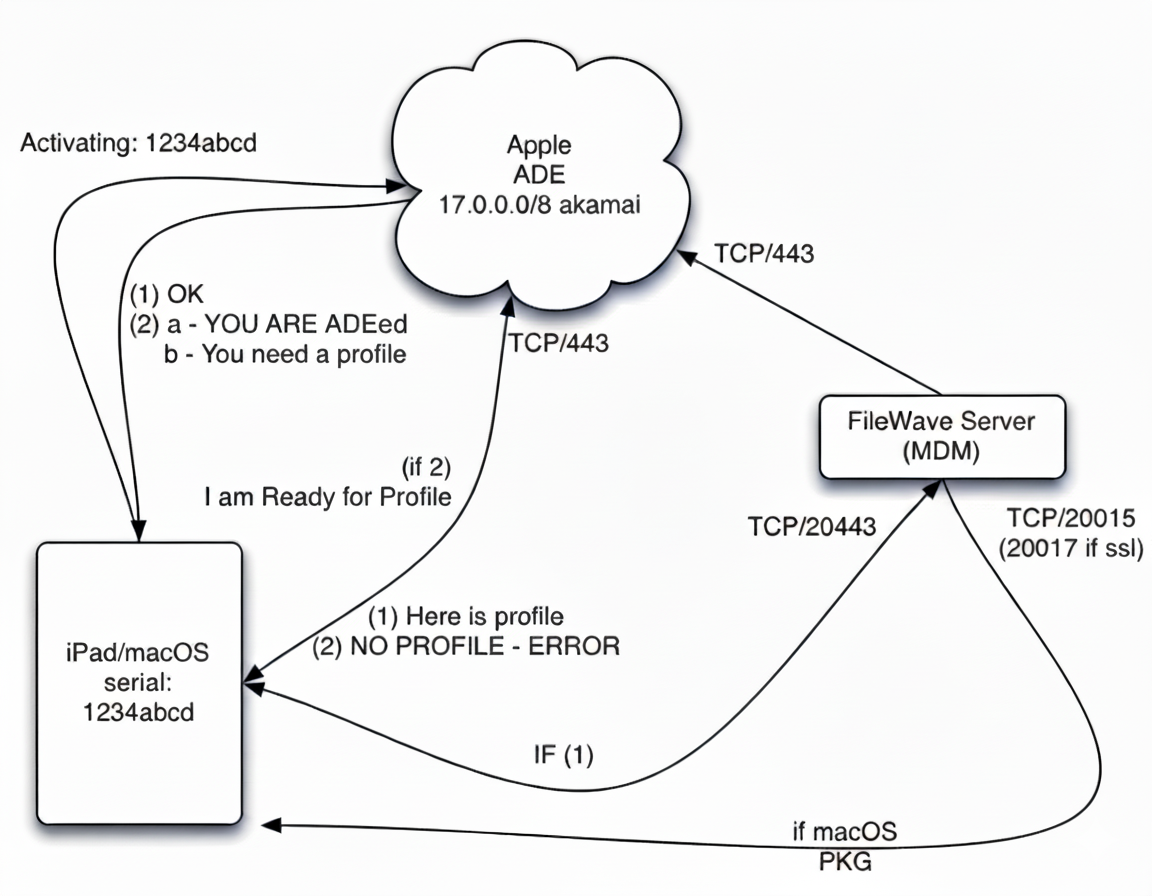
- Device activates
towithappleApple (see ports: Default TCP and UDP Port Usage)DevicesDevice is not in ADE - Apple responds with done - Setup Assistant skips enrollmentDevicesDevice is in ADE - Apple responds with enrollment ownership info
- Apple sends the ADE profiles to the device (See: Working with Apple’s Automated Device Enrollment (ADE))
DevicesDevice installs the ADEprofileprofile,whichthenmakescontactsit reach out tothe FileWave MDM server- Device completes MDM
enrollsenrollment (ifFormacOS)macOS,Devicesthe device then installs themacOSFileWavePKGclient package
Things to Testtest
Check the connectivity
- Check
thethe Default TCP and UDP Port Usage
You can download a FileWave port testing tool from https://supportresources.filewave.com/
GetPut adevicestest(likedevice, such as alaptop)laptop,ontoon the samewifiWi-Fidevicesnetworkenrollusedwithfor enrollment.- Try enrolling iOS/iPadOS devices
withoverethernetEthernet or a mobile hotspot to seeifwhether the normal networkrestrictionsisareblockingdoing something to blockrequired traffic.
You can getconnect supported iPhone or iPad devices to joinEthernet ethernet by creating an adapter usingwith:
- Apple's "Lightning to USB 3 Camera Adapter" (the one with a female USB and another lightning port)
- Apple's "Apple USB Ethernet Adapter"
- A USB charger
supplingsupplying 2+ amps of power
Plug in the device and make sure you get a link light.
Check the profile
Because theseADE profiles are stored with Apple for theassigned devices, whenFileWave newcannot automatically add newly available options become available in ADEto profiles FileWavethat can'talready just auto-update existing ones.exist. If you haverecently upgraded your FileWave instance recently you might want toFileWave, create a new oneADE profile and changeupdate your autoautomatic assignment rules (Automatically Assign ADE profiles ). Do not duplicate an existing profile.