
Combining payloads into a singular deployment based on metadata
What
Every deploymentDeployment has relatedstores metadata about thehow content beingis deployed.assigned: Thatthe is, HOW it should be deployed, WHEN it should be deployed,targets and whatexclusions, LICENSINGdelivery optionsmethod, totiming, use.license assignment, and payload revision choices.
When/Why
DeploymentsUse areone only effectiveDeployment for multiple payloads/payloads or destinations ifonly ALLwhen ofthe thosecontent metadatashould elementsshare match.the Seesame belowmetadata. forIf examples.one payload or target needs a different install method, schedule, license assignment, target list, or revision behavior, split it into a separate Deployment.
How
So,A howsingle doDeployment we makeis a decisiongood here?fit Generallywhen it is very easy. If ALLall of the belowfollowing are true:
If allThe payloadsareusemeantthetosamebedeliveryinstalledmethod,bysuchKiosk,as Kiosk orconverselyStandard/directby Direct Installationinstallation.And If theThe timing optionsarematch.
Then, we can combine all of these elements into the same deployment.
For instance,example, if we want to deploy Firefox byshould be available through Kiosk tofor all devices inboth Accounting and HR, thenthose wegroups can be included in the same Deployment as long as the rest of the settings also match.
If Firefox should be available through Kiosk for Accounting but installed directly for HR, do not combine those into aone singularDeployment. deployment.
But,delivery ifmetadata weis wanteddifferent, toso installthey Firefoxshould viabe Kioskseparate to Accounting, and via direct installation to HR, then we could NOT combine this payload in the same deployment.Deployments.
Digging Deeper
ConversionAssociation-to-Deployment ofconversion associations to deployments will followfollows the same rules…generally, you’llrule: combine associationsAssociations only when their metadata matches. The example below shows selected Associations that are good candidates to move into one deployment if the metadata matches, as shown below:Deployment.
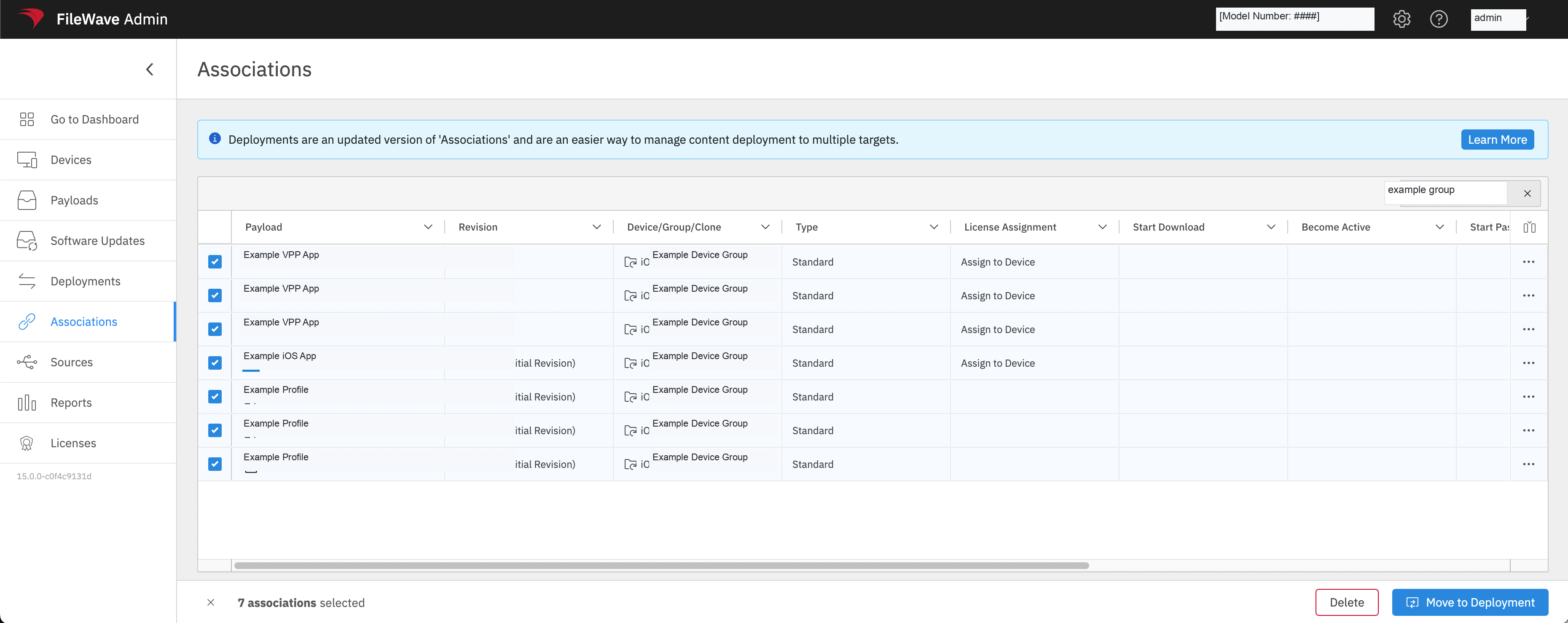
These associationsAssociations all makeare good candidates for being combined into one deployment because:
- They are all direct installation items (Type:
Standard)Standard). - They have common
timing (none actually)timing. - They
all haveuse the same destinationgroup/group or platform scope. - The VPP
Appsappsall haveuse the same license type (Assign toDevice)Device). And thereThere are no payload revisionconflictsconflicts.
Pro Tip:tip: FIlteringFiltering by “Type”Type, beingsuch as Kiosk or StandardStandard, is a greatquick way ofto isolatingisolate likesimilar elementsAssociations forbefore combiningmoving associationsthem into deployments.Deployments.
For more on planning Deployment structure, see Should I create one, or multiple Deployments? and The FileWave Associations-to-Deployment Conversion Tool.