
Columns Adding and Removing (Customizing)
What
The Edit Fields tool allowslets you toshow chooseor to display/hide additional inventory fieldscolumns beyond the standarddefault fields thatin areFileWave includedAnywhere by default.views.
When/Why
Typically,Use we'llit wantwhen a value such as asset tag, location, owner, or a custom inventory field needs to usebe this tool when there are elements that are important to us beyond the default fields. Inclusion of the fieldsvisible in the viewtable. thenOnce allowsthe uscolumn tois doshown, thingsyou like quicklycan search andor filter by thosethat values.value.
How
You can Edit the fields in a view wherever you see the (
 ) icon on the right of the table (it is shown here horizontally, but is vertical in the web admin).
In the followingthis example, you can see that we are adding the custom field "Asset Tag"Tag is added to ourthe devicesDevices view. This is important to us, because whenIf a customeruser calls from the field to reportreports an issue,issue and gives the asset tag istag, the easiestadmin waycan for them to identify their device. Includingfilter the fielddevice inlist thisby viewthat allowsvalue usinstead toof thensearching quicklyby filtername foror theserial troublesome device.number.

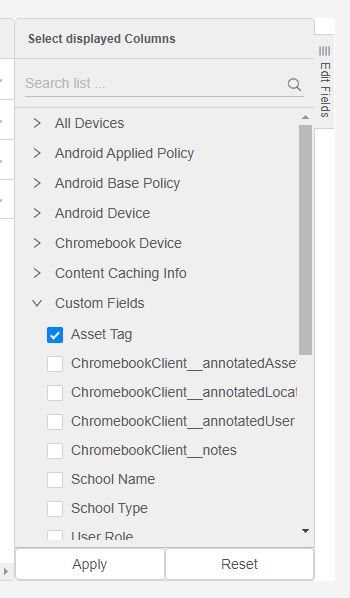
RemovingTo remove a field from athe viewview, isclear asits easycheckbox asand uncheckingsave the checkbox.view.