
Set Tracking Mode
What
Device tracking, or Tracking Mode iscontrols usedwhether toFileWave findrequests location information from a managed device. Location availability depends on the geolocation of managed devices. Setting your expectations about device tracking data is very much key when using these commands, as the capabilities differ widely by OS of the device, the type of deviceplatform, enrollment type, operating-system privacy controls, and even user choices on the device.device, so results can vary.
When/Why
Some organizations likeuse totracking trackfor devicesongoing continually,device-location visibility, but the most typicalcommon practical use ofis thisMissing commandmode for supervised iOS and iPadOS devices that wehave find useful in practice is Missing mode in regards to iOS devices as they are frequentlybeen misplaced. FileWave Missing mode leveragesuses Apple's Lost Mode functionality to lock the device and canhelp belocate used with any Supervised iOS device.it.
How
Tracking mode can be set to Untracked (the default), Tracked (occasional location lookup) or Missing (device locked down) through the Set Tracking Mode> command onFrom the device actions menu(...)menu, choose Set tracking mode, then select one of these modes:
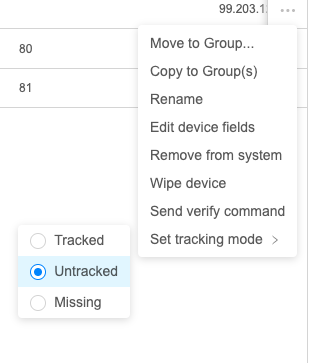

Device tracking can become very frustrating given the many variations of pre-requisites for the many OSes. The reality of this functionalitydata is thattreated eachas personally identifying information by operating system treats geo-location data as Personally Identifying Informationsystems and givesmay therequire customerspecific thepermissions, optionsupervision, toenrollment disabletypes, itand inend-user mostconsent. circumstances.Review See the article linked below on Location Tracking forSetup anbefore in-depthrelying reviewon of what is requiredtracking for thisa command to work.workflow.
When FileWave receives location data is returned from the device, you'll be able to see the device appears on athe map in the Location Tabtab of the Device Detail view.Detail.