
Wipe a Device in FileWave Anywhere
What
The command name of "Wipe Device"Device is probably warning enough, but this command issends a destructive erase command to erasethe selected managed device. On iPhone and iPad, it is the currentremote device. In v14equivalent of theErase WebAdmin,All thisContent commandand is restricted to iOS devices.Settings.
When/Why
WithUse iOSthis devices,action the Wipe command is the equivalent of being local to the device and clicking on the Erase all Contents and Settings command. This command is frequently used whenever you want to erase and re-enrollwhen a device inmust FileWavebe MDM.erased before reassignment, return, or re-enrollment. Confirm that any required data is backed up and that you selected the correct device before sending the command.
AsWipe statedpermanently above,erases the Wipedevice. DeviceReview commandthe istarget aand destructiveevery command.option in the confirmation dialog before selecting OK.
How
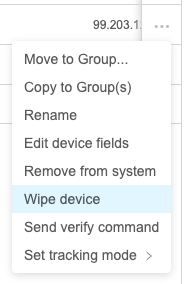
To executeOpen the command,device simplyaction menu (...) and choose "Wipe Device" from the Device Action command (...)device:
NoteFileWave thatthen thereshows isthe aavailable subsequentwipe dialogoptions. toThe chooselist options:varies by platform and OS version:
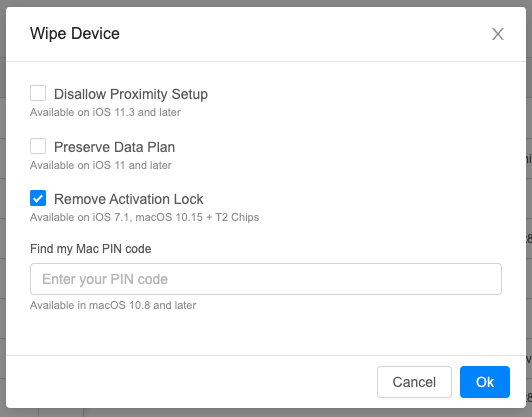
When Remove Activation Lock is particularlyavailable, importantselect so thatit if anthe Activationdevice Lockshould existsreturn itready willfor bereassignment. removedOtherwise, the device may still request the previous user's Apple Account (Apple ID) during wipe...otherwise you are left with a device prompting for AppleID credentials.activation.
Activation Lock propertiesbehavior can nowalso be setcontrolled in DEPAutomated profilesDevice toEnrollment control(ADE, when/ifformerly ActivationDEP) Lock can be used.profiles.