
Wipe a Device in FileWave Anywhere
What
Wipe Device sends a destructive erase command to the selected managed device. On iPhone and iPad, it is the remote equivalent of Erase All Content and Settings.
When/Why
Use this action when a device must be erased before reassignment, return, or re-enrollment. Confirm that any required data is backed up and that you selected the correct device before sending the command.
Wipe permanently erases the device. Review the target and every option in the confirmation dialog before selecting OK.
How
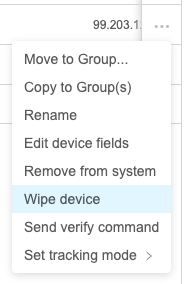
Open the device action menu (...) and choose Wipe device:
FileWave then shows the available wipe options. The list varies by platform and OS version:
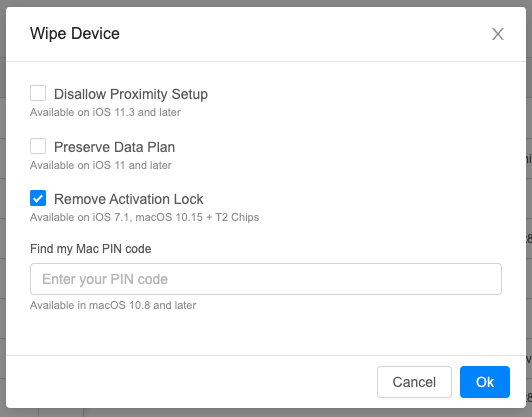
When Remove Activation Lock is available, select it if the device should return ready for reassignment. Otherwise, the device may still request the previous user's Apple Account (Apple ID) during activation.
Activation Lock behavior can also be controlled in Automated Device Enrollment (ADE, formerly DEP) profiles.
No comments to display
No comments to display