Why Apple Device Enrollment Prompts for an IdP Login
WhatWhy the login prompt appears
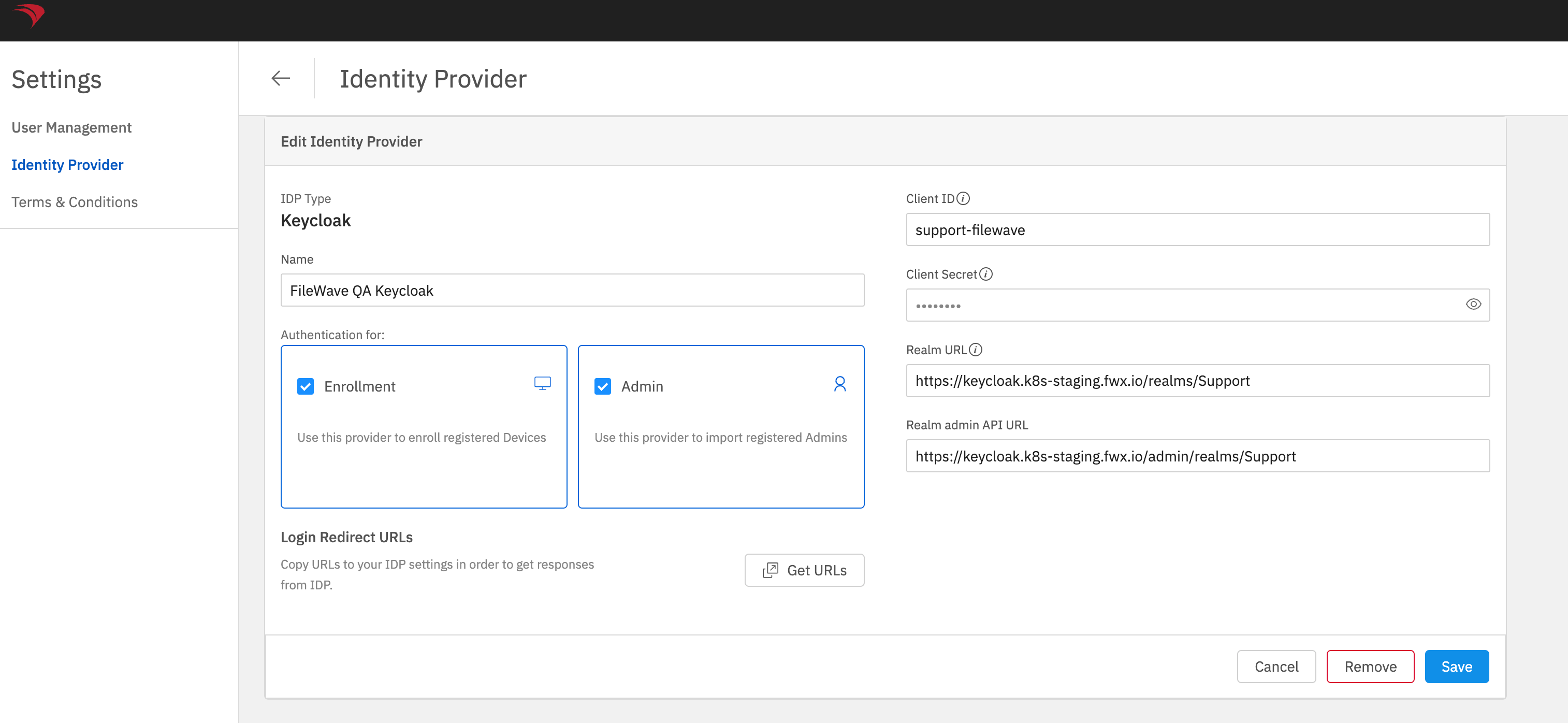
WhenAn Iidentity-provider enrolllogin aprompt during macOS, iOSiOS, or iPadOS deviceenrollment ais pop-upexpected showswhen askingthe meFileWave toIdP loginconfiguration tohas Enrollment enabled. The prompt can use Google, Keycloak, OktaOkta, or Microsoft Entra IDID, (Azure)depending andon I'mthe notconfigured sure why.provider.
When/WhyWhat the Enrollment setting controls
ThisThe canEnrollment happencheckbox iftells youFileWave setupto anrequire authentication through that IdP inas part of device enrollment.
Change the setting
In FileWave andAnywhere, enabledopen the "Enrollment" checkbox.
How
Login to FileWave Anywhere and go to Settings and edit yourthe IdP configuration. Clear Enrollment to stop using that provider for enrollment authentication, or select it to require the login prompt. Save the IdP configuration asafter seen inchanging the image below. Uncheck Enrollment if you do not want this behavior. Conversely if you want to enable this behavior then go back and check the box. setting.