
Why Apple Device Enrollment Prompts for an IdP Login
Why the login prompt appears
An identity-provider login prompt during macOS, iOS, or iPadOS enrollment is expected when the FileWave IdP configuration has Enrollment enabled. The prompt can use Google, Keycloak, Okta, or Microsoft Entra ID, depending on the configured provider.
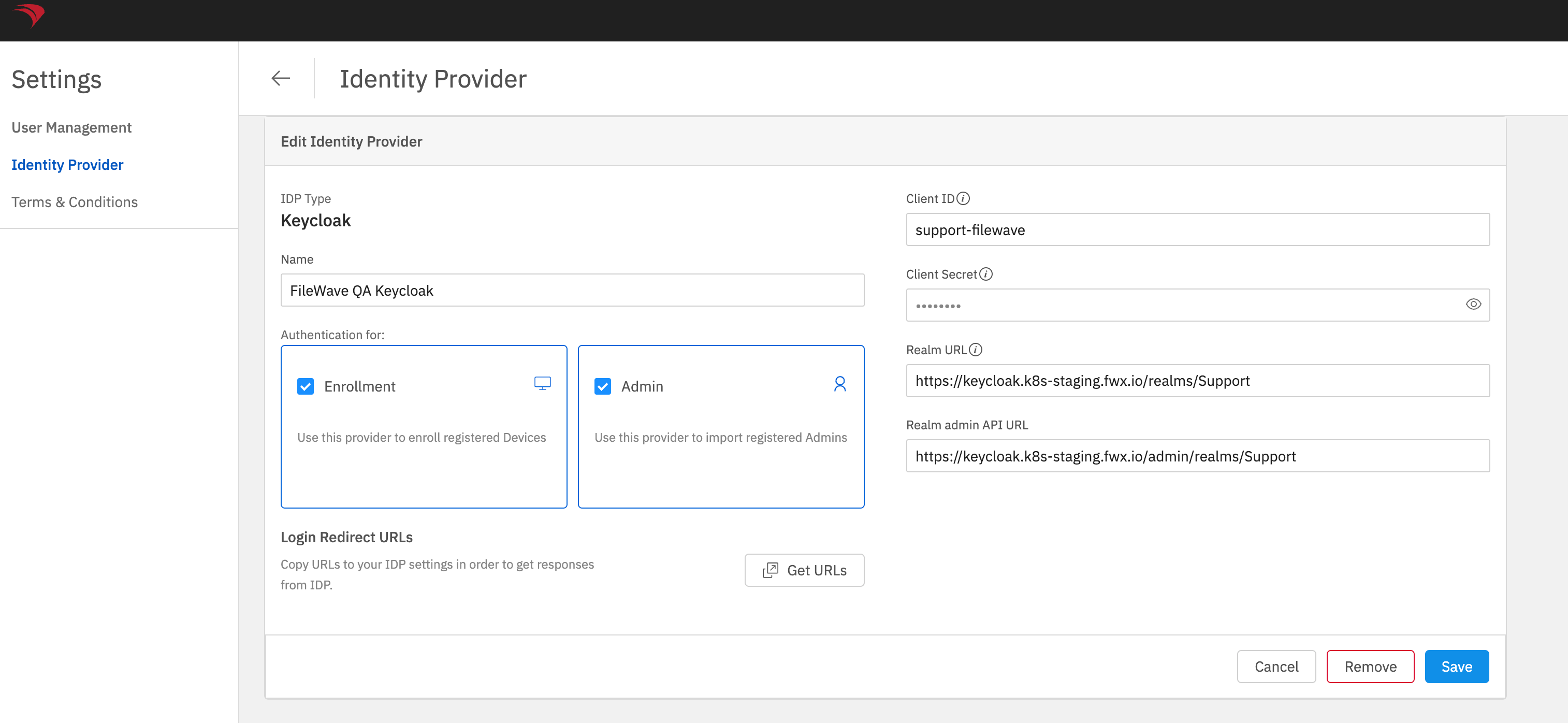
What the Enrollment setting controls
The Enrollment checkbox selects the IdP used for device enrollment authentication. Only one identity provider can be selected for enrollment. Admin is a separate setting for administrator sign-in; leave it unchanged when you only intend to change enrollment authentication.
For Automated Device Enrollment (ADE, formerly DEP), also check the profile assigned to the device: Custom Enrollment enables the IdP enrollment flow when the provider is configured. Follow Configuring DEP Profiles for IdP Authentication to check that part of the setup. Enabling the provider alone is not the complete ADE configuration.
Change the setting
In FileWave Anywhere, open Settings and edit the IdP configuration. Clear Enrollment to stop using that provider for enrollment authentication, or select it to require the login prompt. Save the IdP configuration after changing the setting.
No comments to display
No comments to display