
Using Parameters in Apple iOS/macOS Profiles
CreatingVariables—also profiles withcalled parameters in themFileWave—let one Apple profile use device, user, directory, or locally resolved values instead of fixed text. Put the variable in a supported text field with a percent sign at each end, such as %SerialNumber% or %custom_field.asset_tag%.
There are two different substitution stages. Knowing which system resolves a variable is theessential ability to insert string/bool/int/datetime parameters intowhen a profile socontains thatcertificate, theyVPN, Wi-Fi, or 802.1X settings.
How variables are resolved
%serial_number%, %email%, %custom_field.asset_tag%
macOSThe Mac's local settings and Active Directory bindingOn the Mac during SCEP or network-authentication profile processing%ComputerName%, %AD_ComputerID%, %HardwareUUID%
Do not treat the two lists as interchangeable. FileWave-resolved variables can be dynamicallyused in supported profile text fields across managed Apple devices. Apple's local variables have a narrower macOS scope and are intended for SCEP and related VPN or 802.1X authentication values.
Apple device-resolved variables for SCEP and network authentication
On Mac computers, Apple provides variables that macOS resolves locally while processing SCEP certificate requests and related VPN or 802.1X authentication settings. FileWave delivers these tokens in the profile; the value does not need to exist in FileWave inventory.
Use these variables only in fields that support Apple's local substitution, such as an SCEP Subject or Subject Alternative Name, or the supported authentication-name fields of a VPN or 802.1X configuration. Support is determined by the Apple payload and operating system, not merely by whether a field accepts text.
%AD_ComputerID%Active Directory computer account ID. This normally includes the trailing $ used by an AD computer account.
%AD_Domain%Active Directory domain.
%AD_DomainForestName%Active Directory forest name.
%AD_DomainGuid%Active Directory domain GUID.
%AD_DomainNameDNS%Active Directory DNS name.
%AD_KerberosID%Active Directory Kerberos ID.
%ComputerName%The Mac computer name shown in Sharing settings.
%HardwareUUID%The Mac's hardware UUID.
%HostName%The Mac's DNS hostname.
%LocalHostName%The Mac's local network name.
%MACAddress%The MAC address of the default Ethernet interface (en0).
%SerialNumber%The Mac's serial number.
See Apple's Variables settings for device management payloads and SCEP device management payload settings for Apple's current scope and payload requirements.
Use the AD computer name without the trailing dollar sign
%AD_ComputerID% identifies the AD computer account and therefore normally resolves with a trailing $. Current macOS also exposes %AD_ComputerName%, which returns the AD computer name without that account suffix.
For example, a Mac named engineering-macbook may have the 15-character AD computer name engineering-mac. The following SCEP value:
%AD_ComputerName%.example.orgresolves to:
engineering-mac.example.orgApple's public variable table does not currently list %AD_ComputerName%. macOS reports it through mdmclient dumpSCEPVars, but test it on manyan devices.Active Directory-bound Mac running the oldest macOS version in the deployment before broad rollout. If FileWave's variable picker does not offer it, enter the complete token manually in the supported SCEP field.
%ComputerName%, %HostName%, and %LocalHostName% describe macOS names. They can differ from the AD computer name and do not reliably replace %AD_ComputerName% when the certificate authority expects the AD name.
Check the values available on a Mac
Run this read-only command locally on the Mac:
/usr/libexec/mdmclient dumpSCEPVarsThe followingoutput willlists helpthe youSCEP understandsubstitution whatvariables fieldsthat macOS recognizes and their current values. An AD variable is empty when the Mac is not bound to Active Directory or the corresponding binding value is unavailable.
Review before sharing: the command can bedisplay used,the device serial number, hardware UUID, MAC address, installed MDM profile name, and whatdirectory informationdetails. willRedact comethose fromvalues them.before attaching output to a support case.
Remember:
Deploy Theand belowverify
mdmclient dumpSCEPVars on that Mac.
FileWave-resolved variables
The remaining sections describe variables FileWave resolves from inventory, directory records, and Custom Fields. You can always create yourorganization-specific ownvalues optionswith Custom Fields populated by creatingan customadministrator, fieldsclient that are either mapped toscript, LDAP attributes, custom scripts,mapping, or manuallyCSV entered parameters. See Custom Fields for more information.import.
What are my Options
LDAP Parameters
FileWave version 6.1 allows you to use Directory based parameters in your profile payloads.
|
%first_name% %last_name% %full_name% %short_name% %email% %job_title% %mobile_phone% %guid% |
Setting up a directory server for use with Parameterized Profiles is easy. Navigate to the FileWave Preferences Screen and fill out the appropriate information for your OpenDirectory, Active Directory or E-Directory. For issues and troubleshooting related to your LDAP preferences, please refer to the LDAP section.
You must also be using LDAP authentication for iOS device enrollment. Instructions for that setup are in the the Using LDAP to enroll macOS/iOS/Android devices.
For the above user strings to work you must be pointed to an Directory server and have it selected as authentication
You can also map custom fields to LDAP parameters to extend the above list.
See Custom Fields for more information.
Inventory / Device Parameters
Starting in FileWave 6.1+ you can reference specific information about the device as well, directly from FileWave Inventory. Those fields are:
|
%OSVersion% %SerialNumber% %ProductName% %BuildVersion% %WIFIMAC% %ICCID% %IMEI% |
All Devices
|
Common Device Parameters |
Type |
FileWave Version Introduced |
|
%archived% |
datetime |
13.0.0 |
|
%auth_username% |
string |
13.0.0 |
|
%cpu_count% |
int |
13.0.0 |
|
%cpu_type% |
string |
13.0.0 |
|
%current_ip_address% |
string |
13.0.0 |
|
%last_enterprise_app_validation_date% |
datetime |
13.0.0 |
|
%last_state_change_date% |
datetime |
13.0.0 |
|
%department% |
string |
13.0.0 |
|
%device_id% |
string |
13.0.0 |
|
%device_name% |
string |
13.0.0 |
|
%device_product_name% |
string |
13.0.0 |
|
%enroll_date% |
datetime |
13.0.0 |
|
%filewave_client_name% |
string |
13.0.0 |
|
%filewave_id% |
string |
13.0.0 |
|
%free_disk_space% |
int |
13.0.0 |
|
%is_system_integrity_protection_enabled% |
bool |
13.0.0 |
|
%is_tracking_enabled% |
bool |
13.0.0 |
|
%last_check_in% |
datetime |
13.0.0 |
|
%last_ldap_username% |
string |
13.0.0 |
|
%last_logged_in_username% |
string |
13.0.0 |
|
%location% |
string |
13.0.0 |
|
%management_mode% |
int |
13.0.0 |
|
%monitor_id% |
string |
13.0.0 |
|
%ram_size% |
int |
13.0.0 |
|
%serial_number% |
string |
13.0.0 |
|
%state% |
int |
13.0.0 |
|
%total_disk_space% |
int |
13.0.0 |
|
%unenrolled% |
bool |
13.0.0 |
|
%is_user_enrollment% |
bool |
13.2.0 |
|
%is_activation_lock_manageable% |
bool |
13.2.0 |
|
%remote_desktop_enabled% |
bool |
13.2.0 |
|
%external_boot_level% |
bool |
13.2.0 |
Desktop Specific (macOS & Windows)
|
Desktop Device Parameters |
Type |
|
|
%device_manufacturer% |
string |
13.0.0 |
|
%filewave_client_locked% |
bool |
13.0.0 |
|
%filewave_client_version% |
string |
13.0.0 |
|
%filewave_model_number% |
int |
13.0.0 |
|
%rom_bios_version% |
string |
13.0.0 |
iOS Specific
|
iOS Device Parameters |
Type |
|
|
%battery_level% |
float (from 0 to 1) |
13.0.0 |
|
%last_cloud_backup_date% |
datetime |
13.0.0 |
|
%last_wallpaper_change_date% |
datetime |
13.0.0 |
|
%apple_device_id% |
string |
13.0.0 |
|
%eas_device_identifier% |
string |
13.0.0 |
|
%is_activation_lock_enabled% |
bool |
13.0.0 |
|
%is_device_locator_service_enabled% |
bool |
13.0.0 |
|
%is_do_not_disturb_in_effect% |
bool |
13.0.0 |
|
%is_cloud_backup_enabled% |
bool |
13.0.0 |
|
%is_mdm_lost_mode_enabled% |
bool |
13.0.0 |
|
%is_supervised% |
bool |
13.0.0 |
|
%awaiting_configuration% |
bool |
13.0.0 |
|
%is_network_tethered% |
bool |
13.0.0 |
|
%itunes_store_account_is_active% |
bool |
13.0.0 |
|
%itunes_store_account_hash% |
string |
13.0.0 |
|
%languages% |
string |
13.0.0 |
|
%locales% |
string |
13.0.0 |
|
%maximum_resident_users% |
int |
13.0.0 |
|
%meid% |
string |
13.0.0 |
|
%model% |
string |
13.0.0 |
|
%organization_info% |
string |
13.0.0 |
|
%product% |
string |
13.0.0 |
|
%product_name% |
string |
13.0.0 |
You can also map custom fields to script results to extend the above list.
See Custom Fields for more information.
|
You can also look in the inventory query builder and it will tell you the internal name in the bottom left:
|
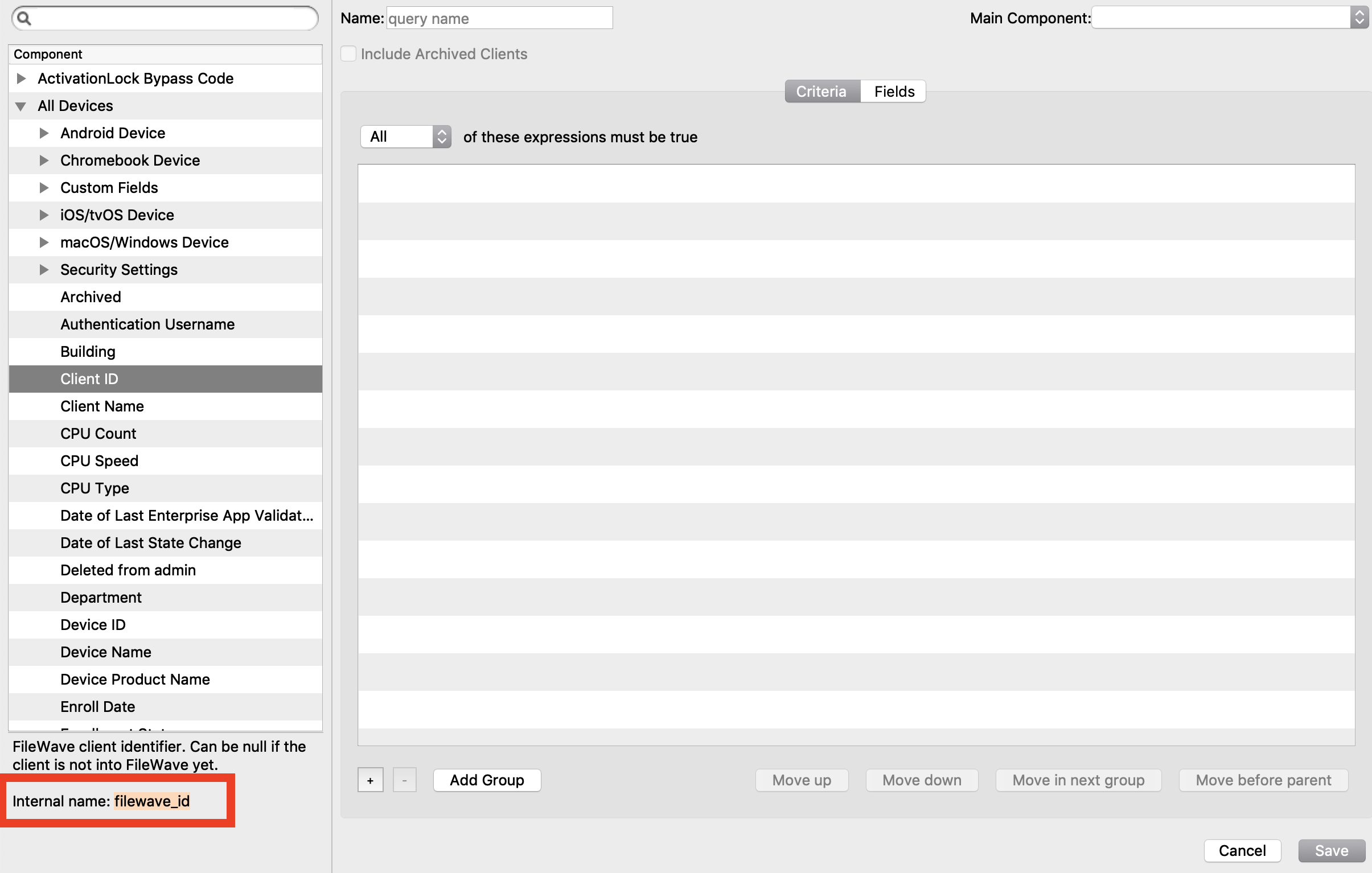
Using parameters in profiles
To add parametersa FileWave-resolved variable to youra profiles, simpleprofile, replace the normalfixed value with one from the listlists above.
A change to an inventory or Custom Field value does not modify the profile definition. Reinstall the profile when devices need to receive the updated resolved value. See Profile Payload Planning for the deployment and removal considerations.
For instance, you might create an email profile with the account information. See the example here:
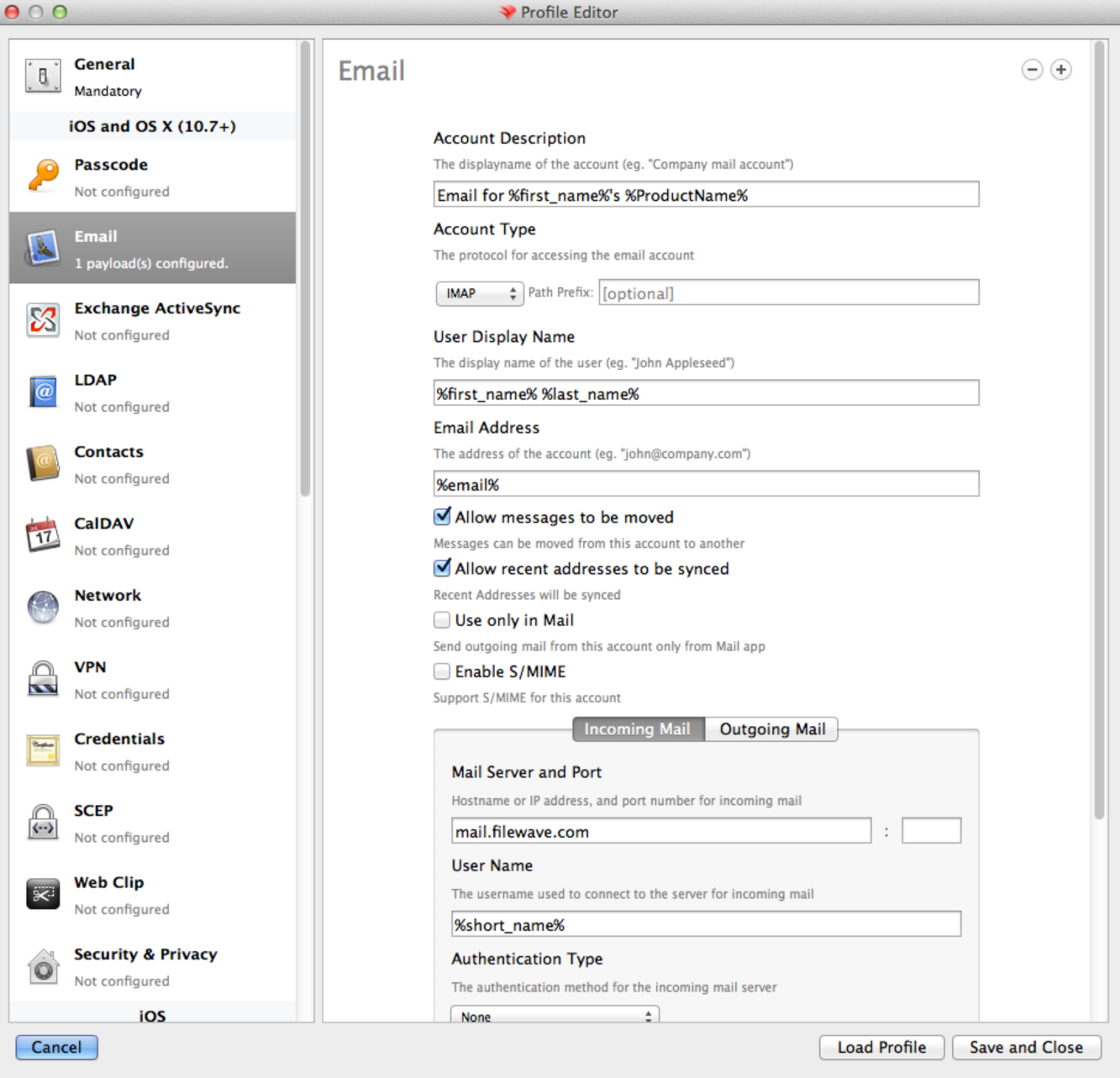
Appendix
Directory servers use their own values for common fields. Below is the mapping for each supported directory:
E-Directory
|
Profile Parameters |
LDAP attribute name |
Remarks |
|
short_name |
uid |
|
|
first_name |
givenName |
|
|
last_name |
sn |
|
|
full_name |
fullName |
|
|
|
|
|
|
job_title |
title |
|
|
mobile_phone |
mobile |
|
|
guid |
GUID |
A binary read-only attribute |
Open Directory
|
Profile Parameters |
LDAP attribute name |
|
|
|
|
first_name |
givenName |
|
full_name |
fullName |
|
guid |
apple-generateduid |
|
job_title |
title |
|
last_name |
sn |
|
mobile_phone |
mobile |
|
short_name |
uid |
Active Directory
|
Profile Parameters |
LDAP attribute name |
|
|
|
|
first_name |
givenName |
|
full_name |
fullName |
|
guid |
objectGUID |
|
job_title |
title |
|
last_name |
sn |
|
mobile_phone |
mobile |
|
short_name |
sAMAccountName |