
TeamViewer: Licensing Overview
What
Quick answer: TeamViewer use in FileWave depends on the administrator's FileWave permissions and the TeamViewer licenses available on the account. A TeamViewer license is assigned to the technician or administrator who starts remote sessions, not to each managed device or end user.
When/Why
A FileWave administrator needs an assigned TeamViewer license to start Remote Client sessions. Each assignment lasts 6 months before it can be reassigned.
Licenses must be assigned to individual administrators, not groups. The administrator name must match exactly, including case. See TeamViewer: Assigning Licenses for the assignment steps.
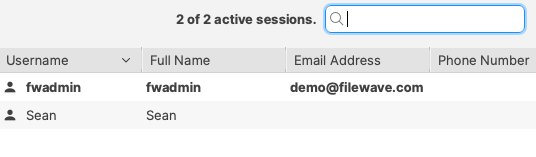
You can assign a license to a directory user. To confirm the exact username, sign in as that user and open the Show Current Online Administrators assistant. The username appears in the visible columns.
Example
Consider a setup with 2 licenses.
Assign one license to bsmith. One month later, assign the other license to pparker.
Five months later, the license assigned to bsmith can be reassigned because its 6-month assignment period has ended. The license assigned to pparker still needs one more month before it can be reassigned.
Plan license assignments before broad rollout. Each customer has at least one TeamViewer license, and additional licenses are available for additional administrators or technicians.
How
Assign licenses in Native Administrator → Assistants → Manage Administrators. That same settings area shows how many TeamViewer licenses are available. For detailed steps, see TeamViewer: Assigning Licenses.