
Android Policy Planning
What
Android Policies provide a method of configuration.
Key aspects:
Example Policy, allowing Developer Settings, including setting Debug:
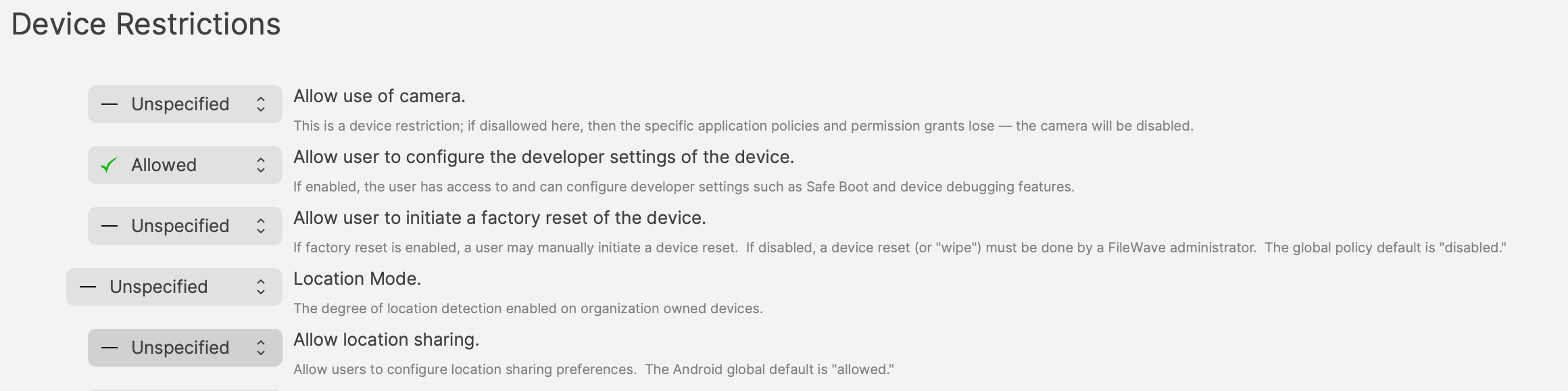
Possibly, one of the most important consideration:
Where multiple Profiles are assigned which contain the same Payload type (but differing settings), what could the possible expectation of experience be on the end device with these overlapping Policy Settings, noting that Apps potentially have their own settings also?
How
Firstly, overlapping Policies should be avoided, to ensure experience is by design, not luck.
Next, as mentioned above,EMM Policies can contain manyseveral configurations,configuration but should they? Consider:
Undesired Experience:
More items in the Policy makes it harder to identify anything occurring that is undesired.
Removing the undesired experience temporarily, whilst identifying, may involve removing the entire Policy, which could easily be undesirable in its own right. By creating multiple Policies withcan differentbe settings,assigned to one device. Good policy design keeps each Policy’s intent, enrollment scope, and removal impact clear.
The core rule is simple: separate settings by purpose and avoid conflicting Policies that manage the same value differently.
Why separate Policies
Remove/Reinstall
Perhaps something doesn’t appear to be working as intended. To confirm the Policy, it may be desirable to remove that Policy, but what if other items in the Policy should not be removed, e.g. Certificates. Separating settings based upon functionality should help alleviate this potential problem.
Overlapping Policies
WhatAn isoverlap an overlapping Policy. This isoccurs when two or more Policies are trying to manage the same thing, butsetting with different settings.values. The This shouldn’t be confused with multiple allowed Policies.
Greater detail on this can be found in our KB:
https://kb.filewave.com/books/android/page/android-emm-policies-and-permissions
In essence, overlapping Policies should be avoided. An experiencedevice may appear correct,correct due to an overlap. Ifuntil one ofPolicy is changed or removed, at which point the Policeseffective werebehavior removed,can thechange experience may unexpectedly alter if there was no awareness of this.unexpectedly.
ADo not design around accidental precedence. Avoid assigning conflicting values and document which Policy toowns provideeach setting.
Multiple Policies are fine when they manage different things. For example, separate Policies can deliver different certificates iswithout an example of a potential multiple allowed Policy. One Policy provides one certificate and another Policy provides a different certificate.conflict.
FileWave 16.4 policy planning
FileWave 16.4 adds controls that should be separated by purpose so enrollment type, operational role, and app trust remain explicit.
| Control | Planning decision |
|---|---|
| System Update | Choose Automatic, Windowed, or Postpone based on |
| Compliance: Password | May be used independently, including for supported BYOD/work-profile deployments. |
| Compliance: Keyguard | Use only where |
| Default App Update Mode | Set |
| Credential Provider | Keep the default deny posture and explicitly allow only trusted credential-management apps on Android 14 and later. |
Recommended separation
- Keep System Update behavior separate from Password and Keyguard compliance so maintenance windows can change without disturbing security policy.
- Separate BYOD compliance from Dedicated Device compliance because Keyguard is not applicable to BYOD.
- Use the Android Default Policy for fleet baselines; use individual app Fileset Properties for exceptions.
AvoidNameoverlappingPoliciespoliciesforthattheirsetpurpose and scope, such as BYOD – Password Compliance or Dedicated Devices – Windowed System Updates.
Planning checklist
For
Related theContent
Planning
Android Thedevices above comes down to planning.
Policies could containwith multiple settingspolicies
Consider the impact if there was a requirement to remove and subsequently reinstate a Policy, for whatever reason.
Also give thought to how devices will be purchased and enrolled depending upon what needs to be managed. Enrolment types can also impact items managed.
Will the choice made, incur additional concerns over security, if desired management cannot be achieved?