
Policy Loops
What
A policy loop happens when a Smart GroupsGroup's providecriteria extensiveare powerchanged by the Fileset or association assigned to Filesetthat management.same Smart ByGroup. wayThe ofdevice presetenters criteria,the devicesgroup, enterreceives an action, then no longer matches the criteria. On the next Smart Group refresh it may leave the group, remove or change the Fileset, and leavethen groupsqualify appropriately.again. The However,result itcan isbe possiblerepeated forinstalls, thisremovals, todowngrades, goor wrongconfusing andassociation get unexpected experiences. Policy Loops are an example of such behaviour.churn.
When/Why
TimeThe torisk explain,is withhighest examples.when group membership is based on the exact state that the Fileset changes, such as an application version, installed-file presence, or another inventory value that changes immediately after activation.
Example 11: version-based installer loop
Imagine a PKG macOS installer Fileset for an app called CLU.app,app, version 1.0
ThisIt is associated to all devices based uponon two criteria:
- Device OS is macOS
- Device does not have CLU.app version 1.0 installed
Once the software is installed, thethose devices no longer belong to the group,group sincebecause version 1.0 Iis now installed.
A new version of the software is released,released: CLU.app version 1.1. A new association is created with a differingdifferent group,Smart withGroup Criteria:using similar criteria:
- Device OS is macOS
- Device does not have CLU.app version 1.1 installed
Perhaps the apparent issue is already obvious.
Clearly,because allthey shouldno belonger donematch now,its until the next new version is released. However, there is an issue.criteria.
WhenThe devicesproblem checkappears back that version 1.1. is installed, aton the next Smart Group refresh,refresh. devices will be added back into the group forBecause version 1.0, since this version0 is no longer installed.installed, those Ifsame thisdevices may qualify again for the older version 1.0 Smart Group. If the older PKG iscan allowed to instalinstall over the newer version, the software will beis downgraded back to version 1.0.
ButOnce hangthat on. If 1.0 is now installed,happens, the device willqualifies be added back into the Smart Groupagain for versionthe 1.1 atgroup, next refresh, withand the consequencecycle of installing 1.1. again.repeats.
This is an example of a Policypolicy Loop.loop: Thethe device willkeeps continuallymoving bebetween addinggroups itselfbecause ineach andsuccessful outdeployment ofchanges groups,the installingcriteria andused removingto softwaretarget asthe itnext goes.deployment.
Example 22: self-healing Fileset loop
HereThe issame anotherprinciple example,can buthappen with just one group.
Same principle, butIn this timeexample, withCLU.exe version 1.0 is delivered as a file file-level self-healing Fileset of this same application for Windows. This time CLU.exe, version 1.0
The criteria for the Smart Group associationcriteria this time has been set as:are:
- Device OS is Windows
- Device does not have this software installed
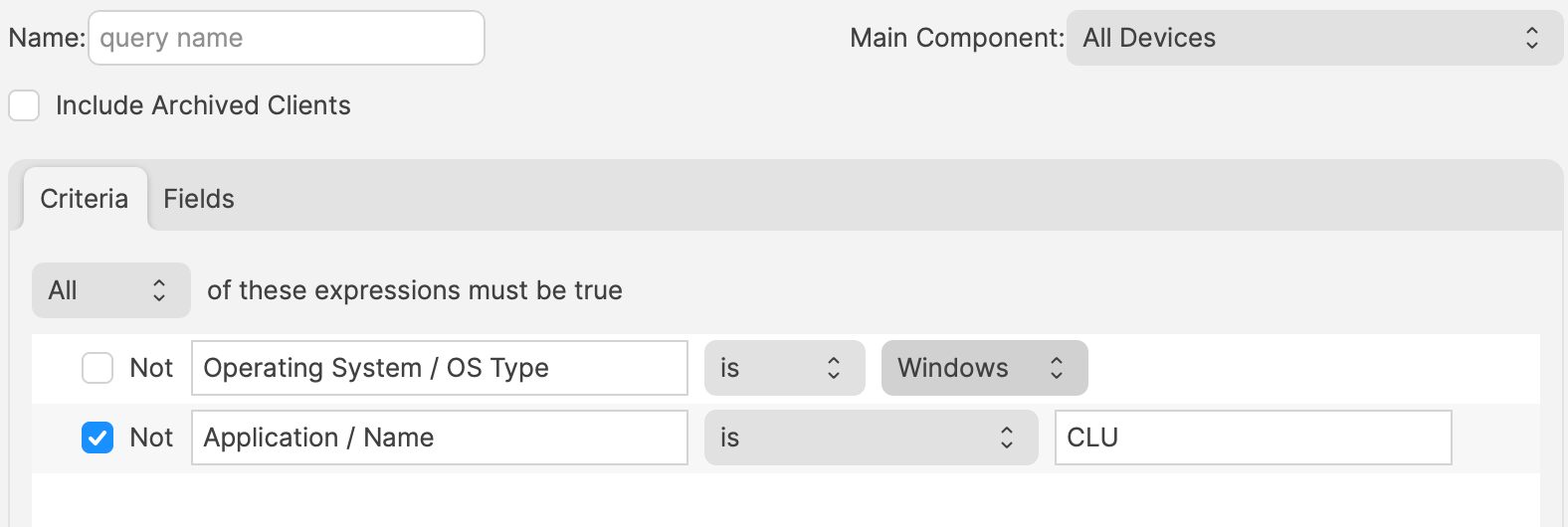
Windows devices without thisthe software will enter the Smart Group, receive the Fileset, adding the exe and anyreport other supporting files to the designated folder. Subsequently, the device will check back in, reportingthat the software is now installed. At Atthe next Smart Group refresh, thethose devicedevices no longer meetsmeet the criteria and leave the group.
Because the Fileset is self-healing, leaving the association can remove the software. The user loses the application, the next refresh sees the device as missing the software again, and the device leavesre-enters the group. The software is then installed again, removed again, and the loop continues.
Avoiding the loop
ThisThe answer is nownot whereto theavoid issueSmart occurs.Groups As aor self-healing Fileset,Filesets. theBoth softwareare willcore FileWave workflows. The important part is to design criteria so a successful deployment does not immediately undo its own targeting logic.
Fast Smart Group Evaluation can be removeduseful onfor disassociationtime-sensitive ofmembership the Fileset. The user will lose the software,changes, but atit next refresh, the device will re-enter the group, causing the software to instal once more.
Again, this will continue to occur, with the software constantly being removed and re-added.
For each of these examples, should certain featuresdoes not be used, for example, self-healing in the latter example. Absolutely not. Self-healing isfix a keypolicy aspectloop. to FileWave Fileset deployment. Instead, care should be taken, when consideringIf the criteria ofare unstable, faster evaluation can simply make the loop show up sooner.