
Fast Smart Group Evaluation
What
Fast Smart Group Evaluation lets selected Smart Groups evaluate on a shorter interval than normal Smart Groups. Use it when waiting for the normal Smart Group refresh would delay an important action, such as a newly enrolled device needing required assignments after its first check-in or inventory update.
When to use it
Use fast evaluation for a small number of time-sensitive Smart Groups that drive initial device setup, enrollment cleanup, urgent remediation, or another workflow where group membership needs to update quickly.
Do not enable it on broad reporting groups or every deployment group. Fast evaluation does not make clients submit inventory faster; it evaluates eligible Smart Group membership more frequently once the server has the data needed to evaluate the criteria.
Performance limit
Smart Group evaluation consumes server resources, especially in large environments or when criteria are complex. FileWave allows up to 3 Smart Groups with Fast Smart Group Evaluation enabled. This keeps fast evaluation useful for critical workflows without allowing many Smart Groups to add constant recurring load.
Configure it
The Fast Smart Group Evaluation checkbox is available when creating or modifying a Smart Group.
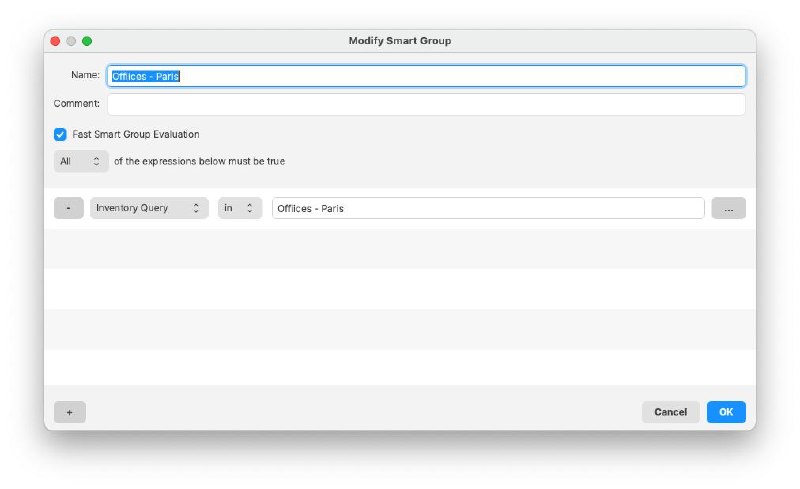
- Enable Fast Smart Group Evaluation on the Smart Group that needs faster membership updates.
- Set the server-wide fast interval in Inventory preferences using Fast smart group refresh period.
- If FileWave reports that the limit has been reached, review the existing fast-evaluation Smart Groups and disable it on a lower-priority group before enabling another one.