
Use IdP Attributes in FileWave Custom Fields
What
FileWave 16.2 introduces IdP Custom Fields, allowingbring administratorsidentity to pull user and device-specific data directlyattributes from an Identity Provider (IdP) suchinto asFileWave Custom Fields. FileWave 16.2 introduced this provider for Apple devices. Common sources include Okta, Google, Microsoft Entra ID (formerly Azure AD), or Keycloak into FileWave. These fields work just like other Custom Fields but are powered by your IdP attributes, enabling automation and personalization across devices.Keycloak.
When/Why
You would useUse IdP Custom Fields when you want to:
-
Dynamically populate user-specific values (e.g., email address, username, department).
-
Create Smart Groups based on IdP-sourced information.
-
Use variables in configuration profiles (e.g., pre-fill email profiles with the user’s email address).
-
Simplify large-scale deployments by automatically binding devices to users through IdP attributes.
ThisThe featureIdP reducesremains manualthe source of the attribute values, which avoids maintaining the same user data entryseparately and ensures consistency between your IdP andin FileWave.
⚠️ Platform Supportsupport:: IdP Custom Fields are supported on macOS, iOS, and iPadOS. Windows devices currently do not leverageuse usernamesEnrollment Username for IdP-basedIdP fieldsCustom Fields in the same way they do withuse LDAP.
How
-
Navigate to Assistants > Custom Fields > Edit Custom Field Definitions in FileWave Central.
-
Create a new field:
-
Name/Internal Name:
DefineEnterasthewithdisplayanynameotherandcustomstablefield.internal name you want to use in reports, Smart Groups, profiles, or API work. -
Provided By: Select IdP.
-
Assigned to all devices:
Usually checkSelect thisto ensurewhen the fieldappliesshould apply acrossyourtheenvironment.environment; otherwise scope it to the devices that need the value.
-
-
Set the Data Type (commonly String).
-
In
theIdP Reference,section, specifyenter the Attribute JSONPath—suppliedthis should match the attribute name fromby yourIdPIdP,(e.g.such asemail,emaildisplayName,displayName,ordepartment).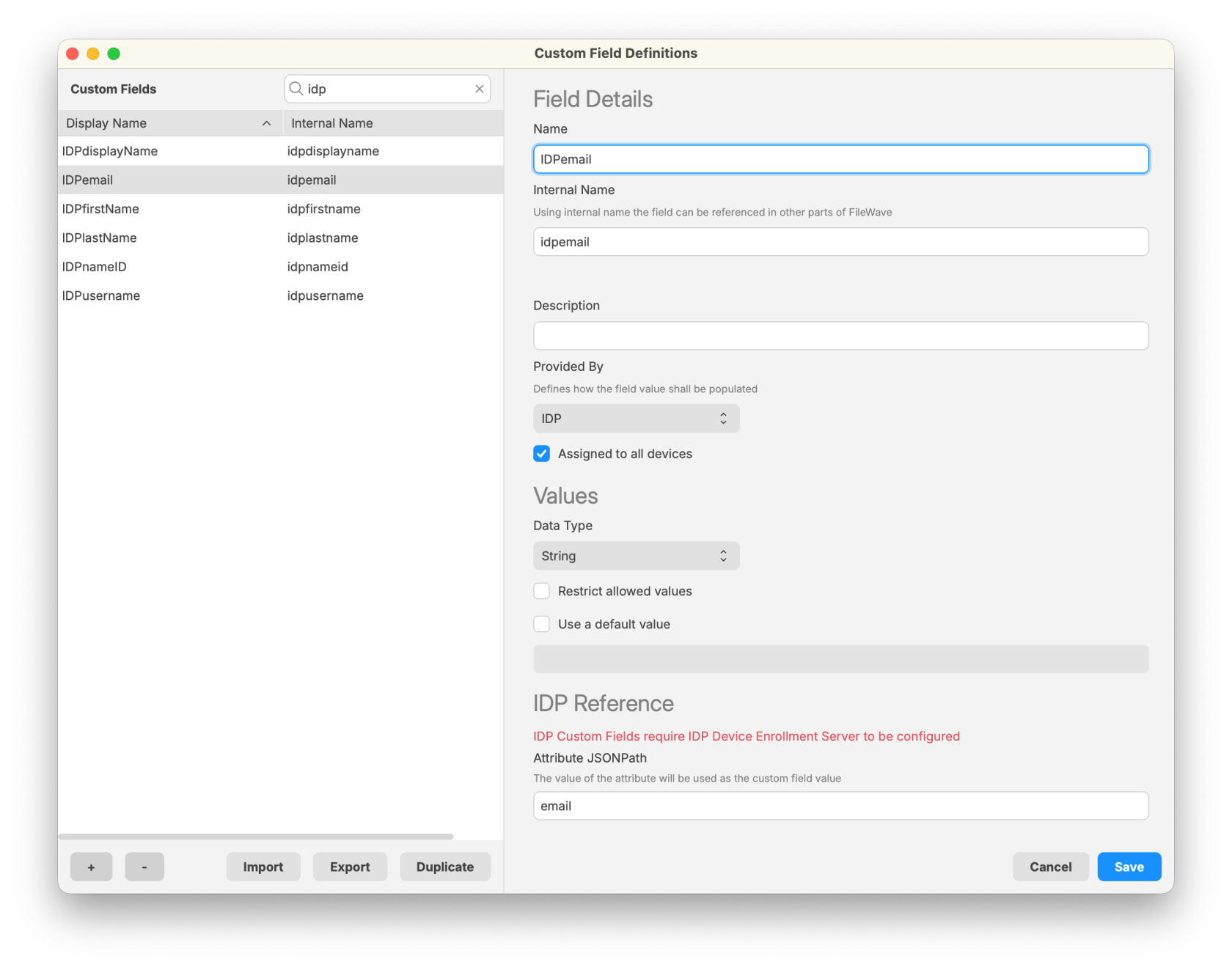
-
Save the Custom Field.
-
Ensure that devices are linked to users:
-
FileWave
usesmatchestheIdP data to a device through its Enrollment Usernamefield to associate IdP data with a device.. -
ThisSetcanthebe setusername manually(right-clickwithdevice >Set EnrollmentUsername)Username,automaticallycollectviait during ADEenrollment,enrollment, or supply it throughAPI/an API or importmethods.workflow.
-
Related Content