
US K-12 Starter Pack
Description
The US K-12 Starter packsPack aregives what the name implies...a great way to jump-start your new FileWave installation!environment a Startersample packsdevice-group arestructure, builtCustom Fields, Reports, and Grafana dashboards designed for selecteda customerschool verticals and provide client group structure as well as sample reports and dashboards.district.
Note:Use Starterthis packs are NOT meant to be used with long-standing FileWave environments...they are meantpack for brand-new,a new or recently setupconfigured environmentsenvironment. Importing it into an established environment can add sample structures and fields that haveoverlap littlewith currentyour existing organization.
TheReview examplesthe willimported reallyexamples, helpthen yourename jump-startor adjust them for your understandingschools, roles, and capabilitiesreporting ofneeds. FileWave! You can use them the way they are as well as further tailor them to your needs! After you get your start with this starter pack, check out our library of otherOther content packs forcan addingadd otherfocused spectacularexamples stuff!later.
What You Get in this Starter Pack
This content pack provides:
Custom Fields:
"Custom Fields"Fields areadd aorganization-specific terrificinventory wayvalues to extenddevice records. This pack includes the "inventoryfollowing attributes" of your devices. In this starter pack we have provided example custom fields that we think will be valuable to you:examples:
-
-
- Asset Tag: Used by almost every organization, you can use asset tag to help tie your devices from FileWave into an asset management or helpdesk system
- Graduation Year: Typically used by school districts to assign devices to a "grade". Much more flexible than having to change the grade every year as most districts have the device travel with the student from year to year.
- User Role: An important field for designating the type of device...in this case user role is "Student" by default for every device, but can be switched to Staff or Admin. This field is critical to do things like assign restrictions to student devices.
- School Type: School type is used to define that a school is elementary, junior high, or high school. A great field to have when you want to distribute content widely.
- School Name: This one is self explanatory, but the custom field is provided with some sample data to give you an idea of how you can tailor to your district.
-
Groups &and Smartgroups:Smart Groups:
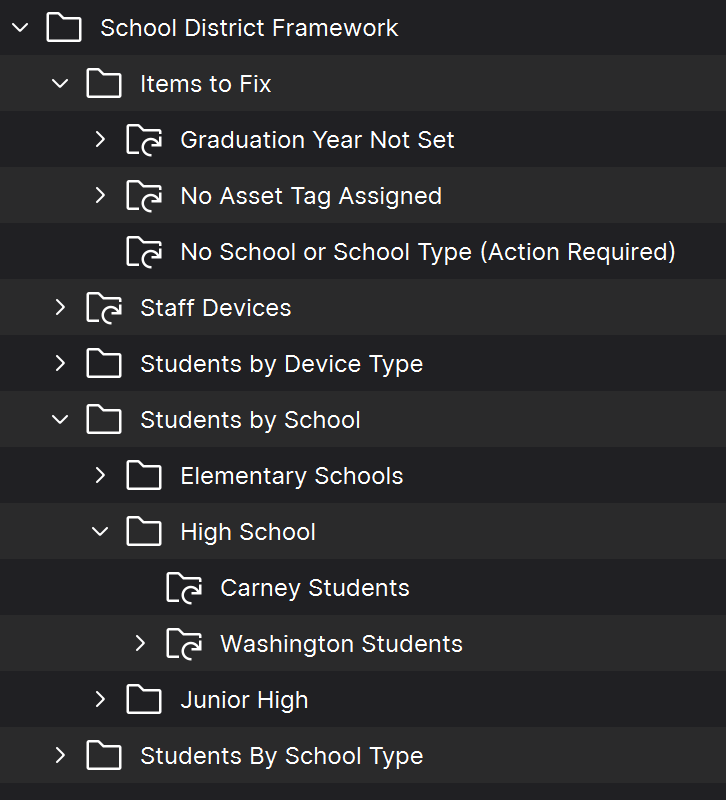
Groups and Smartgroups areprovide a toolmanual for organizing your devices. They can be used in infinite combinations, and you can think of them a little like folders for files, except in this case "files" are computers. In this pack we have provided the following defaultdevice structure, whichwhile isSmart meantGroups tocollect devices that match defined inventory criteria. The sample structure should be updated with at least your school names:names and local targeting logic:
Reports (aka Inventoryformerly Queries):
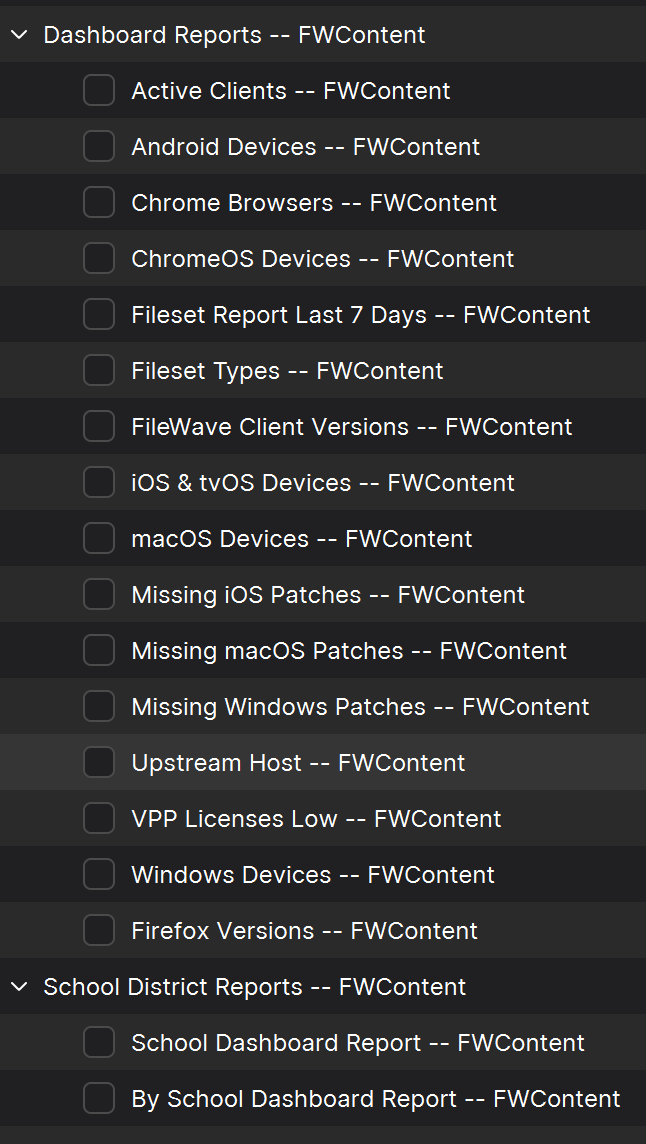
Reports arefilter waysand of looking at data about your devices...that data beingdisplay hardware, software, and customCustom fieldField inventory. For Reports areexample, a greatreport waycan to show data (example: show melist all macOSmanaged devicesMacs running Ventura).a selected AndmacOS reportsversion. are used as well to feed data to ourThe included visualGrafana dashboard(s)dashboards (grafana).also use InReport this starter pack we have included the following reports.data.
Dashboards:
Dashboards aresummarize anReport incredibly powerful tool for showing aggregated data. They are easy to setup, and allow you to do things like track software distributions (etc)data in simple-to-readvisual visualizations,panels likesuch as bar and pie charts. Use Take our word for it: your senior management is goingthem to lovetrack these,device counts, operating systems, user roles, locations, and itsoftware isdeployment a way for you to show off all of your great work! status. This pack provides:
-
-
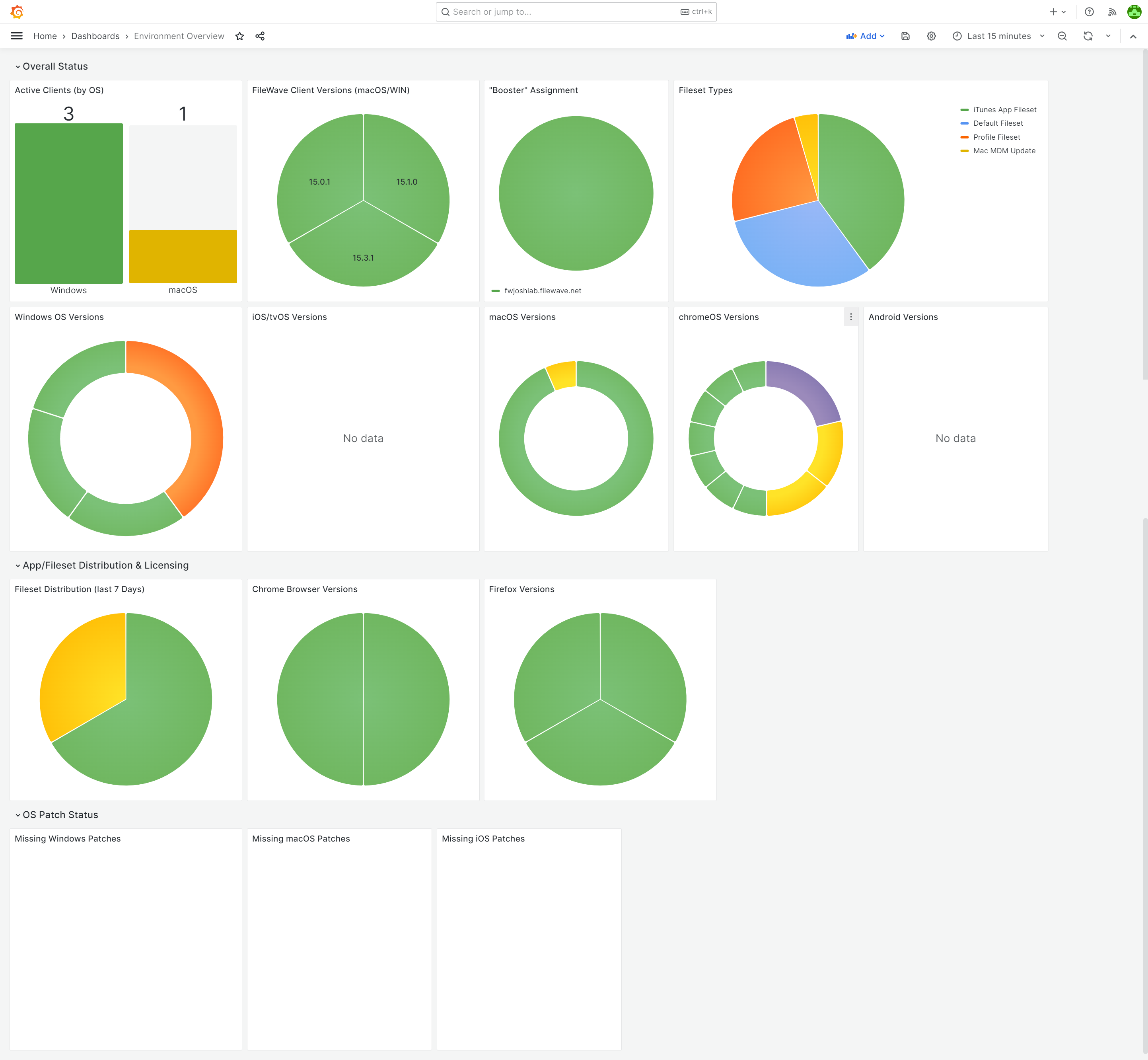
- Environment Overview Dashboard: A great starter dashboard, built from data fields that devices report right out of the box.
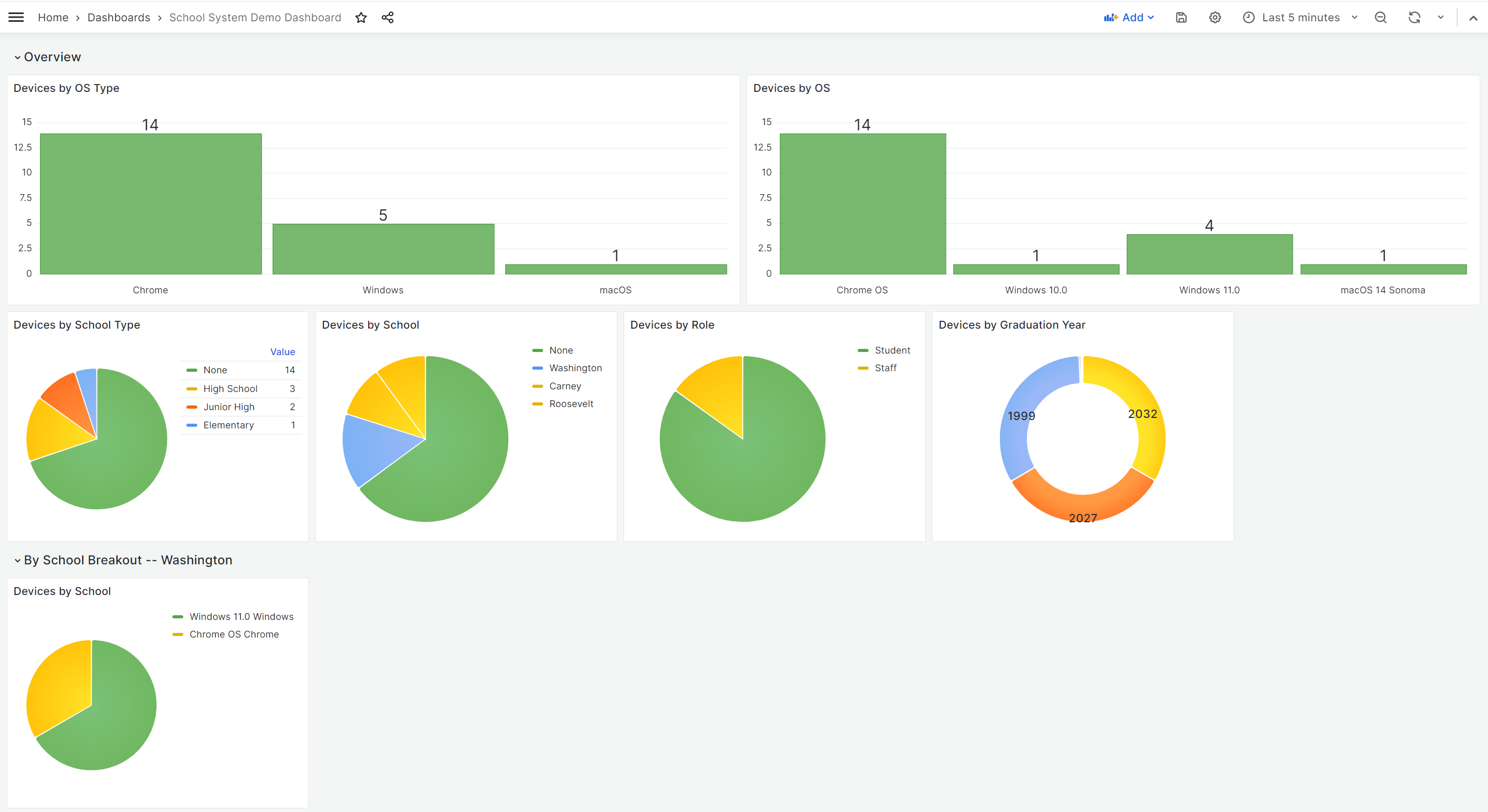
- School District Dashboard: A breakout of devices by OSes, by user roles, locations, etc.
-
Ingredients
-
FileWave Central
Adminadministrator& Credentialscredentials - Base64 API Token for 'fwadmin' account
| Starter Pack |
|
|

Directions
-
Download the above attached starter pack and unzip it
- Run the import_starter_pack.exe tool, using appropriate credentials for your environment
- The import tool
iscurrentlyonly availableruns on Windowsdevices currentlyonly.
- The import tool
- Once completed, verify the new content in your system (and import dashboards, if applicable)
Sample Screenshots
Notes
NoteReview thatthe imported Groups, Smart Groups, Custom Fields, Reports, and dashboards before changing them so you canunderstand freelytheir editdependencies. anyThen ofadapt the contentnames, incriteria, thisand startersample pack...in fact, you are encouragedvalues to doyour so. We recommend reviewing each of the types of content as provided first though so that you can get a feel for how things "fit together" before modification.environment.