
Using LDAP to enroll macOS/iOS/Android devices
Connect FileWave to an LDAP directory when your workflow needs directory data for groups, Custom Fields or parameterized profiles, or directory-backed enrollment authentication. LDAP lets FileWave look up users and other directory entries in services such as Active Directory. Treat directory data and enrollment authentication as separate goals: a working directory connection does not prove that only authorized users can enroll devices.
Start with one approved directory connection below. If you only need directory data, stop after verifying that connection and plan any extraction or group use separately. Continue to enrollment authentication when directory-backed enrollment is one of your chosen goals or is required by your organization. Leave an established enrollment policy unchanged. If neither goal is in scope, return to your chosen enrollment route.
For enrollment authentication, document which users should be allowed to enroll, which platform and enrollment route they will use, and which directory supplies their identity. Review this requirement with the Server and directory administrators before changing authentication. Configuring enrollment authentication does not install the FileWave Client or replace the platform’s MDM prerequisites.
A connection in Central Preferences → LDAP, directory extraction, and authentication at an enrollment URL are distinct parts of the workflow. A successful Test Connection does not verify every LDAP setting or prove that an enrollment URL rejects unauthorized users. See LDAP Preferences for connection fields and synchronization safeguards; do not turn on automatic group updates or change removal thresholds merely to test enrollment.
Connect one approved directory in Central
Use an account allowed to configure LDAP in the intended FileWave Server. Have the directory administrator provide the approved server address, protocol and port, certificate trust, search base, and any least-privilege lookup account. Store the lookup account’s secret through your organization’s approved process, not in test notes. Hosted customers can configure the connection in Central; FileWave must handle any server-file changes.
- Open FileWave Central → Preferences → LDAP. Inspect the existing connections first. If the intended connection already works, review and reuse it rather than adding a duplicate or changing another integration.
- If a new connection is approved, select + and give it a recognizable name, such as Evaluation directory. Enter the connection fields below using the directory administrator’s values.
- Review the existing authentication, extraction and synchronization settings before saving. Do not select a new Authentication server, enable use it for extraction, or check Enable Automatic Group updates for this LDAP merely to test a connection. Leave established settings unchanged. These choices can affect directory data and groups beyond one test device.
- Select Test Connection after checking the address, port, protocol and credentials. A successful test confirms that the configured connection and bind can complete, using the supplied credentials or anonymous bind if configured. It does not validate user searches, group extraction, LDAP administrator logins or enrollment authorization. Stop on an error and check the supplied settings, network access and certificate trust. Do not disable certificate verification or repeatedly guess a password.
- Save the approved Preferences changes, then reopen LDAP and confirm the intended connection and settings remain. Use Assistants → LDAP Browser and the directory administrator’s checks to verify the directory path and lookup account. If an authorized test record is available, compare its identity and required attribute with the directory. If data is missing, establish the needed permissions or extraction scope before enabling additional controls.
- Record the connection name, test outcome and whether the required directory lookup was verified, without recording secrets or unnecessary personal data. You have completed the connection check when the saved settings match the plan, the server responds, and the approved lookup has been verified. If only reachability is confirmed, record that limitation rather than calling enrollment authentication successful.
Understand the connection fields
| Field | What to enter or check |
|---|---|
| Name | A label that lets administrators distinguish this connection from others. |
| Host / IP and Port | The approved directory hostname or address and its port. Do not assume the enrollment Server address is also the LDAP server. |
| Protocol and Check Server Certificate | The interface offers LDAP, LDAPS and STARTSSL. Use the supported encrypted option and certificate-validation settings agreed with the directory administrator. For LDAPS or STARTSSL, keep certificate checking enabled for this test. FileWave may use a different CA trust source from the operating system; importing a CA into macOS Keychain alone may not establish trust. See LDAP Preferences certificate guidance and involve FileWave Support if validation fails. |
| Server Type | The matching supported directory type: Active Directory, Open Directory or eDirectory. If your directory uses a different schema, confirm the supported mapping instead of guessing. |
| Base DN | The distinguished name of the search base, such as the domain or approved subtree. It controls where FileWave searches; it is not an enrollment-group allowlist. |
| LDAP User DN | The exact distinguished name of the approved lookup account, when authenticated bind is required. Do not use a directory administrator simply for convenience. |
| LDAP User Password | The lookup account’s secret. Anonymous bind is appropriate only when the directory’s existing policy and supported configuration permit it; do not weaken that policy for this test. |
Plan extraction before automating it
Directory extraction, group updates and enrollment authentication are separate choices. Before enabling them, review the actual directory scope and the FileWave records or assignments they can affect. The connection-only check does not require Synchronize Now → All Servers or automatic group creation.
| Control | Effect |
|---|---|
| Refresh Interval (sec) | Controls how often FileWave is eligible to refresh directory data. A shorter interval means more frequent work, not a more complete or safer extraction. |
| Change Limit (%) | Can reject an extraction with too many missing or orphaned entries. A very low limit can keep otherwise valid changes from being accepted; shortening the interval only retries them more often. |
| Remove Missing items after | Controls how many successful, accepted extractions an item must be missing from before removal. A value of 0 allows removal after the first accepted sync where it is missing. Do not change this setting to troubleshoot the connection. |
If the test connection is no longer needed, first check whether it is used for authentication, extraction, groups, Custom Fields or profiles. Remove only a connection created solely for this test and only after its dependencies have been cleared; then reopen Preferences and confirm the intended configuration. Do not remove a shared connection as routine cleanup. See LDAP Preferences for the full controls and their interaction.
Establish ownership before touching authentication files
FileWave-hosted Server: if you are evaluating FileWave, ask your assigned FileWave representative to coordinate with FileWave Technical Support. If you are an existing customer, contact FileWave Technical Support directly. Confirm the supported identity route and arrange any necessary server-side work. Hosted users do not have direct access to these files and must not follow self-managed shell instructions.
Self-managed Debian appliance: the authorized Server administrator owns the configuration. New appliances use the documented fwadmin / sudo administration model rather than direct root login. Agree on a maintenance window and recovery access before changing enrollment behavior.
Self-managed macOS Server: have the owner confirm the supported FileWave build, actual authentication configuration, service controller, file permissions, and rollback procedure for macOS. Do not use the Debian package details below to choose a macOS command path or reload procedure.
No privileged shell or new production credential is needed for the initial review. Keep bind secrets out of screenshots, chat, terminal transcripts, and version control. The owner must provision any later lookup account through the organization's approved secret-handling process, with only the directory-read permissions the supported route requires.
The enrollment-authentication file is /usr/local/filewave/apache/conf/mdm_auth.conf. FileWave can generate or manage its configuration. Before considering a manual edit, have the Server administrator identify the active file, included configuration, and how the installed release manages it. A packaged example is not necessarily the active configuration.
Before an approved change, preserve a uniquely named, protected copy of the known-good active file, its ownership and permissions, and any relevant included configuration. Record the exact restore and service-recovery procedure in the change plan. Do not overwrite an earlier recovery copy.
Do not replace the entire active file with mdm_auth.conf.example_ldap_auth; that can remove unrelated routes, custom controls, or generated settings. Compare the proposed configuration with the active file and limit changes to the approved enrollment route. The Central Preferences guidance explains this boundary. Disabling authentication is not a step in this LDAP exercise.
Read the configuration before proposing changes
Apache distinguishes between authentication—checking who a user is—and authorization—deciding whether that user may access the resource. The distinction matters even when the same LDAP directory supplies both.
| Setting or block | What to review |
|---|---|
<Location ...> |
The URL path to which the configuration applies, not an LDAP group. Match it to the intended enrollment mechanism and preserve other routes. |
AuthType Basic |
HTTP Basic authentication. The client-facing enrollment connection must use HTTPS with a trusted certificate; Basic alone does not encrypt credentials. |
AuthBasicProvider |
The authentication provider or a defined alias. Apache's LDAP provider is ldap; the required module must be present. |
AuthName |
The authentication realm. Some older browsers display it in the prompt; modern browsers may not. It does not select allowed users. |
AuthLDAPURL |
Directory server, search base DN, login attribute, search scope, and optional filter. The search must identify the intended user uniquely. |
AuthLDAPBindDN / AuthLDAPBindPassword |
A directory lookup identity and its secret, when required. The bind DN is the account's distinguished name, not a list of its group memberships. |
Require valid-user |
Allows successfully authenticated users. It is not, by itself, an enrollment-group allowlist. |
Require ldap-group |
Apache's distinct LDAP group-authorization mechanism. Group schema, nesting, and configuration context need separate review; do not blindly add it to an alias-based example. |
LDAPReferrals |
Referral behavior during directory operations. Do not change it without understanding which directory servers and credentials may be involved. |
RequestHeader unset Authorization |
Present in FileWave’s templates. Retain the required authorization-header handling for the applicable enrollment route. |
Confirm the authentication provider and required modules against the installed FileWave configuration. Apache’s LDAP provider is ldap. Correct spelling alone does not mean enrollment will work. Confirm that the configuration covers the intended URLs, authenticates and authorizes the intended users, and remains correct when FileWave generates or manages it.
Protect both connections
The device-to-enrollment HTTPS connection and the FileWave-to-directory connection are separate security boundaries. The owner must confirm supported LDAPS or StartTLS, certificate trust and verification, hostname, port, and directory policy for the installed runtime. Do not disable certificate verification to make a connection succeed.
A displayed ldap://...:389 URL alone does not tell you whether a running deployment uses encryption: TLS may be configured elsewhere. You still need to verify that the connection is secure. Apache's TLS behavior depends on the linked LDAP toolkit. Its LDAP TLS documentation is a reference for the owner, not proof of the FileWave build's runtime configuration.
Map the route, not just the hostname
Use the enrollment address supplied for your Server, with its trusted certificate and approved port. Identify the mechanism as well as the hostname: browser enrollment, Automated Device Enrollment, and Android Enterprise can use different authentication routes.
| Enrollment route | What to confirm |
|---|---|
| Apple manual enrollment | Authentication and authorization through the actual supported enrollment portal, followed by completed MDM enrollment. |
| Apple Automated Device Enrollment (ADE) | Identity handling during the approved ADE workflow; a browser login is not an ADE test. |
| Android Enterprise | The selected ownership and enrollment mode, its supported identity integration, and completed enrollment. Do not substitute a legacy APK-download path. |
Ask the Server administrator to identify the applicable route blocks in the active configuration. Do not copy URL blocks between enrollment mechanisms or edit a generated file without confirming how FileWave manages it.
Open Directory, eDirectory, and OpenLDAP
Whether anonymous lookup is allowed depends on the directory’s policy; do not weaken that policy to enable it. Confirm the search base, login attribute, bind identity, and secure transport with the directory administrator. uid is one possible login attribute, but it must match the actual schema.
A search base such as cn=Users,... identifies where to search. It does not establish that only members of a group named Users may enroll. Define the allowed-user or group policy separately.
Save the proposed configuration separately for review. Saving the file does not activate authentication or confirm that the enrollment endpoint behaves as intended.
Active Directory
Active Directory commonly requires an authenticated lookup account. Use an approved, least-privilege read account rather than a directory administrator. Confirm the login attribute, such as sAMAccountName, the account’s exact DN, search base, and authorization policy. Do not infer these from display names or OU labels.
An account DN describes its directory entry, from the most specific component through its containers and domain components. The account’s cn is not necessarily its displayName, and its location under an OU is not a membership list. Keep bind-password values out of screenshots and shared documents.
Keep the lookup secret and proposed configuration protected. Review the diff for unintended authorization changes and unrelated enrollment routes before activation.
Validate and activate only through the supported Server procedure
An Apache syntax check is useful, but it does not prove directory reachability, certificate trust, correct authorization, or completed enrollment. Have the owner identify the actual executable, full configuration context, and supported validation procedure for the installed Server before issuing any command.
Do not assume FileWave’s apachectl is Apache’s standard script. In the FileWave 16.4.1 Debian package, /usr/local/filewave/apache/bin/apachectl is a wrapper: graceful and restart both delegate to a supervisor restart. It has no configtest or -t handling. Generic Apache documentation does not establish that this wrapper can check syntax or preserve live connections during activation. Obtain the supported validation and activation procedure for the installed Server; do not infer macOS behavior from the Debian package.
The change plan must include a protected known-good backup; a narrowly scoped proposed configuration; the supported syntax/configuration check; approved activation; service-health checks; permitted and denied enrollment cases; and restore/reactivation if a check fails. If activation or recovery is unclear, stop before changing the active file. Do not improvise a reload, weaken authorization, or repeat login attempts that might trigger lockout.
Verify the enrollment policy
A credential prompt proves only that a challenge appeared. For the approved lab validation, use one test device and pre-approved identities under the organization’s account-lockout policy. Confirm that authorized enrollment completes, an out-of-scope but valid identity is denied, and the planned invalid-credential case fails. Check that unaffected enrollment routes retain their intended behavior. Stop and use the agreed recovery plan if any result differs.
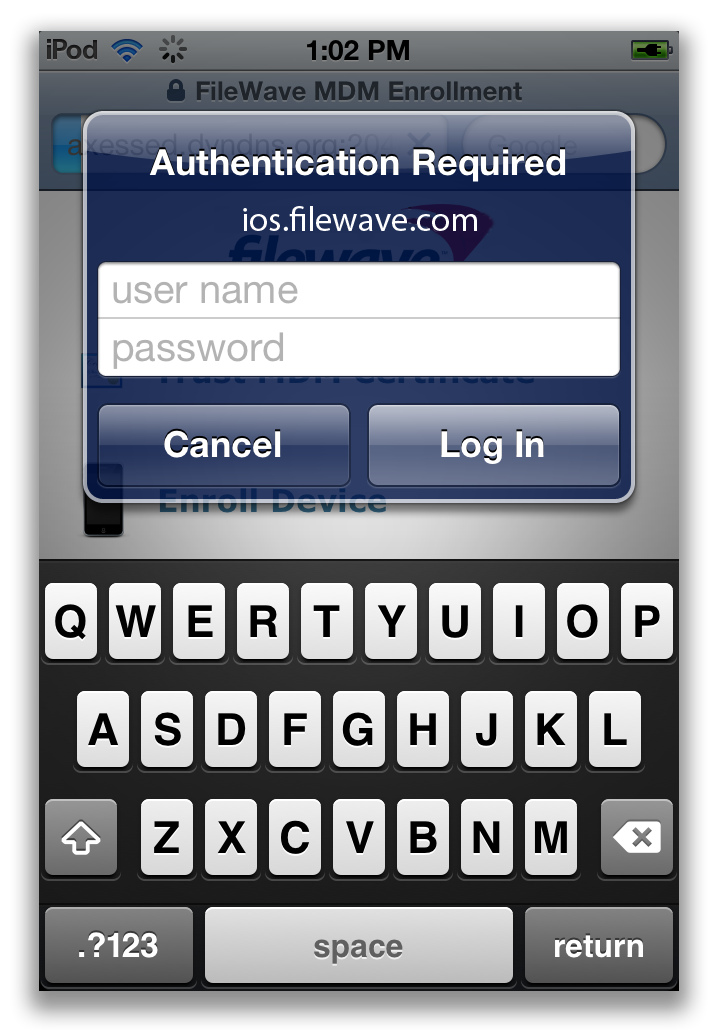
Older iOS authentication prompt with empty credential fields. It illustrates a challenge, not a current interface or successful enrollment. The displayed service hostname is historical, not an address to use.
Configuration saved, configuration activated by the supported service procedure, authentication/authorization verified, and device enrolled are separate results. A FileWave Model Update is not an Apache configuration reload. For any separately documented Client State or Deployment change requiring Model Update, review shared pending work beforehand; the confirmation dialog is not a preview, and the commit is not endpoint success.
Optional reference: more than one authentication source
Apache supports AuthnProviderAlias to define named authentication providers, which can then be listed in AuthBasicProvider. This can support a design with separate directory sources, but it does not by itself restrict who may enroll.
A provider alias groups connection and lookup settings under a name. For example, separate Faculty and Student sources require a plan for duplicate usernames, account ownership, and enrollment authorization—not merely two connection definitions.
A Location block can reference those aliases. Apache queries providers in order until one finds the username; if that provider rejects its password, it does not fall through to the next provider. Review duplicate usernames and identity attribution before relying on multiple sources.
Keep authentication-source selection separate from authorization. A working lookup across two directories is not proof that only the intended faculty or students can enroll.
Have the Server and directory administrators confirm whether multiple sources are supported by the installed FileWave enrollment workflow, and validate each permitted and denied case before activation.
Apache explicitly warns that AuthnProviderAlias does not pass its configuration to authorization providers, even when authentication and authorization come from the same module. Adding Require ldap-group to an alias-based design is therefore not a drop-in group restriction. The owner must design and validate authorization separately. See Apache authentication-provider aliases and provider ordering.
Troubleshoot without broadening access
The FileWave server reference identifies /usr/local/filewave/apache/logs/error_log. Have the administrator confirm the active log location for the installed platform and service. Logs can contain usernames, device/network identifiers, request paths, and other sensitive data. Redact them before sharing through an approved support channel.
Use error messages to guide investigation, not to justify broader access. A message alone does not establish the cause:
- Password Mismatch: can accompany an authentication failure. It does not establish whether the service-account bind succeeded. Review the surrounding log entries, lookup settings, credentials, and lockout policy with the owner. Redact sensitive data before sharing log entries.
- user … not found: review the search base, login attribute such as
uidorsAMAccountName, filter, scope, and lookup permissions. Do not expand the search across the directory just to make a user appear.
- apache require directives present and no authoritative handler: investigate loaded modules, version-specific directives, and the complete authentication/authorization configuration. Do not toggle an obsolete authoritative directive or allow all users as a troubleshooting shortcut.
Apache can cache authentication and authorization results. Directory password, group, or revocation changes may not be reflected immediately. Check the actual cache configuration when interpreting an approved test. Do not assume that a directory edit immediately revokes access.
Subtree search is not nested-group authorization
In Apache's LDAP URL syntax, an attribute followed by ?sub requests a subtree search beneath the base DN. It can change which user entries are found; it does not by itself traverse or authorize nested group memberships. Validate the intended search scope and separate group rules, rather than appending ?sub blindly. See Apache LDAP authentication and authorization.
If you are evaluating FileWave, ask your assigned FileWave representative to coordinate further help. If you are an existing customer, use FileWave Technical Support. The server LDAP reference explains configuration review and FileWave’s version-specific wrapper limits; use the supported procedure for your Server rather than copying example commands.
Return to Apple ADE Enrollment, Apple Manual Enrollment, or Android Enrollment for the actual device procedure after the owner has confirmed the supported identity route. For another platform, return to the Getting Started with FileWave introduction. Directory authentication remains optional unless your organization requires it.
No comments to display
No comments to display