
FileWave Central Preferences
Check initial Server readiness
You have an existing or newly provisioned Server and have connected through FileWave Central Setup. Now check the settings that need to be in place before preparing your first device. Preferences includes both Server-wide settings and settings for this local Central installation. You do not need to configure every feature for this walkthrough. Do not change existing production settings just to match this guide.
FileWave 16.4.x navigation: This page reflects the Preferences categories and locations in FileWave Central 16.4.x, with the tab-name change below. Earlier releases may place some settings elsewhere. In particular, automatic Booster-upgrade timing is under Preferences > General in 16.3.x and Preferences > Upgrades in 16.4.0 and later.
Open Preferences
Open Preferences from FileWave Central. The categories appear as tabs across the top of the window. Use the left and right arrows when the window is not wide enough to display every tab.
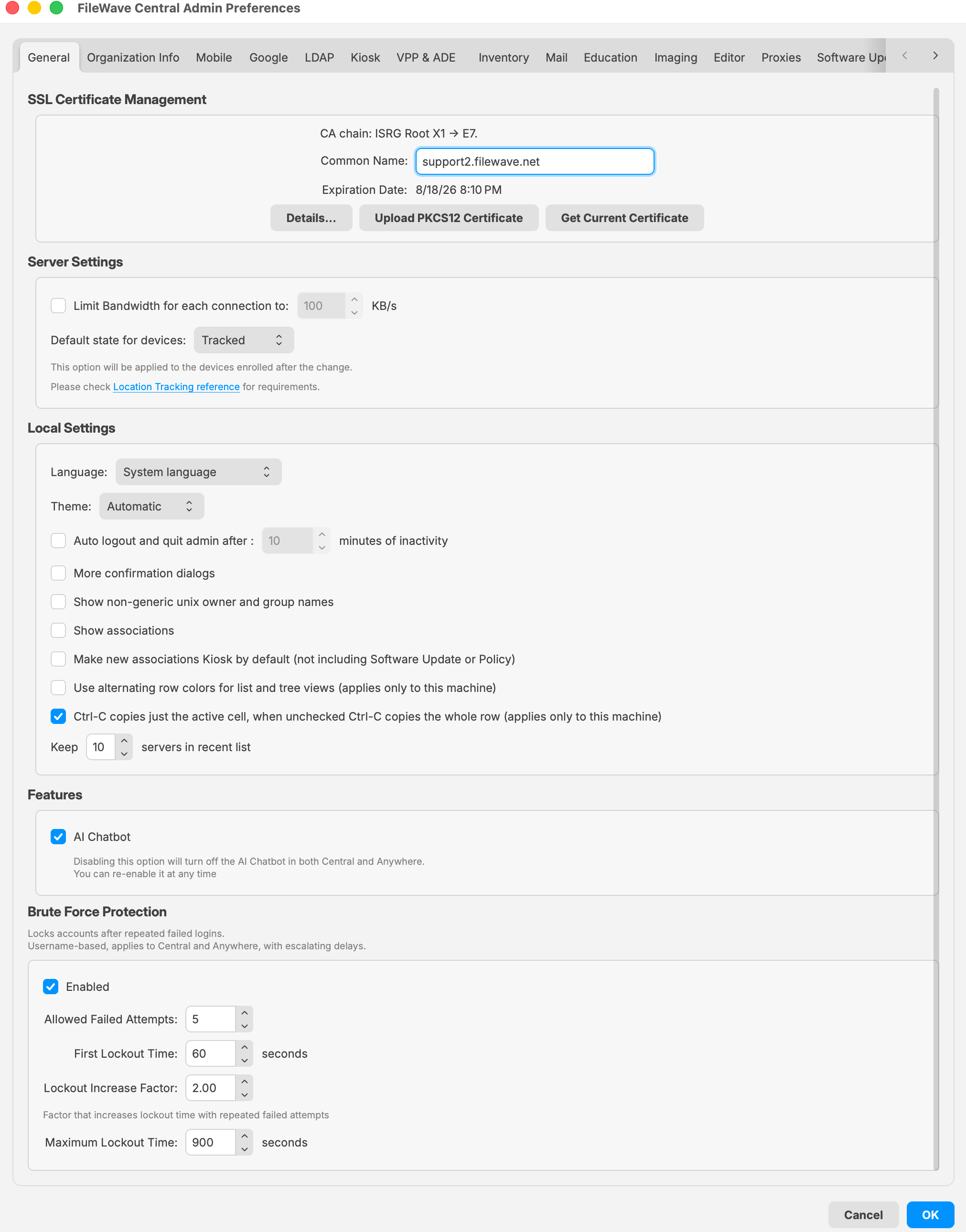
The General Preferences view in FileWave Central 16.4.1 shows the category tabs along with server, security, certificate, and local Central settings.
An administrator needs the applicable permission before opening or changing a protected area. Sensitive operations can also require the currently signed-in administrator to authenticate again. Use named administrator accounts and least-privilege permissions for daily work instead of sharing the fwadmin account.
See Managing FileWave Administrators for account and permission management.
Initial readiness checks
- Confirm your access. Confirm that you are connected to the intended Server with an authorized application account. If you have not completed the initial application-password check in Central Setup, do so now; the appliance password is not the Central password.
- Confirm the Server’s identity and network path. Follow the hosted or self-managed checks below. Do not replace a working certificate or Server name as a setup exercise.
- Review Organization Info. Enter or confirm the organization details needed for this environment. Do not overwrite an existing organization’s information.
- Leave unrelated settings alone. Review existing security policy with the owner; do not weaken brute-force protection, turn on tracking, increase inventory frequency, or schedule upgrades to get through setup.
FileWave-hosted Server
With your FileWave contact, confirm the assigned fully qualified domain name (FQDN), Server version, certificate owner, and license coverage. If you are evaluating FileWave, also confirm the evaluation license and expiration date. FileWave manages the hosted Server identity and infrastructure. Ask your network owner to confirm that your administration and test-device networks can reach the Server. Do not upload a replacement certificate or edit hosted-server files yourself; arrange any required hosted change through your FileWave contact. If you are an existing customer, contact FileWave Support. If you are evaluating FileWave, contact your assigned FileWave Systems Engineer (SE).
Self-managed Server: name, certificate, and services
The Server, network, and certificate owners should complete these checks together before device enrollment. An FQDN is the full Server name, such as filewave.example.com. Its trusted certificate must cover that name. These checks apply whether you use a macOS Server or a Debian appliance.
- Set the server name and certificate before enrollment. If the Server does not already have the correct trusted certificate, have its owner use Central Preferences > General > SSL Certificate Management to upload the approved
.p12bundle using its password. If the correct certificate is already installed, confirm its name, trust, and expiration without replacing it. In Preferences > Enrollment (Mobile in 16.4.0), verify the MDM Server Address uses the same FQDN. Check the actual MDM port against your network plan rather than changing it to match an old screenshot. Follow Name and Certificate Planning for the self-managed local-name resolution and conditional ApacheServerNameconfiguration; its older screenshots label Enrollment as Mobile. The server owner should back up any affected files and coordinate a restart only when that procedure requires it. Certificate preparation is for the certificate owner; do not replace an existing server's identity to follow this guide. - Verify reachability from the intended networks. Confirm that DNS returns the expected address from the administration computer and each test-device network. Have the network owner check the active default route, DNS service, and the required inbound/outbound connections using the port-testing guidance. A ping, a Webmin login, or a successful IP assignment alone does not prove FileWave services are reachable.
- Check the services you will use. Reconnect Central after any required service restart and confirm that its administration views load. For web-based enrollment in your chosen platform route, use the enrollment URL supplied by your server owner or listed in that platform's setup instructions. Open it from the test-device network and verify that the certificate is valid for the agreed FQDN, with no name, trust, or expiry warning. Do not enroll a device yet. If the address, certificate, or services are wrong, stop and involve their owner before proceeding.
- Record the handoff. Keep the FQDN, Server version, hosting route, stable address, responsible administrators, certificate renewal owner and renewal date, and backup/recovery location in the environment notes. Store passwords and private keys only in the approved credential system. Confirm license coverage before enrolling devices; for an evaluation, confirm the evaluation license and expiration with your assigned SE.
If your chosen platform requires an integration that is not configured yet, complete it in the platform preparation lesson and repeat that route’s service checks before enrolling. A successful Central login alone does not confirm that MDM or Client enrollment is ready.
Platform settings come next
After completing this page and the device-work concepts lesson, choose Windows, Apple, Android, or Chromebook preparation. Configure APNs (Apple Push Notification service), ADE (Automated Device Enrollment), Apps and Books, or Google services only when that route requires them and they are not already configured. Verify and use working integrations rather than recreating them. The Windows/macOS lessons explain when to build enrollment packages in Central. Do not build packages for every platform now.
The map below is a reference for later tasks, not a list of settings to change now.
FileWave Central 16.4.x Preferences map
| Category | Use it for |
|---|---|
| General | SSL certificate management, server defaults, the device tracking default, local Central behavior (including the recent-server list), optional AI Chatbot access, and brute-force protection. |
| Organization Info | Organization metadata associated with the FileWave environment and managed-device information. |
| Enrollment (Mobile in 16.4.0) | MDM server connectivity, Apple push configuration, mobile-management settings, and FileWave 16.4.x macOS/Windows enrollment-package builds. |
| Google and Android EMM integration and its organization-wide configuration. | |
| LDAP | Directory connections, synchronization safeguards, directory-backed groups, enrollment identity, and parameterized data. |
| Kiosk | Kiosk categories and organization of self-service content. |
| VPP & ADE | Apps and Books tokens, Automated Device Enrollment services, Apple School or Business Manager API accounts, synchronization, and advanced Apple service settings. |
| Inventory | Apple MDM inventory polling, Smart Group refresh timing, LDAP Custom Field cleanup behavior, and identity-provider (IDP) Custom Field synchronization. |
| Outgoing email configuration used by FileWave notifications and tests. | |
| Education | Education-specific integrations and classroom-related server configuration. |
| Imaging | Imaging Virtual Server registration, status, and IVS upgrades managed by FileWave 16.4.x. |
| Editor | Preferences that control supported content-editor behavior in FileWave Central. |
| Proxies | Proxy settings used when FileWave services must reach external resources through an intermediary. |
| Software Updates | Server-level Software Update behavior used by the Software Updates workflow. |
| Upgrades | Client upgrade batch size, permanent-failure threshold, scheduled reports, and automatic Booster-upgrade delay. |
Configure the recent-server list
FileWave Central 16.4.x includes Keep n servers in recent list under Preferences > General. Set the number of recently used FileWave Servers that Central should retain for the login window.
- Increase the value when the same administrator regularly connects to several FileWave environments.
- Use a smaller value on shared administration Macs or where old environment names should not remain in the login history.
- This setting changes the recent list in FileWave Central; it does not add, remove, rename, or reconfigure a FileWave Server.
Enrollment authentication during setup
For most evaluations—and for many organization-owned devices using Automated Device Enrollment—FileWave recommends leaving generic URL/ADE enrollment authentication disabled unless the organization has a deliberate enrollment-identity requirement. This recommendation does not override an existing approved policy. Requiring a shared username and password can interrupt zero-touch enrollment after a wipe or reassignment. When user identity is required, have the owner confirm a supported LDAP or identity-provider enrollment workflow instead of distributing generic credentials.
FileWave-hosted Servers
Hosted Servers are normally provisioned without generic enrollment authentication unless another configuration was requested. Confirm the intended policy with your assigned FileWave representative; they can coordinate any necessary hosted-server change. If you are evaluating a hosted Server, you do not have direct access to its configuration files.
Self-managed Servers
If your organization requires enrollment authentication, have the Server and identity owners confirm the supported route before enrollment. Server enrollment-authentication reference and LDAP-backed enrollment cover that separate work. The Server and identity owners should review those configuration examples; do not run the commands as part of these initial Preferences checks.
Do not replace the active authentication file with an example, disable an approved policy, or improvise a service reload. Any required change needs a protected backup, a scoped review, and validated activation and recovery procedures for the installed release and Server OS. Stop and involve the owner if those procedures are unknown. A Model Update is not an authentication-service reload.
Change Preferences safely
- Record the current value before changing a server-wide setting.
- Change one integration or operational behavior at a time and test it before continuing.
- Do not replace certificates, shared keys, service tokens, package settings, or enrollment authentication casually; those changes can affect existing devices and integrations.
- Keep credentials, private keys, tenant identifiers, tokens, server hostnames, and certificate details out of screenshots and support notes unless the destination is approved for that data.
- Use the focused workflow articles below instead of treating this overview as the procedure for every Preferences category.
Related content
Ready for the next lesson?
- You can reconnect to the correct Server with secured, authorized application access.
- The Server name, certificate, and network responsibilities are confirmed; the checks that can be completed before platform integration have passed.
- Required organization information is recorded, and unrelated integrations and security policies are unchanged.
- Any remaining platform-specific integration or service check has an owner and will be completed before enrollment.
If a name, trust, access, or service check fails, stop and resolve it with the responsible owner. Otherwise continue to How FileWave turns your changes into device work. That lesson requires no device changes; it prepares you to follow one platform’s prerequisites and enrollment route.
No comments to display
No comments to display