
Apple Client Health Dashboard
Description
FileWave can stitch many parts of a workflow together, but building that from scratch can take time. Content packs give you a working example that you can import, inspect, and adapt for your own environment.
Once you use this dashboard, please consider giving us feedback so we know how helpful this was to you: Submit Feedback
This FileWave Content Pack provides reporting and dashboard content for the health of managed Apple MDM clients.
What You Get in this Content Pack
This content pack provides:
Custom Fields:
Custom Fields extend the inventory attributes available for devices. This content pack includes:
-
-
- macOS APNs Topic Value: The Apple Push Notification Topic on macOS devices. Note that this should only show 1 value unless you have ever accidentally or purposefully changed the APNs certificate to a different Topic.
- macOS Enrolment Server: The FileWave server that the macOS device believes it is enrolled with.
-
Reports (formerly Queries):
Reports help you verify device state, spot stale Apple MDM check-ins, and support compliance review. This pack includes the following reports:
-
-
- Apple MDM All Devices: Reports on a list of all Apple MDM devices.
- Apple MDM - iOS: Reports on a list of all iOS devices.
- Apple MDM - macOS: Reports on a list of all macOS devices.
- Apple MDM - Last Connected > 1M: Reports on all Apple devices that last connected to FileWave more than 1 month ago.
- Apple MDM - Last Connected 1W:1M: Reports on Apple devices that have connected to FileWave in the past month but not in the last week.
- Apple MDM - Last Connected 1W: Reports on Apple devices that have connected to FileWave in the past 1 week.
- Apple MDM All Devices: Reports on a list of all Apple MDM devices.
-
Dashboards:
Dashboards build on reports by showing aggregated data in charts and graphs. This pack provides:
-
-
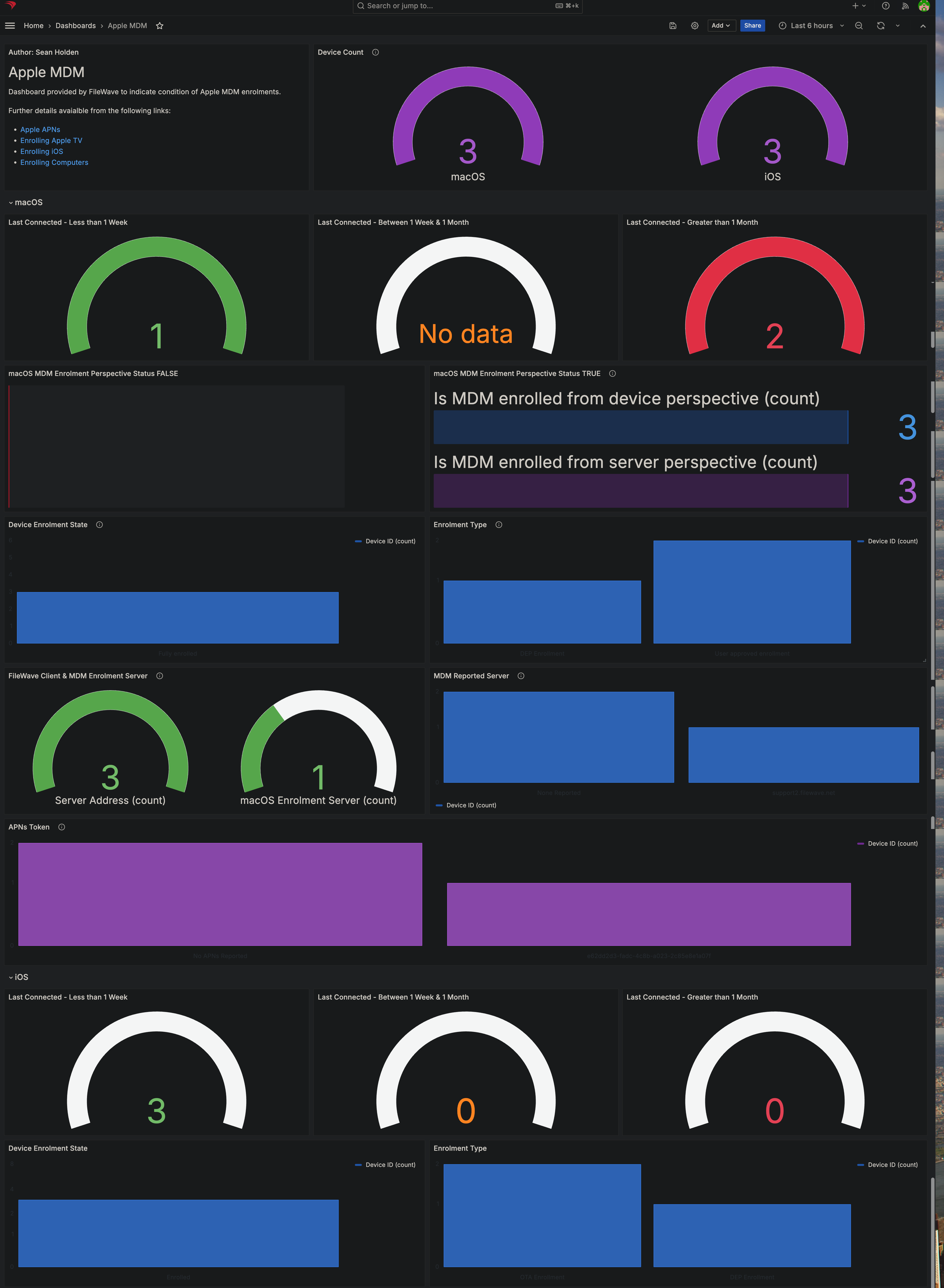
- Apple MDM: This dashboard summarizes Apple device health using the custom fields and reports listed above. It is fully customizable, so you can add panels or adjust the reports for your environment.
-
Ingredients
For FileWave 16.1.0 or higher, use FileWave Central > Assistants > Content Packs to add this Content Pack with one click. Use the manual download and upload steps below only when the Assistant workflow is not available.
-
FileWave Central Admin & Credentials
- Base64 API Token for 'fwadmin' account
- Content Pack:
| Windows Content Pack | Windows Content Pack Download |
|
macOS Content Pack (ARM based) |
On macOS, we need to use curl for downloading, such that Gatekeeper doesn't quarantine the import application. You can copy and paste the following into Terminal.app. The example provided downloads import_pack.zip to the desktop
|
|
macOS Content Pack (Intel based) |
On macOS, we need to use curl for downloading, such that Gatekeeper doesn't quarantine the import application. You can copy and paste the following into Terminal.app. The example provided downloads import_pack.zip to the desktop
|
Directions
- Download the appropriate content pack for your admin device's platform and unzip it.
- Run the FileWave Uploader tool in the unzipped folder using credentials for your environment. For more detail, see the overview article on importing content packs.
- After the upload completes, verify the new content in your system and import the dashboard.
Sample Screenshots
Notes
You can edit any content imported by this content pack. Review the imported custom fields, reports, and dashboard first so you understand how the pieces fit together before changing them.
Once you use this dashboard, please consider giving us feedback so we know how helpful this was to you: Submit Feedback
No comments to display
No comments to display