
Deploy Lightspeed Smart Filter on iOS and iPadOS
What this profile does
Use this recipe to create the supervised Apple Web Content Filter profile required by Lightspeed Smart Filter on managed iPhone and iPad devices. Obtain the customer-specific value from Lightspeed before building the profile.
Requirements
FileWave Central or FileWave Anywhere with permission to create and deploy profiles
Supervised iPhone or iPad test devices
The Lightspeed customer ID and username format for your environment
If a Central-created profile changes the identifier or fails to deploy: recreate the Web Content Filter in FileWave Anywhere, then test it again. Check FileWave Known Issues for the current status before treating this workaround as required.
Create and deploy the profile
Open FileWave Central or FileWave Anywhere.
Create a new mobile Fileset.
Select Profile.
-
Enter the name of the Profile, i.e. Lightspeed Filter
-
Select Web Content Filter (Supervised Only) payload
-
Select and enter the following:
-
Filter Type: Plug-in
-
Filter Name: Lightspeed Filter
-
Identifier: com.lightspeedsystems.iosrelayfilter
-
User Name: %auth_username%@your.domain.org or %email%
-
Filter Webkit Traffic: enable
-
Filter Socket Traffic: enable
-
Custom Data:
-
Key: UDID - Type: String - Value: %device_id%
-
Key: customerID - Type: String - Value: your_lightspeed_ID
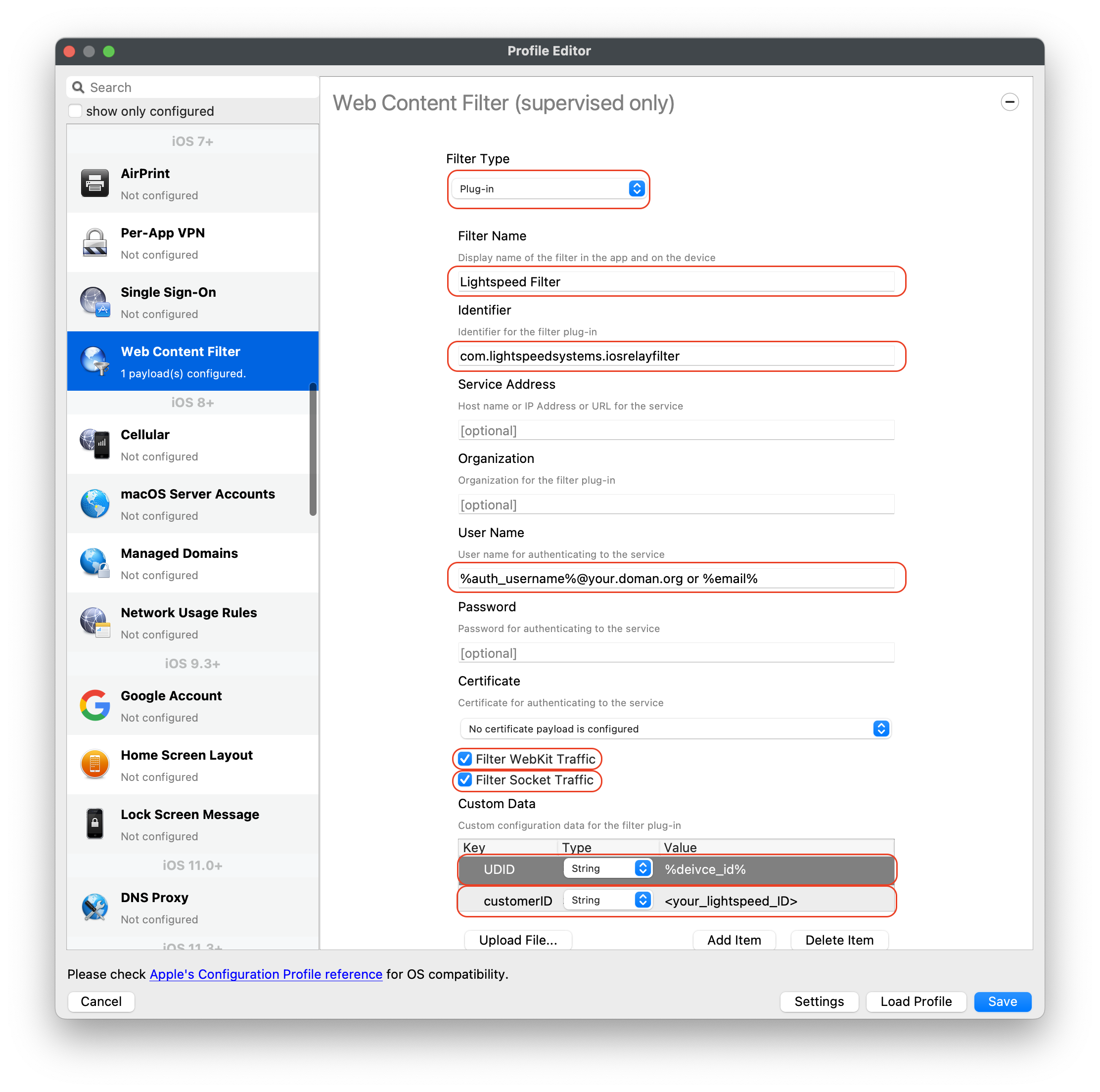
-
-
-
Click Save
-
Create a Deployment to one or two supervised test devices.
-
Update Model
Verify before expanding the Deployment. Confirm that web filtering works on the test devices and that they still communicate with FileWave. Then expand the Deployment to the intended group.
Lightspeed Smart Agent for macOS devices
Looking to deploy your Lightspeed Smart Agent for macOS devices? Review the KB article here: Lightspeed Smart Agent Deployment (macOS 2023).
Needing to deploy Lightspeed for macOS using Certificate Manager? Review the KB article here: Lightspeed Smart Filter Deployment (macOS v2.3.1+ using Certificate Manager)
No comments to display
No comments to display