
Export a .p12 SSL Certificate from Windows
When the FileWave Server certificate and private key were created on Windows, export them as a password-protected PKCS #12 bundle for upload in FileWave Central > Preferences > Mobile. The bundle should contain the private key, server certificate, and available intermediate and root certificates. Windows saves the bundle with a .pfx extension; rename it to .p12 without changing its contents before upload.
Protect the exported bundle.
A .p12 file contains the server's private key. Use a strong temporary export password, transfer the file through an approved secure method, and remove unnecessary desktop or transfer copies after FileWave accepts the certificate.
Export the certificate and private key
- Open a Run dialog and enter "mmc".
- Go to File > Add/Remove Snap-in.
- Add the Certificates snap-in and click the Add > button in the middle.
- Choose Computer account.
- Pick Local computer and click Finish.
- Click the OK button.
- In the MMC console browse to Certificates (Local Computer) > Personal > Certificates on the left. If your certificate is not there, browse the rest of the Certificates (Local Computer) tree until you find it.
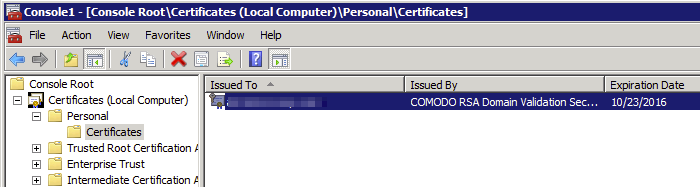
- Select your certificate in the middle pane, right-click, and pick All Tasks > Export.
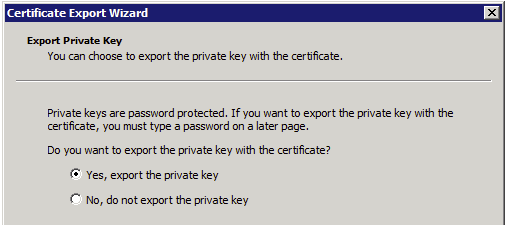
- When prompted, choose Yes, export the private key. If that option is unavailable, the selected certificate does not have an exportable private key on this computer; return to the system where the CSR and private key were created.
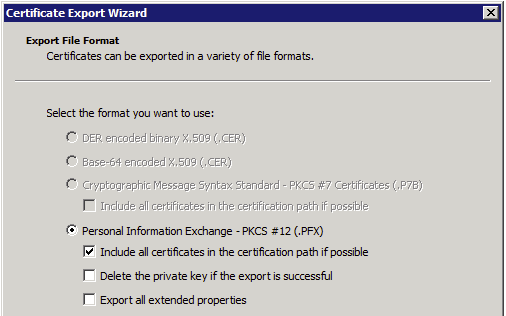
- Under Personal Information Exchange - PKCS #12 (.PFX), check Include all certificates in the certification path if possible. Leave the other two checkboxes unchecked.
- Choose Next and set a strong export password. FileWave Central prompts for this password during upload.
- Save the
.pfxfile to a temporary secured location. - Rename the extension from
.pfxto.p12. - Upload the
.p12file in FileWave Central > Preferences > Mobile, enter the export password, and verify that the expected certificate is shown before deleting temporary copies.
No comments to display
No comments to display