
Apple Client Health Dashboard
Description
FileWave is immensely powerful, but can bestitch dauntingmany when it comes to stitching the various componentsparts of a complex workflow together.together, but building that from scratch can take time. Content packs are meant to give you a leg-upworking inexample creatingthat distributableyou contentcan import, inspect, and areadapt alsofor ayour greatown way to learn by example! Each content pack is designed to be a "whole solution", putting together all of the pieces of FileWave to accomplish a goal.environment.
Once you use this dashboard, please consider giving us feedback so we know how helpful this was to you: Submit Feedback
This FileWave Content Pack is built for extensiveprovides reporting onand dashboard content for the health of managed Apple MDM clients and is comprised of all of the contents listed below:clients.
What You Get in this Content Pack
This content pack provides:
Custom Fields:
"Custom Fields" are a terrific way toFields extend the "inventory attributes"attributes ofavailable yourfor devices. In thisThis content pack we have included:includes:
-
-
- macOS APNs Topic Value: The Apple Push Notification Topic on macOS devices. Note that this should only show 1 value unless you have ever accidentally or purposefully changed the APNS certificate to a different Topic.
- macOS Enrolment Server: The FileWave server that the macOS device believes it is enrolled with.
-
Reports (aka Inventoryformerly Queries):
Reports arehelp ayou greatverify waydevice ofstate, measuringspot thestale effectivenessApple ofMDM distributed contentcheck-ins, and can be used for all sorts ofsupport compliance purposesreview. as well. Trust, but verify, is what reports are all about. In thisThis pack we have includedincludes the following reports:
-
-
- Apple MDM All Devices: Reports on a list of all Apple MDM devices.
- Apple MDM - iOS: Reports on a list of all iOS devices.
- Apple MDM - macOS: Reports on a list of all macOS devices.
- Apple MDM - Last Connected > 1M: Reports on all Apple devices that last connected to FileWave more than 1 month ago.
- Apple MDM - Last Connected 1W:1M: Reports on Apple devices that have connected to FileWave in the past month but not in the last week.
- Apple MDM - Last Connected 1W: Reports on Apple devices that have connected to FileWave in the past 1 week.
- Apple MDM All Devices: Reports on a list of all Apple MDM devices.
-
Dashboards:
Dashboards build uponon reports and are an incredibly powerful tool forby showing aggregated data in charts and graphs. This pack provides the following dashboard(s):provides:
-
-
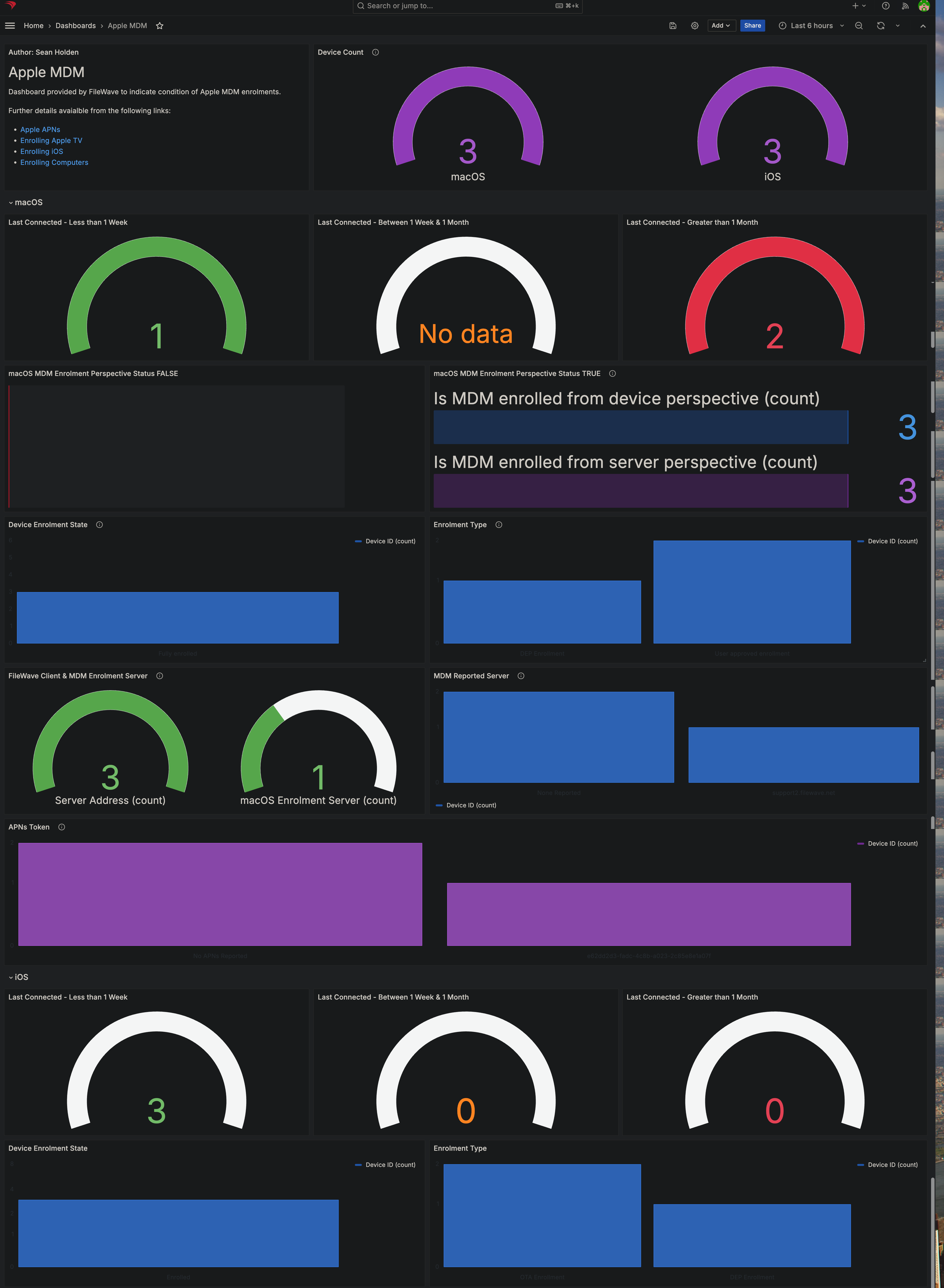
- Apple MDM: This dashboard
shows you almost everything you'll ever want to know aboutsummarizes Appledevicesdeviceinhealthyour environment and is built from all ofusing the custom fields and reportsfromlisted above. It is fully customizable, soif the dashboard is missing something,you caneasilyaddit!panels or adjust the reports for your environment.
- Apple MDM: This dashboard
-
Ingredients
For FileWave 16.1.0 or higherhigher, you merely need to go inuse FileWave Central to> Assistants -> Content Packs and then canto add thethis Content Pack with 1-one click. TheUse intructionsthe manual download and upload steps below inonly thiswhen articlethe areAssistant forworkflow belowis 16.1.0.not available.
-
FileWave Central Admin & Credentials
- Base64 API Token for 'fwadmin' account
- Content Pack:
| Windows Content Pack | Windows Content Pack Download |
|
macOS Content Pack (ARM based) |
On macOS, we need to use curl for downloading, such that Gatekeeper doesn't quarantine the import application. You can copy and paste the following into Terminal.app. The example provided downloads import_pack.zip to the desktop
|
|
macOS Content Pack (Intel based) |
On macOS, we need to use curl for downloading, such that Gatekeeper doesn't quarantine the import application. You can copy and paste the following into Terminal.app. The example provided downloads import_pack.zip to the desktop
|
Directions
- Download the appropriate content pack
above (based onfor your admin device'splatform)platform and unzipitit. - Run the FileWave Uploader tool in the unzipped
folder,folder usingappropriatecredentials for yourenvironmentenvironment.(checkForoutmoreourdetail, see the overview article on importing contentpackshere)packs. OnceAftercompleted,the upload completes, verify the new content in your system(and import thedashboard)dashboard.
Sample Screenshots
Notes
You can freely edit any of the content inimported by this content pack. We do recommend reviewing each ofReview the typesimported ofcustom contentfields, asreports, providedand first,dashboard though,first so that you can get a feel forunderstand how thingsthe "pieces fit together"together before modification.changing them.
Once you use this dashboard, please consider giving us feedback so we know how helpful this was to you: Submit Feedback