
Default TCP and UDP Port Usage
FileWave software uses the below-listed TCP/IP ports. These are default settings and may be configured to listen on different ports if required. Consider FileWave Server should not have IPv6 enabled for the best experience.
Port Testing
Please consider downloading the FileWave Port Testing macOS/Windows utility to confirm communication of Google Cloud Messaging, Apple Push Notifications and connectivity between device network(s) and Server/Boosters.
The following may be run from an On-Premises server to confirm Apple, Microsoft, and FileWave services:
sudo /usr/local/filewave/python/bin/python /usr/local/filewave/django/manage.pyc check_connectionsFileWave Server Ports
The current default MDM/inventory HTTPS port is 20445; older installations may use 20443. Use the port configured on your Server, not both automatically. Check FileWave Central > Preferences > Enrollment > MDM Server Address / Port (the tab is named Mobile in 16.4.0 and older interfaces).
The ports in this table are listed from the FileWave Server’s perspective, so the “Server In/Out” column indicates the direction of traffic relative to the Server.
| Server Ports | Service | Protocol | Server In/Out | Description |
| 80 | HTTP | TCP | Outgoing |
FileWave Software Updates (apple.com & microsoft.com) *** |
| 443 | HTTPS | TCP | Outgoing | * FileWave License Server (fwks.filewave.com & logstash.filewave.com)
* FileWave Software Updates (apple.com) *** * FileWave/TeamViewer Session Server (rcs.filewave.com) * FileWave/TeamViewer Push Notification Server (fwpn.filewave.com) * FileWave Kiosk ( *.filewave.cloud ) * AutoPkg, WinGet, and feature-specific FileWave services: see the versioned destinations below. |
| 443 | HTTPS | TCP | Incoming |
* API endpoints - Anywhere API (v2 API) * Device to Server (Enrollment URL) - Google/Azure/Okta |
| 20016 | SSL | TCP | Incoming | FileWave Central to Server |
| 20017 | SSL | TCP | Incoming |
FileWave Client to Server: Secure Set port 20015, not 20017, in Client Configuration |
| 20019 | SSL | TCP | Incoming | Booster to Server: Priority Traffic |
| 20022 | SSL | TCP | Incoming | FileWave Central to Server: NATS
FileWave Client to Server: NATS IVS to Server: NATS |
| 20023 | SSL | TCP | Incoming |
FileWave Booster to Server: NATS |
| 20124 | SSL | TCP | Incoming | FileWave Server JSON Websockets (JWT) Websocket connections for NATS SERVER used between FW Anywhere and Central to FW Server. |
| 20443 | HTTPS | TCP | Incoming |
* FileWave Client to Server: Inventory * Apple Devices to Server: Inventory, Profiles, DDM, MDM * Android Devices to Server: Companion App * Chromebook to Server: Inventory * Booster to Server: Inventory/Discovery * App Portal to Server * FileWave Central and FileWave Anywhere to Dashboard |
| 20445 | HTTPS | TCP | Incoming |
NATS includes: Remote Control Publishing, Remote Control Routing, device renaming, revoking device certificates, push notifications
*** Also used by FileWave Central to vendor Software Update Servers.
Enter 20015 in the Client configuration; the secure Client service uses 20017 instead. Do not open 20015 for that connection. This is not the complete Client firewall list: NATS, inventory, and any Booster connections above are separate.
FileWave service destinations
Outbound HTTPS on TCP 443 from the FileWave Server, unless the row specifies another source or port requirement.
| Service / version | Destination / port requirements | When needed |
|---|---|---|
| Licensing — Server and Central | fwks.filewave.com |
License activation and refresh; Server usage reporting. In 17.0+, the certificate hostname and chain must validate against the connecting component’s OS trust store. An approved TLS-inspection proxy’s CA must be trusted there. |
| AutoPkg metadata — 17.0+ | autopkg.filewave.com |
AutoPkg package lookup. Through 16.4, use le7bqzikha.execute-api.us-east-1.amazonaws.com instead. |
| WinGet catalog — 17.0+ | winget-pkgs.filewave.com |
WinGet package lookup. Through 16.4, the catalog uses winget-pkgs-filewave-software-cbf55b4e0df155796b2fc9c8daeae37ff.gitlab.io. |
| Linux Package catalog — 17.0+ | linux-package-catalog.filewave.com |
Linux Package Filesets. Endpoints also need their configured repositories; see Linux Ports. |
| Android Management Service — 17.0+ | fwams.filewave.comfwauths.filewave.comservauth.filewave.com |
FWAMS enterprise binding, authentication, and ongoing Android management. Legacy service-account connections retain the Google AMAPI route. |
| Integrated APNs certificate signing — 17.0+ | csr.filewave.com |
Creating or renewing the APNs certificate from Central. The Server makes the signing request. |
| Upload Support Bundle — 17.0+ Central action | utdata.filewave.com |
The Server uploads its support bundle. The uploader destination also exists in earlier support workflows. |
| Chromebook app deployment — 17.0+ | chromepolicy.googleapis.com |
Server access to Google Chrome Policy API; already included by an approved *.googleapis.com rule. |
| TeamViewer remote sessions | TeamViewer network requirements | Additional connections from the technician’s computer and the remote device. Use TeamViewer’s linked guide for its required destinations and ports; session traffic is not limited to the FileWave Server’s TCP 443 connections. |
FileWave Central Ports
Directions below are relative to the computer running FileWave Central: macOS, Windows, or supported Linux systems in 17.0+. For the integrated 17.0 catalog, APNs-signing, and support-upload workflows, allow the external destinations on the Server; Central initiates the action through its Server connection.
| Server Ports | Service | Protocol | In/Out | Description |
| 443 | HTTPS | TCP | Outgoing | * FileWave License Server (fwks.filewave.com & logstash.filewave.com)
* FileWave/TeamViewer Session Server (rcs.filewave.com) * FileWave/TeamViewer Push Notification Server (fwpn.filewave.com) * Legacy AutoPkg destination (through 16.4): le7bqzikha.execute-api.us-east-1.amazonaws.com. In 17.0+, the integrated metadata request is made by the Server. |
| 20016 | SSL | TCP | Outgoing | FileWave Central to Server |
| 20022 | SSL | TCP | Outgoing | FileWave Central to Server: NATS |
| 20443 | HTTPS | TCP | Outgoing |
* FileWave Central and FileWave Anywhere to Dashboard on Server |
| 20445 | HTTPS | TCP | Outgoing |
FileWave Kiosk Ports
Directions below are relative to the device running FileWave Kiosk: macOS, Windows, or supported Linux systems in 17.0+. Use the Server’s configured MDM/inventory HTTPS port.
| Kiosk Ports | Service | Protocol | In/Out | Description |
| 443 | HTTPS | TCP | Out | Devices to *.filewave.cloud (To download the Kiosk App) |
| 20443 | HTTPS | TCP | Out | Devices to FileWave Server |
| 20445 | HTTPS | TCP | Out | Devices to FileWave Server |
FileWave Client Ports
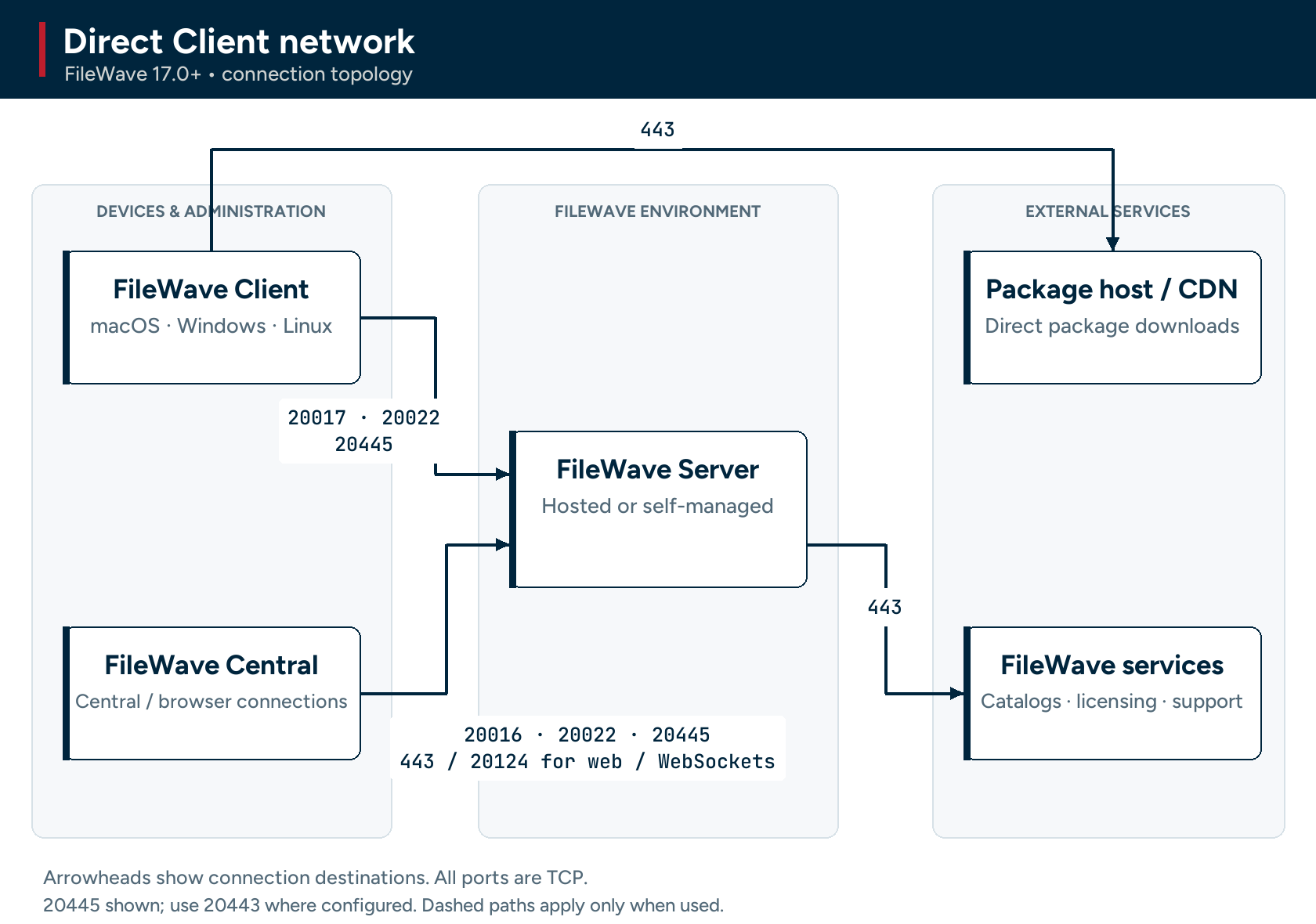
Directions below are relative to the native FileWave Client on macOS, Windows, or supported Linux systems in 17.0+. The Server and Booster rows describe the receiving side of these connections; Linux-specific repository access is listed in Linux Ports.
| Client Ports | Service | Protocol | In/Out | Description |
| 443 | HTTPS | TCP | Out | FileWave Software Updates (apple.com & microsoft.com) *** |
| 443 | HTTPS | TCP | Out |
For Hosted Customers Only. If blocked then a Booster can be used so that the configured Booster can reach these and a Client would not need to: Cloudflare host for Filesets in the Cloud - c7b0813948fe034d9fe3ca8c90faddab.r2.cloudflarestorage.com
Cloudflare IP addresses as listed on https://www.cloudflare.com/ips-v4 - 173.245.48.0/20 |
| 20017 | TLS | TCP | Out | Client to FileWave Server: secure Client connection. |
| 20022 | TLS / NATS | TCP | Out | Client to FileWave Server: NATS. |
| 20445 or configured 20443 | HTTPS | TCP | Out | Client to FileWave Server: inventory / configured web services. |
| 20014 / 20026 | TLS / NATS | TCP | Out | Client to configured Booster: secure content connection / NATS. |
| 20030 | HTTPS | TCP | Out | Client to Booster: cached Windows OS updates; also AutoPkg package downloads in 17.0+. |
| 443 | HTTPS | TCP | Out | AutoPkg package-download URL/CDN when downloading directly, including when no Booster is available. The destination comes from the selected package metadata; it is not necessarily autopkg.filewave.com. |
*** Also used by FileWave Central to vendor Software Update Servers.
FileWave Booster Ports
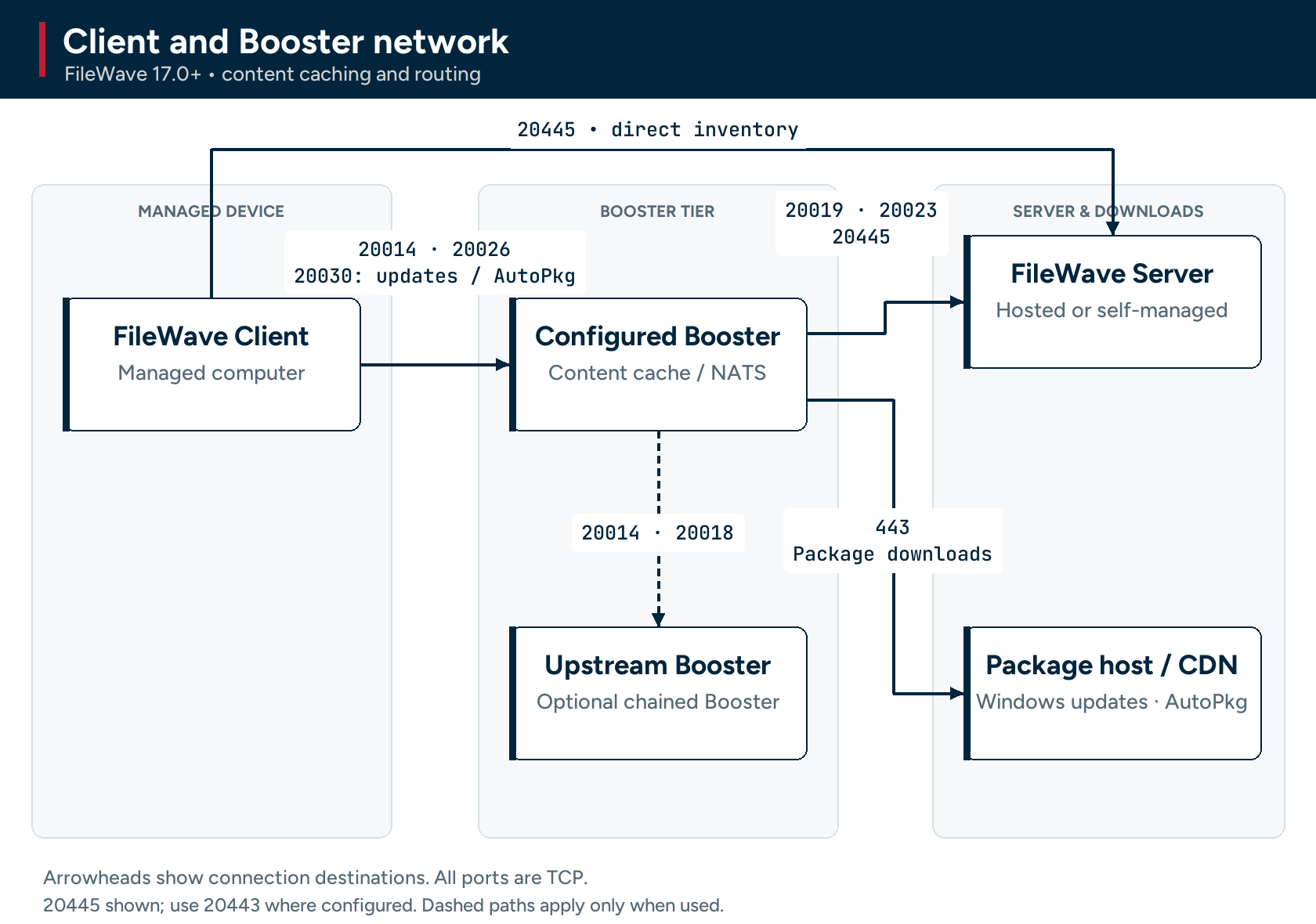
The ports in this table are listed from the Booster's perspective, so the “In/Out” column indicates the direction of traffic relative to the Booster.
| Booster Ports | Service | Protocol | In/Out | Description |
| 443 | HTTPS | TCP | Out | FileWave Software Updates (microsoft.com) *** |
| 20014 | SSL | TCP | Incoming |
FileWave Client to Booster: Secure (Booster Priority fallback) Set port 20013, not 20014, in Booster Configuration |
| 20018 | SSL | TCP | Incoming | Booster to Booster: Priority Traffic |
| 20026 | SSL | TCP | Incoming | FileWave Client to Booster connections using NATS Server |
| 20030 | SSL | TCP | Incoming | FileWave Client to Booster for Windows OS updates; 17.0+ also uses this port for AutoPkg package downloads |
| 443 | HTTPS | TCP | Out |
For Hosted Customers Only: Cloudflare host for Filesets in the Cloud - c7b0813948fe034d9fe3ca8c90faddab.r2.cloudflarestorage.com
Cloudflare IP addresses as listed on https://www.cloudflare.com/ips-v4 - 173.245.48.0/20 |
| 443 | HTTPS | TCP | Out | 17.0+ AutoPkg caching: Booster to the package-download host/CDN named in the requested package URL. Allow those download destinations, including required redirects; the metadata service alone is not sufficient. |
NATS includes: Remote Control Publishing, Remote Control Routing, device renaming, revoking device certificates, push notifications
*** Also used by FileWave Central to vendor Software Update Servers.
Enter 20013 in the Booster configuration; secure connections use 20014 and priority Booster-to-Booster traffic uses 20018. Do not open deprecated 20013 for those connections. NATS on 20026 and cached-download traffic on 20030 are separate requirements when those paths are used.
A Booster needs access to Microsoft download URLs for Windows Software Updates and, in 17.0+, the selected AutoPkg package-download URLs when caching AutoPkg content. These downloads are separate from hosted Filesets-in-the-Cloud storage.
Apple MDM Ports
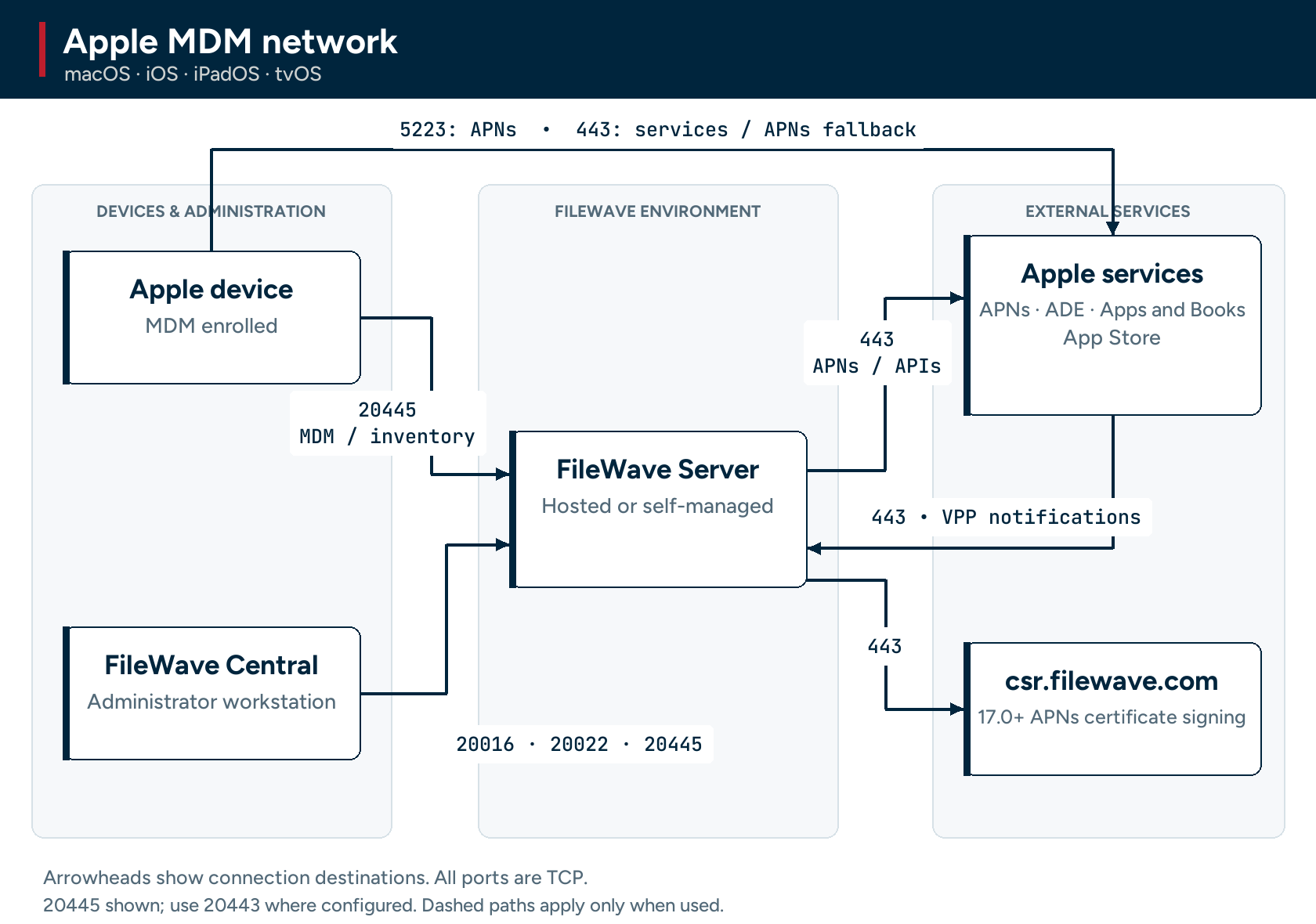
Apple management needs connections from both the Server and the managed Apple devices. The source and destination are shown separately below. Apple’s APNs addresses are within 17.0.0.0/8; see Apple’s APNs network guidance for current requirements.
| Port | Service / protocol | From | To | Purpose |
|---|---|---|---|---|
| 443 | HTTPS / TCP | FileWave Server | Apple services (17.0.0.0/8) | APNs provider requests and Apple management services. |
| 443 | HTTPS / TCP | Central or Apple device | Apple services | App Store, ADE and Apps and Books (VPP), as applicable. |
| 5223 | APNs / TCP | Managed Apple device | Apple APNs | Persistent push connection. This is device outbound, not a Server-to-Apple 5223 requirement. Devices can use 443 as Apple’s fallback path. |
| 443 | HTTPS / TCP | Apple | FileWave Server | VPP v2 Notifications. |
| 20445 or configured 20443 | HTTPS / TCP | Apple device / Central | FileWave Server | MDM, inventory, profiles and related web services on the configured port. |
| 443 | HTTPS / TCP | FileWave Server | csr.filewave.com | 17.0+ integrated APNs certificate signing; not the APNs push connection itself. |
Android EMM Ports
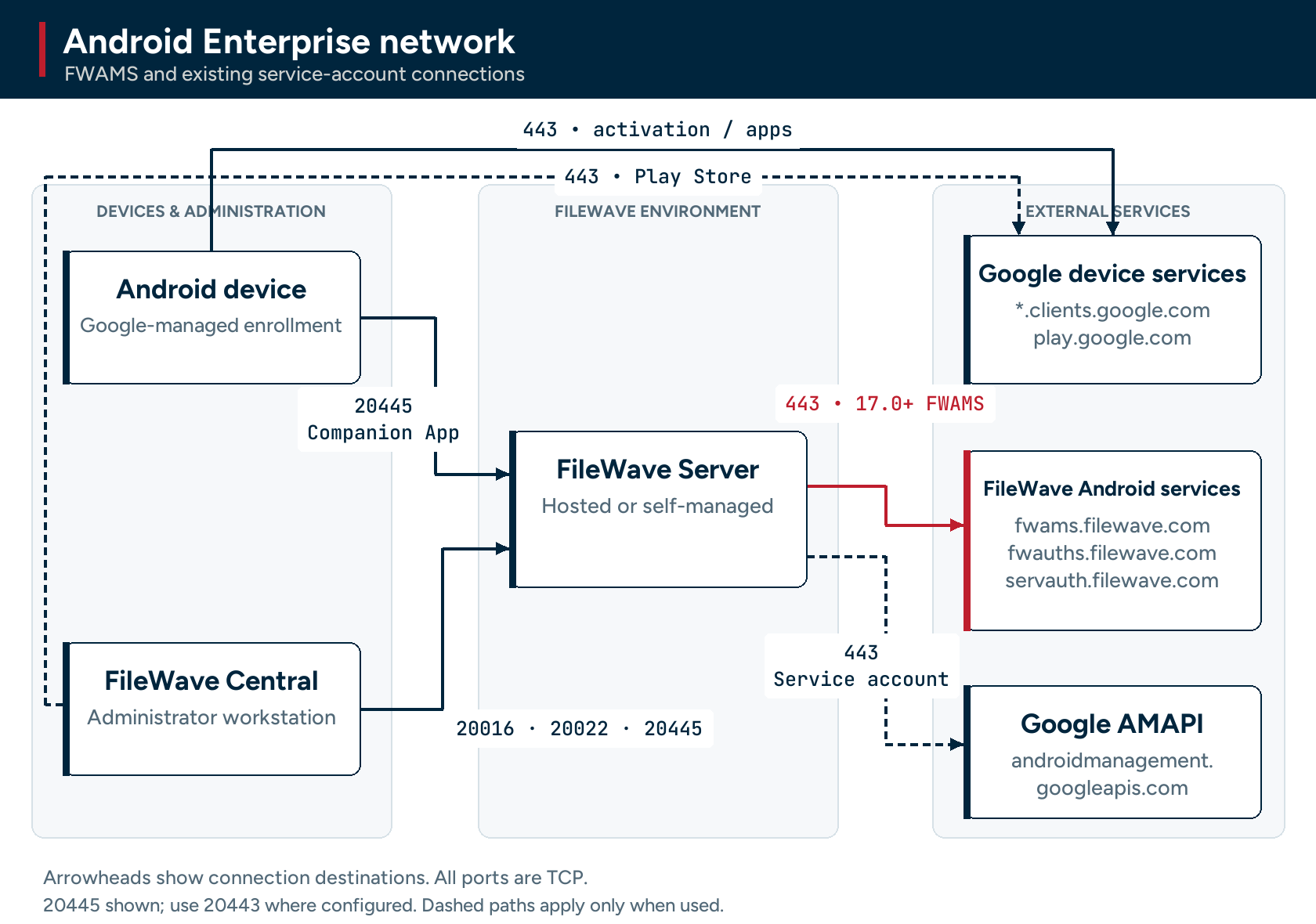
Android devices still contact Google for activation and apps. In 17.0+, new FWAMS-based enterprise connections use the FileWave Android Management Service; existing service-account configurations use the legacy direct Google AMAPI route.
| Port | Service / protocol | From | To | Purpose |
|---|---|---|---|---|
| 443 | HTTPS / TCP | FileWave Server | fwams.filewave.com fwauths.filewave.com servauth.filewave.com |
17.0+ FWAMS binding, service authentication and ongoing Android management. |
| 443 | HTTPS / TCP | FileWave Server | androidmanagement.googleapis.com | Legacy service-account Android Management API connection. |
| 443 | HTTPS / TCP | Android device | *.clients.google.com play.google.com |
Google activation and Play Store. |
| 443 | HTTPS / TCP | FileWave Central | play.google.com | Play Store access. |
| 20016 | TLS / TCP | FileWave Central | FileWave Server | Central connection. |
| 20445 or configured 20443 | HTTPS / TCP | Central / Android Companion App | FileWave Server | Configured web services; Companion App location reporting when used. |
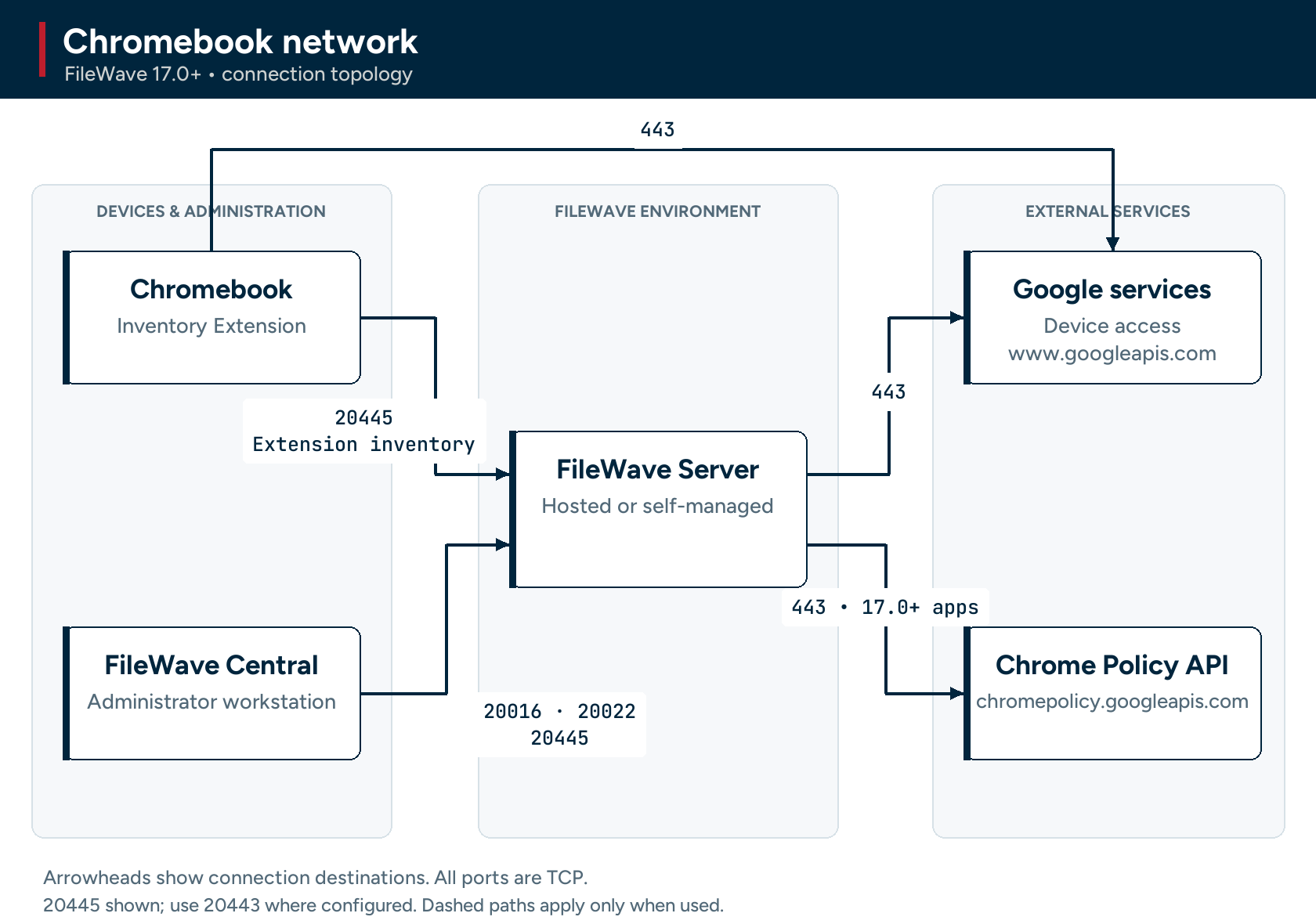
Chromebook Ports
Chromebook management uses Google services plus the FileWave Server connections below. 17.0+ Chromebook app deployment adds the Chrome Policy API destination; it does not require a new inbound FileWave port.
| Port | Service / protocol | From | To | Purpose |
|---|---|---|---|---|
| 443 | HTTPS / TCP | FileWave Server / Chromebook | Google APIs, including www.googleapis.com | Existing Chrome management and device API access. |
| 443 | HTTPS / TCP | FileWave Server | chromepolicy.googleapis.com | 17.0+ Chromebook app deployment. |
| 20016 | TLS / TCP | FileWave Central | FileWave Server | Central connection. |
| 20445 or configured 20443 | HTTPS / TCP | Central / Chromebook Inventory Extension | FileWave Server | Configured web services and extension inventory. |
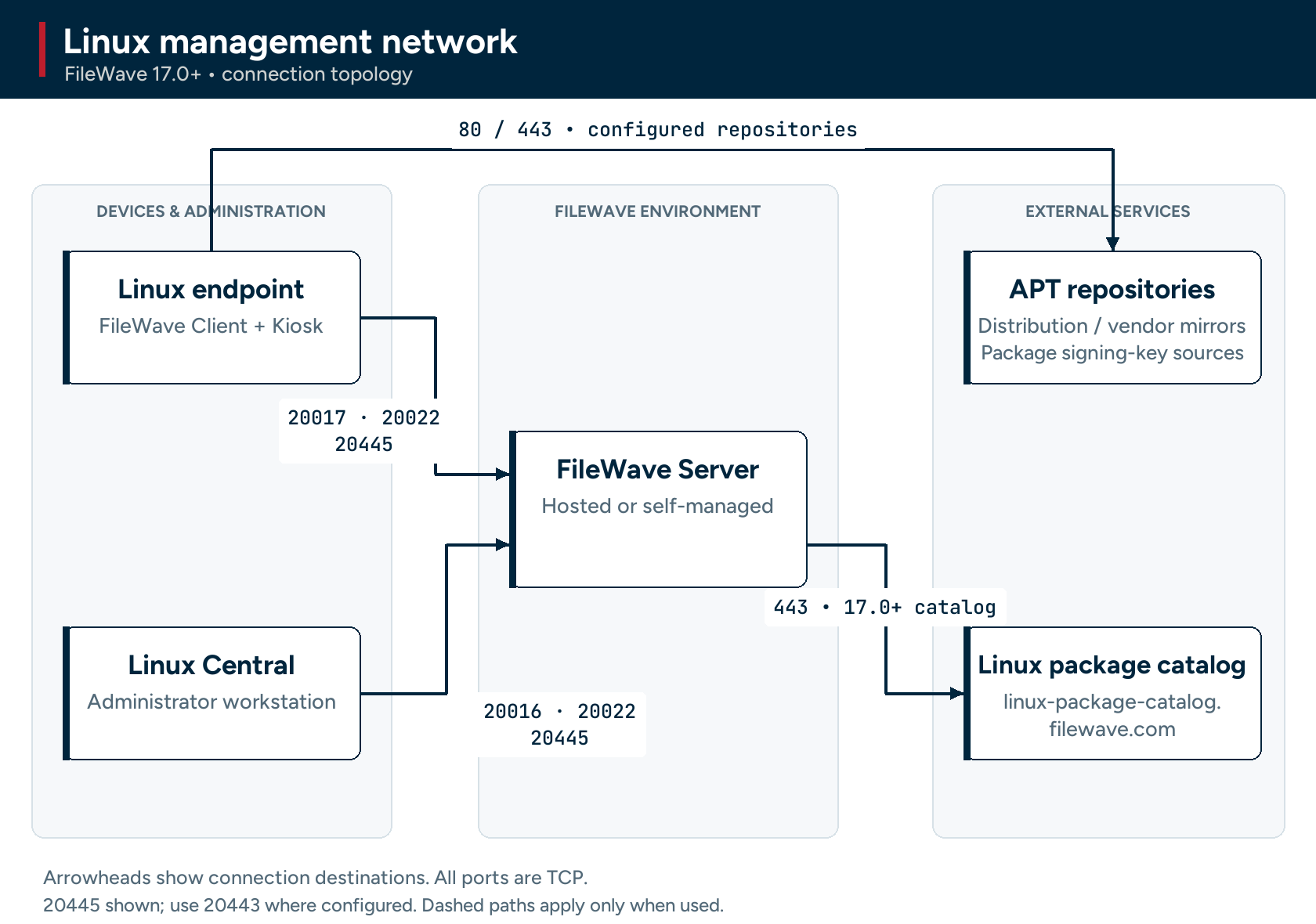
Linux Ports (17.0+)
Linux uses the same native Client, Central, Kiosk and optional Booster connections described above. This section summarizes those Server connections and adds Linux-specific package access; it does not require an inbound port on every Linux endpoint.
| Port | Service / protocol | From | To | Purpose |
|---|---|---|---|---|
| 20017 | TLS / TCP | Linux Client | FileWave Server | Secure native Client connection. |
| 20022 | TLS / NATS / TCP | Linux Client / Central | FileWave Server | NATS communication. |
| 20016 | TLS / TCP | Linux Central | FileWave Server | Central administration. |
| 20445 or configured 20443 | HTTPS / TCP | Linux Client / Central / Kiosk | FileWave Server | Inventory and configured web services. |
| 443 | HTTPS / TCP | FileWave Server | linux-package-catalog.filewave.com | Linux Package Fileset catalog. |
| 80 and/or 443, as configured | HTTP / HTTPS / TCP | Linux endpoint | Configured distribution mirrors, vendor APT repositories and signing-key download URLs | OS updates, third-party Linux packages, and dependencies. Allow the actual sources and required redirects; there is no single hostname for all repositories. |
Allow the Linux endpoint to reach its configured package sources, or its approved package proxy/mirror. Server access to the FileWave catalog alone does not download those packages to endpoints. If a Booster is configured, also apply the Client-to-Booster rules above. Linux Central and Kiosk retain their applicable external-service requirements in their own sections.
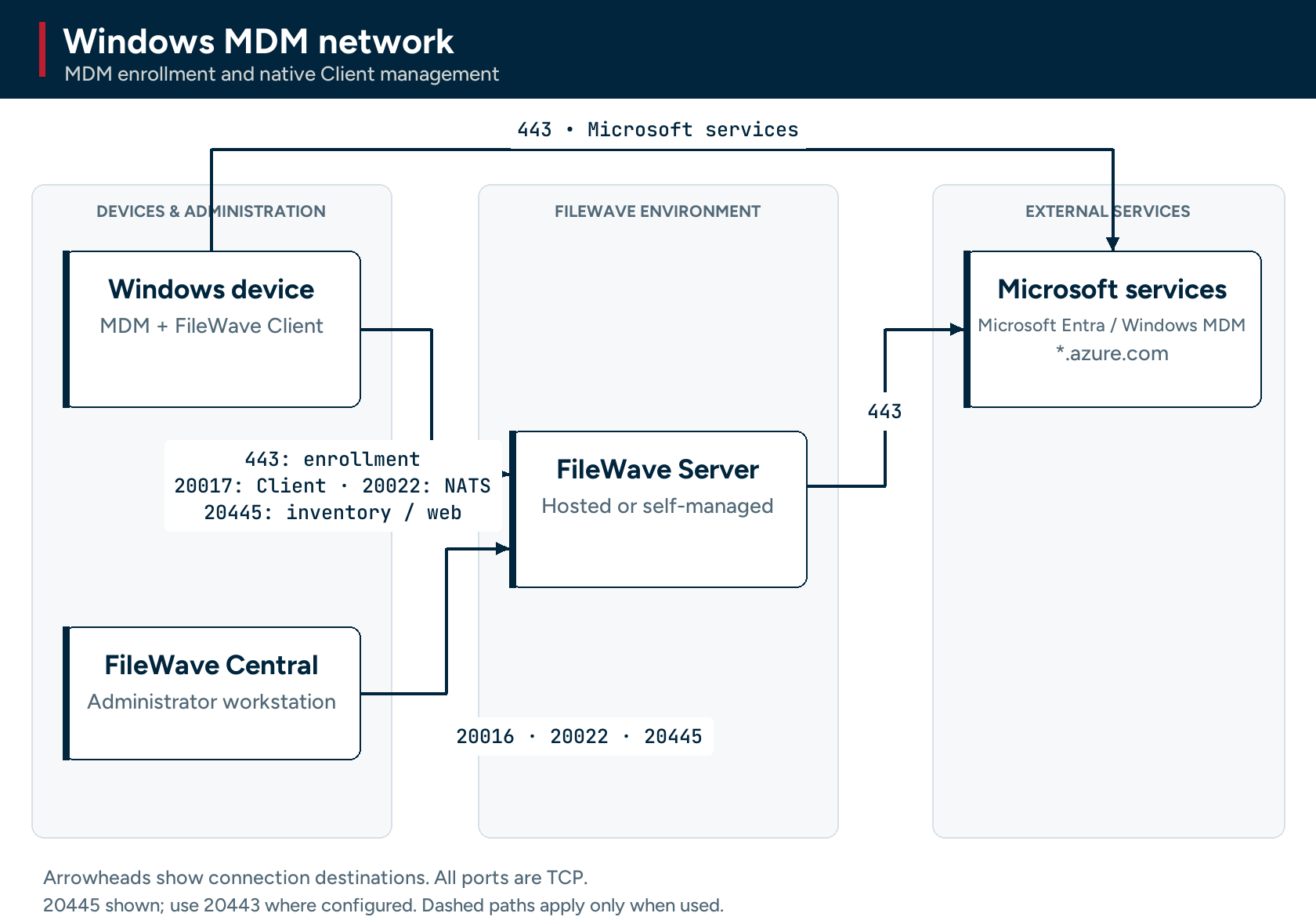
Windows MDM Ports
The ports in this table are listed from the FileWave Server’s perspective, so the “Server In/Out” column indicates the direction of traffic relative to the Server and these ports are specifically those needed to manage Windows MDM devices. Windows devices will also need to reach the Microsoft's servers.
| Windows MDM Ports | Service | Protocol | Server In/Out | Description |
| 443 | HTTPS | TCP | Incoming | Device to Server (Enrollment URL) |
| 443 | HTTPS | TCP | Outgoing |
Server to Windows MDM (*.azure.com) Device to Windows MDM (*.azure.com) |
NOTE: The FileWave client will also be installed and all previously listed FileWave client ports are required.
FileWave IVS Ports
| IVS Ports | Service | Protocol | From | To | Notes | Open port on... |
| 67 | DHCP | UDP | Client | IVS | ‡‡ | IVS |
| 69 | TFTP | UDP | Client | IVS | ‡‡ | IVS |
| 80 | HTTP | TCP |
Client |
IVS | IVS | |
| 111 | NFS | TCP/UDP | Client | IVS | ‡ | IVS |
| 4011 | DHCP | UDP | Client | IVS | UEFI PXE‡‡ | IVS |
| 2049 | NFS | TCP/UDP | Client | IVS | Client to IVS‡ when Secure Imaging is disabled. | IVS |
| 5201 | iperf3 | TCP | Client | IVS | For Performance testing | IVS |
| 20016 | SSL | TCP | IVS | Server | Server | |
| 20017 | SSL | TCP | IVS | Server | Server | |
| 20022 | SSL | TCP | IVS | Server | NATS | Server |
| 20443 | HTTPS | TCP | IVS | Server | Inventory | Server |
| 20444 |
HTTPS |
TCP |
Server | IVS |
Non Hosted Only |
IVS |
| Client | IVS |
|
||||
| IVS |
IVS Django |
|||||
| 20490 | VPN | TCP/UDP | Client | IVS | Client to IVS‡ when Secure Imaging is enabled. | IVS |
| 20445 | HTTPS | TCP | IVS | Server | Inventory | Server |
‡ TCP/IP & UDP
‡‡ UDP only
No comments to display
When ports are added/removed, will the port tester applications be updated as well (in terms of what ports are auto-populated)?
In reply to #1
Thank Sean. The challenge can be when a port is removed or added in version 2.0 we still support 1.0 so there's sometimes a lag, and there were a lot of port changes in the 14.7 - 15.0 releases. That one port though that we are removing now I think stayed too long. In the future it might be nicer if the tool asked what version of FW server it was testing against and then loaded the appropriate list but I also hope we don't go through such a big change in port numbers again.
thanks for literally highlighting 20015!
No comments to display