
New Inventory Item -- Enrollment Type
What
The Enrollment Type inventory field records how a device enrolled in FileWave. Use it to distinguish enrollment methods when reviewing inventory or planning content assignments. It is not the same as Enrollment State, and it does not prove that a device is currently online.
When/Why
Check the recorded enrollment method before using it to target content. The device-details example below shows Enrollment Type: OTA Enrollment separately from Enrollment State: Enrolled.
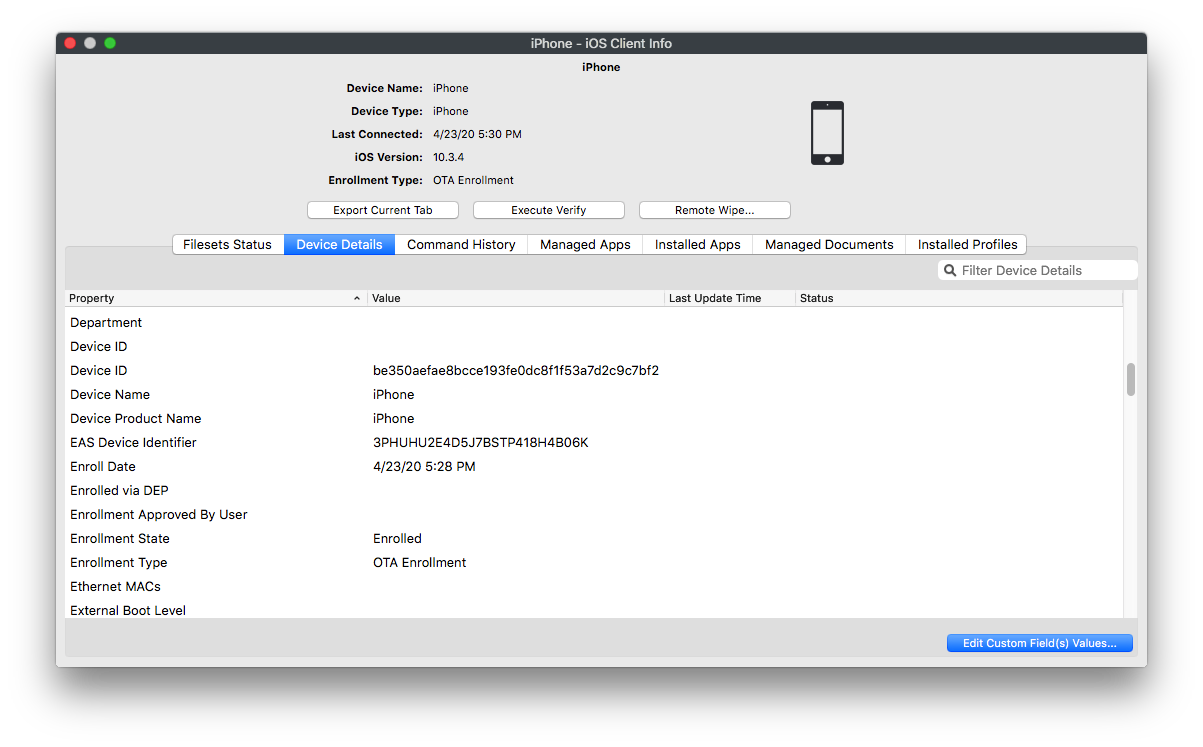
How
Use Enrollment Type in an Inventory Report or Smart Group. In FileWave Central 16.3.0 and later, open Reports; earlier versions call this Queries. For a first check, follow Inventory Reports and add Enrollment Type alongside the device name, an identifying field and inventory Last Connected. Confirm the result for a device whose enrollment method you know before reusing the criteria in a Smart Group. Review which content the group would assign before changing membership.
The table below lists the recorded labels and numeric values, including legacy methods. Not available (8) means the method was not determined, not that the device is necessarily unenrolled. Presumed DEP Enrollment (9) is a historical inference for supervised iOS devices enrolled before FileWave 14; it cannot distinguish ADE from Apple Configurator and must not be treated as confirmed ADE. DEP is Apple's former name for Automated Device Enrollment (ADE).
|
Displaying information |
Number |
Description |
|
Enrollment via APK |
0 |
Device was manually enrolled via installation of FileWave application |
|
Enrollment via EMM_API |
1 |
Device was enrolled via the Android Management API (through NFC or a QRcode) |
|
OTA Enrollment |
2 |
Device was enrolled over-the-air |
|
User Enrollment |
3 |
Device was enrolled BYOD |
|
DEP Enrollment |
4 |
Device was enrolled via Apple DEP |
|
Enrollment via fwcld |
5 |
Device was enrolled via fwcld |
|
Enrolled |
6 |
Enrollment of Chromebook |
|
User approved enrollment |
7 |
Device was enrolled over-the-air and approved by user |
|
Presumed DEP Enrollment |
9 |
Device is supervised iOS client that was enrolled before v14. |
|
Not available |
8 |
Enrollment type is not determined |
No comments to display
It would be helpful if the descriptions for all the fields included the numbers for the matching values that are included in the emailed Query Reports. (0-9)
In reply to #1
I documented this as FWRD-15704 and made a note about how in the email it uses numbers and in Central it uses the pretty name for each but there is no table to relate the two. I imagine in the emails we should just be using the same text as we use in Central. At some point in the past it was probably numbers shown in both and then Central got display names for it that weren't inserted in the email send. I pulled the below from source code;
(0, 'Enrollment via APK'), (1, 'Enrollment via EMM_API'), (2, 'OTA Enrollment'), (3, 'User Enrollment'), (4, 'DEP Enrollment'), (5, 'Enrollment via fwcld'), (6, 'Enrolled'), (7, 'User approved enrollment'), (8, 'Not available'), (9, 'Presumed DEP Enrollment')
No comments to display