
Resolve a Revoked Apps and Books (VPP) Token
Problem
FileWave Central can show VPP token is Revoked on the Dashboard or during a manual Apps and Books (VPP) sync. This can happen when the same location token is uploaded to another service, including Apple Configurator.
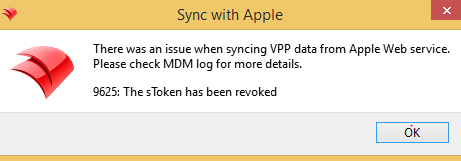
The sync dialog may report 9625: The sToken has been revoked and ask you to check the MDM log. The message identifies the token problem, but does not establish its cause.
If the Managed Apple Account password was recently changed, download a new content token. Apple also lists password changes as a reason a content token becomes invalid; see Manage content tokens in Apple School Manager.
Solution
- Identify the affected token and its Apple School Manager or Apple Business Manager location, then download a fresh Apps and Books content token for that same location.
- Follow Renew Your VPP Token. Import the replacement into the existing matching token entry in FileWave Central; do not delete the entry or substitute a token from a different location as a troubleshooting shortcut.
- Run a manual Apps and Books sync and wait for it to complete. Confirm that the revoked-token error no longer appears and that the token shows the new expiration date.
Content tokens expire annually, so record the renewal date. If another service needs a content token, use a separate Apple location and token instead of reusing the one connected to FileWave.
If the error returns, check whether another service is still using the same location token. Record the exact error and sync time for FileWave Technical Support rather than repeatedly replacing tokens without identifying the cause.
No comments to display
No comments to display