
VPP Apps Not Updating
Description
As described in the KB on VPP App updates, these should occur automatically, within 24 hours of the new App release. However, there are times they may not happen.
Information
From device check-in, the FileWave Server receives information on installed applications and where an update exists, a new command is queued for the device. Once received, the device pulls the updated version from the App Store.
Consider the elements involved when assessing why one or more Apps may not update. These include:
- Server SSL certifiate
- VPP token
- APNs token
- Apple T&Cs
- App identifiation
Directions
The certificates and tokens are relatively straightforward. If expired, they should be updated. Whilst expired, VPP installations will be impacted until resolved.
It is not unusual for Apple to update the T&Cs. However, Administrators of School or Business manager accounts should receive an email from Apple, indicating these have changed and informing customers to log into their Apple manager account and accept those new terms.
On rare occasions, it may found that updating a token, which appears to still be valid, resolves issues with App installations and updates. Since there is no restriction on frequency of renewal they can be updated in advance of expiry; no harm trying this.
The last in the list though is one that can more often catch Administrators out.
App Identification
Analysis
Each App has a unique bundle identification. This information is stored within the Info.plist of any App, amongst other places.
For this example, consider Apple Numbers for macOS.
% /usr/libexec/PlistBuddy -c "Print CFBundleIdentifier" '/Applications/Numbers.app/Contents/Info.plist'
com.apple.iWork.Numbers
Since Numbers used to belong as part of the iWork suite, its bundle identifier reflects this. We see the same with Keynote:
% /usr/libexec/PlistBuddy -c "Print CFBundleIdentifier" '/Applications/Keynote.app/Contents/Info.plist'
com.apple.iWork.Keynote
FileWave needs to reference these Apps from the App Store, which is handled by the unique App Store ID. This can be observed as part of the App Store URL link.
For the above version of Numbers, the URL is:
https://apps.apple.com/gb/app/numbers-14-5/id409203825?mt=12&uo=4Making the store ID number as: 409203825
Apple has a developer article, indicating how to action store lookups.
Not all items need necessarily be included, but it could be in the form of:
"https://itunes.apple.com/lookup?id=${apple_id}${country_id}${language}"Using the Numbers example, simplistically, the lookup could be:
% curl -s "https://itunes.apple.com/lookup?id=409203825Amongst the information returned from this query is the identifier and version string:
- "bundleId":"com.apple.iWork.Numbers"
-
"version":"14.5"
Where this is installed on a device, FileWave will report the relevant information:

This information is supplied by the device. Hence, the device knows what is installed, which version is installed and inventory will cause the server to trigger an update where appropriate.
What happens though if the information were to change? Why would it change?
Incorrect Identity
Before we get into incorrect identifiers, this time compare this with the mobile version of Numbers. It has an alternate bundle identifier and hence a different App Store identifying number.
% curl -s "https://itunes.apple.com/lookup?id=361304891"This time the command returned:
-
"bundleId":"com.apple.Numbers"
-
"version":"15.1"
Of course, Apple have spent time working on Universal Apps; those that would work on both macOS and iOS type devices. Of course, to achieve this, only one App Store App would be required, but clearly there can't be one App with one URL for two different versions and bundle identifiers.
This poses an issue for the developer of the application and that has a knock-on effect with MDM servers and devices.
Simplifying the change to universal, Apple took the choice to keep the app identity used on mobile devices for the new universal App. The outcome is iOS devices running Numbers won't notice any difference and will update to the newer released version. However, macOS will not.
As far as the macOS device is concerned, it doesn't have this software installed and there are no more updates for the Numbers.app installed at that time. The consequence is a requirement to change the association with the original Numbers App with the Universal App Store entry. The original Numbers.app for macOS is now deprecated, but should still show in purchased Apps and be deployable to relevant devices.
Indeed, the same can be seen for Keynote and Pages, for example.
Although not recommended by Apple, it is indeed possible to have both versions installed simultaneously, since the reality is they are effectively two different Apps.

Unix systems can't have two items with the same name though in the same directory. Looking at additional information from the App Store query, another point of interest is:
"releaseNotes":"Numbers is now part of Apple Creator Studio..."Using the Get Info option on the newly installed versions, does indeed show the name of the App as Numbers Creator Studio:
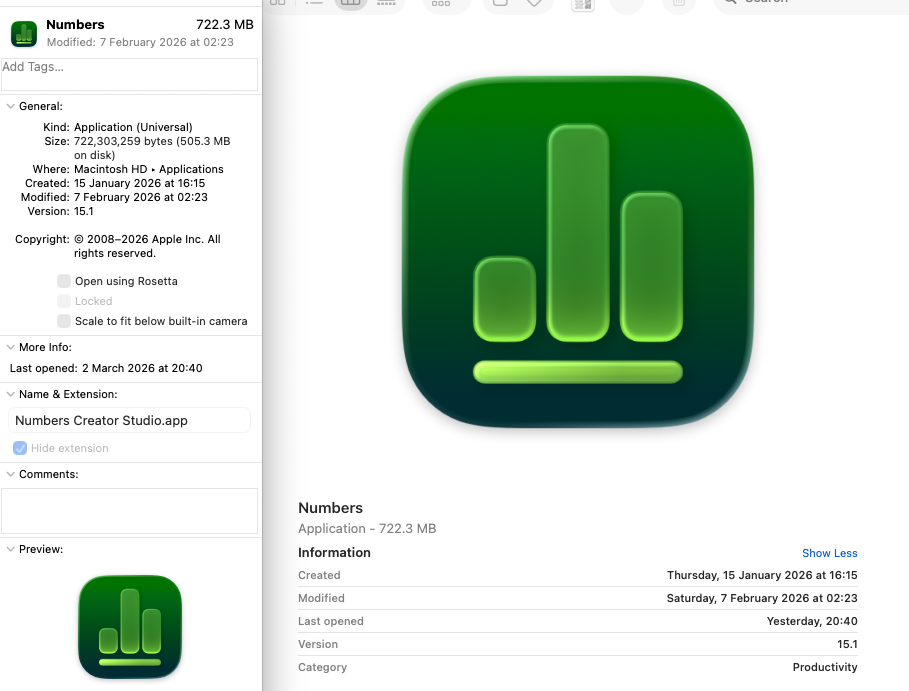
Using that information, actioning a query against the Info.plist file for that App, highlights it is the same as the version installed on Mobile devices:
% /usr/libexec/PlistBuddy -c "Print CFBundleIdentifier" '/Applications/Numbers Creator Studio.app/Contents/Info.plist'
com.apple.Numbers
Changing over will likely involve a new 'Purchase' of the App in the Apple School or Business Manager account or an increase in licence quantity, if already used for mobile devices.
Like iLife and iWork, Apple Creator Studio is a suite of applications. Apple have provided details regarding this suite, purchases and deployment in Apple's Education Forum:
Apple Creator Studio Deployment Considerations
As such, the issue of VPP Apps can be about certificates and communication, but sometimes the App isnt' there anymore in its original form. The same has been seen from other developers and entirely likely more of these could show, particularly with the transition to universal apps from dedicated apps.
No comments to display
No comments to display