
Build Custom FileWave Client and Booster Installers
What a custom installer contains
A custom FileWave Client installer includes the connection settings a new device needs, such as the FileWave Server address. It can also include Booster addresses, Booster routing, and the Remote Connections setting.
A custom Booster installer includes its FileWave Server address and required port settings. Available packages depend on the component and platform: Client installers use PKG or MSI, while Booster installers can also be built for Debian.
Choose installation or upgrade
Use a custom Client PKG or MSI for a new installation or enrollment, not as the normal upgrade method for an already enrolled Client.
- New macOS or Windows Client: Build an enrollment installer using the version-specific steps below.
- Existing Client 16.3.0 or later, with Server and Central 16.4.0 or later: Use Software Updates > Client Upgrades. Do not deploy a custom installer or an Upgrade Fileset to perform this upgrade.
- Existing Client earlier than 16.3.0, with Server 16.4.0 or later: Deploy the applicable Upgrade Fileset to reach at least 16.3.0, then use integrated upgrades for subsequent versions.
- Server earlier than 16.4.0: Continue to use the Client upgrade procedure and Upgrade Filesets for that Server release until the Server is upgraded.
For eligibility checks, upgrade settings, and rollout steps, see Upgrading FileWave Clients. Building an enrollment package and scheduling an existing-client upgrade are separate workflows.
Choose the builder by component and Server version
FileWave Client installer
- FileWave Server 16.4.0 and later: Build and download the custom Client installer from the integrated builder in FileWave Central on the Server the Client will enroll with.
- FileWave Server earlier than 16.4.0: Build the custom Client installer at custom.filewave.com.
FileWave Booster installer
For every supported FileWave Server version, build custom Booster installers at custom.filewave.com. FileWave Central does not build custom Booster installers.
Build a custom Client installer in Central (16.4.0+)
Connect FileWave Central to the FileWave Server that the new clients will enroll with. Upgrade Central to match that Server and confirm both are running 16.4.0 or later. Review the target release's platform requirements before building or deploying a package.
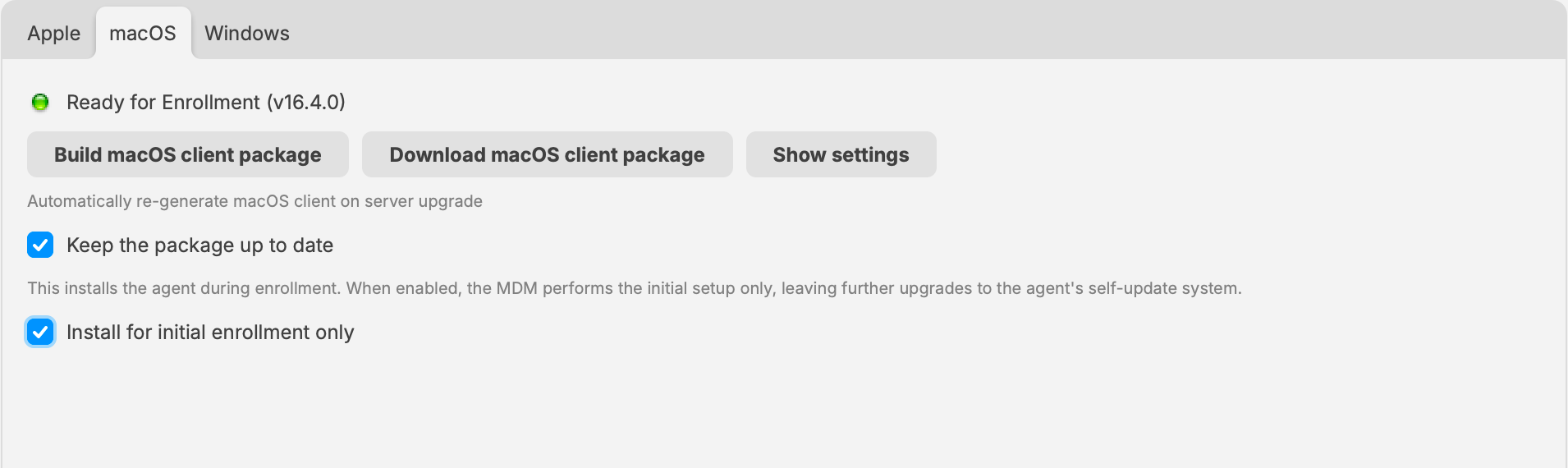
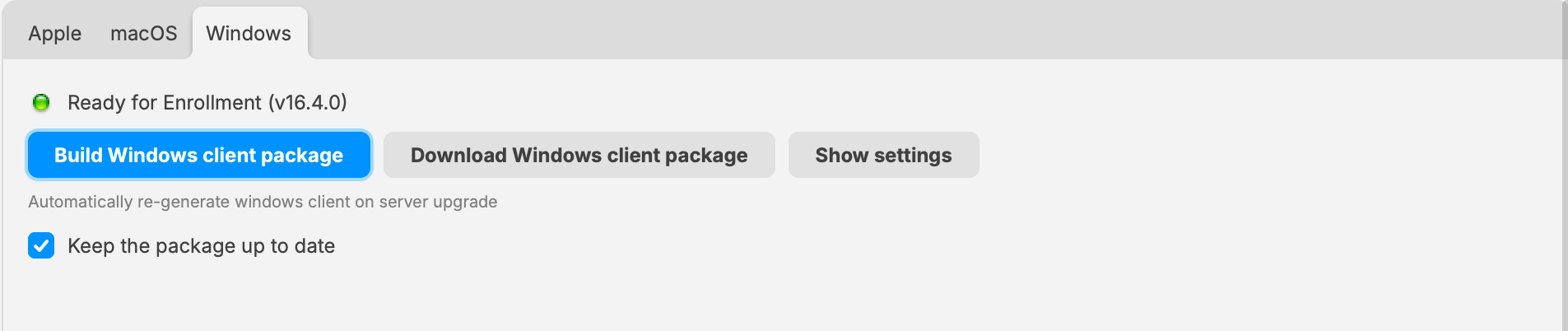
- Open FileWave Central > Preferences > Enrollment (Mobile in 16.4.0), then select macOS or Windows.
- Select Show settings to review the stored package configuration. Check the intended Server, Client naming, Booster/routing, and remote-connection settings applicable to your deployment. Do not copy example values from screenshots.
- Select Build macOS client package or Build Windows client package. In 16.4.1 and later, package configuration opens in a separate dialog; review or change the settings there and confirm to start the build. In 16.4.0, review the expanded settings on the platform pane before building.
- Wait for Ready for Enrollment and confirm the displayed package version. The generated package is stored for enrollment; you do not need to download it and upload it back to Central.
- Use Download macOS client package or Download Windows client package when you need a standalone PKG or MSI for a new installation or provisioning workflow.
- Enable Keep the package up to date when FileWave should automatically regenerate the enrollment package after future Server upgrades. This maintains the enrollment installer; use Client Upgrades to schedule upgrades of existing clients.
- Test a new installation or enrollment on a representative device. Confirm the native FileWave Client checks in to the intended Server before wider deployment.
macOS enrollment package
For the normal enrollment-and-upgrade workflow, keep Install for initial enrollment only enabled. MDM performs the initial Client installation, while later Client upgrades use the integrated upgrade workflow. Do not clear this setting just to push a newly built PKG over existing clients; use a separate Support-directed procedure if recovery is required.
For the surrounding Apple enrollment configuration, see FileWave Client for macOS ADE.
Windows enrollment package
For Windows MDM, prepare the Client package before enrolling devices so MDM can install the native Client. Building an MSI alone does not configure Windows MDM enrollment. Follow Configure the FileWave Client Package for Windows MDM for its prerequisites and enrollment-specific checks.
If the package is not ready
Review the build status and stored configuration in the platform pane before distributing the installer. Confirm that you are connected to the intended Server and using the intended production or Early Access package channel. Do not substitute an unconfigured Client installer or an unrelated package when a build fails; retain the error details and contact FileWave Support.
For Beta builds, follow Building Custom Clients During Early Access before starting. Beta package-channel setup is separate from normal production enrollment.
External builder: earlier Clients and custom Boosters
Use custom.filewave.com for Client installers when the Server is earlier than 16.4.0, and for custom Booster installers on every supported Server version. Choose the component and platform, enter the intended Server and connection settings, build the package, and extract the downloaded archive when applicable.
On a Server earlier than 16.4.0, upload the custom Client PKG or MSI under Preferences > Mobile > macOS or Windows when it is needed for MDM enrollment, and wait for upload confirmation. Central's 16.4.0+ builder replaces that external-build-and-upload process for Clients, not for Boosters.
When to use the packages
Use the generated package for new manual installations, software deployment, or provisioning workflows. A custom MSI can be included in a Windows provisioning process. A custom PKG can install the FileWave Client during macOS provisioning; Automated Device Enrollment provides the MDM enrollment path and does not itself install the FileWave Client.
Before deployment
- Enter the FileWave Server fully qualified domain name and the intended Client or Booster version.
- For a Client installer, confirm Booster addresses, Booster routing, and Remote Connections settings before building the package.
- For a Booster installer, confirm the FileWave Server address and required port settings before building the package.
- Install the package on a representative test device or Booster and verify check-in before wider deployment.
Rebuild the installer when its embedded Server, routing, port, or component-version settings need to change.
No comments to display
No comments to display